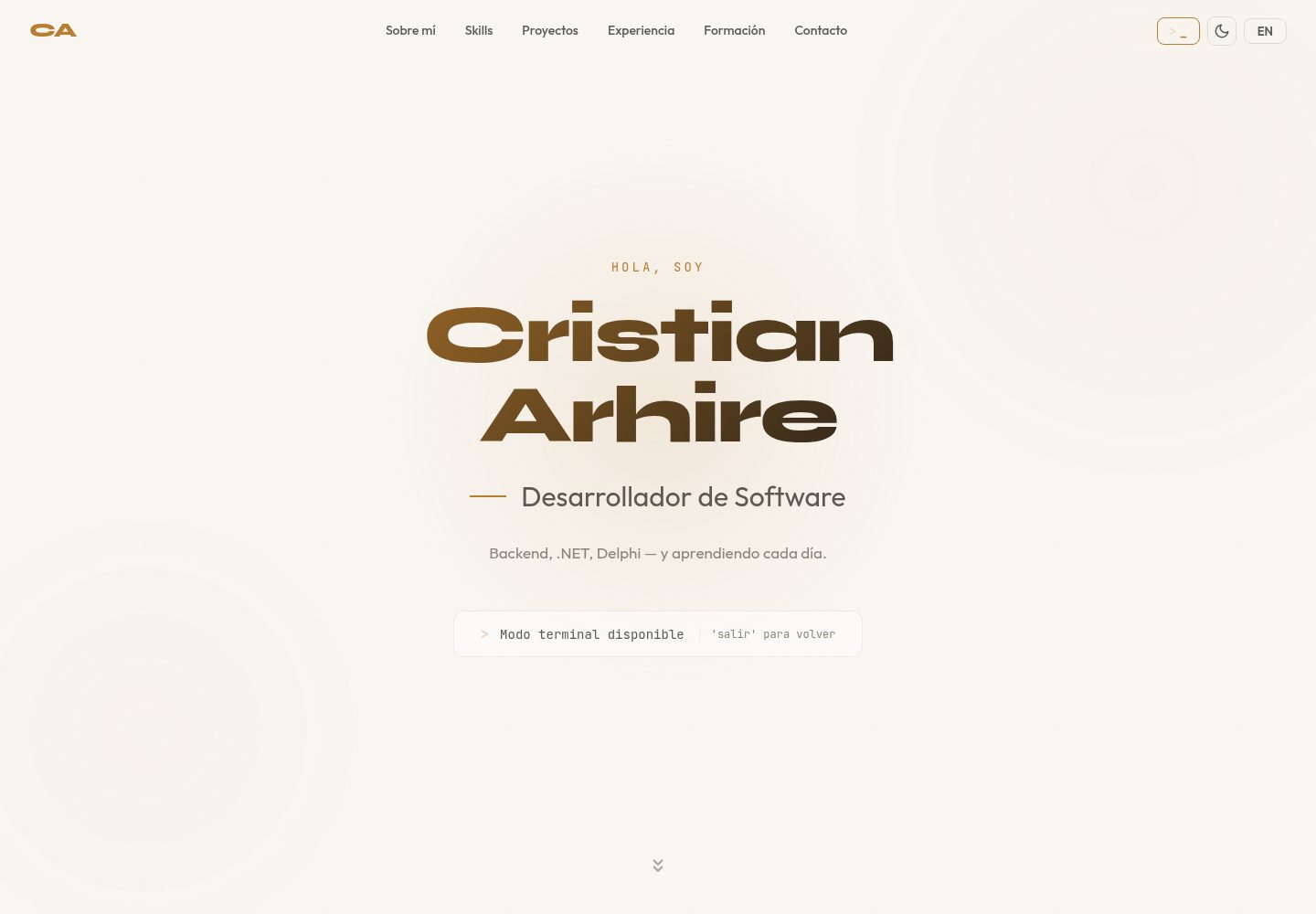
Interactive terminal interface supporting commands such as about, skills, projects, experience, education, and contact, with corresponding Spanish commands
ViteReactPortfolio
react-terminal-portfolio — Vite Portfolio Template
By CristianArhire
A terminal-style portfolio template built with React and TypeScript. Personal information is entered through a single configuration file. It supports Spanish/English bilingual commands, multiple theme switching, and command history, and can be used as a template app or an npm component.
Explore the design
Compare the page layouts and mobile experience. Open any screenshot for a closer look.
Desktop homepage1 / 2
Desktop captureTop of page
Actual screenshot captured by the server browser.
All pages & views 2
Screenshots show visual appearance; interactive behavior may differ.
Recorded 2026-10-17View source
What stands out
A quick read of the recorded project description.
Four built-in themes—Dracula, Matrix, Ubuntu, and Catppuccin—switchable via the theme command, with support for merging custom themes in configuration
Supports ES/EN bilingual switching (lang command), with personal data maintained separately for both languages in a Bilingual structure
Command history supports arrow key navigation, the welcome screen can use ASCII art, and interface animations are based on Framer Motion
All personal data is configured in a single file, src/config.ts, and the build output is a static dist/ directory
The same codebase can be built as a template app (npm run build) or as an npm library (npm run build:lib)
Template Details
This project provides an interactive terminal-style personal portfolio interface where users enter commands to view content such as about, skills, projects, experience, education, and contact. The README states that it supports Spanish and English bilingual commands, includes four built-in themes—Dracula, Matrix, Ubuntu, and Catppuccin—and allows custom themes to be added via configuration. It also provides command history (arrow key navigation), an ASCII art welcome screen, Framer Motion animations, a responsive mobile layout, and support for keyboard navigation and reduced motion.
There are two usage methods: first, clone the repository, edit the personal data in src/config.ts, run the development or build commands, and deploy dist/ to any static hosting; second, install it as an npm package and embed it in an existing React project as a <TerminalPortfolio config={...} /> component. Configuration items cover the prompt, title bar text, ASCII art, bilingual welcome messages, about, skills (1–10 levels), projects, experience, education, optional certificates, contact, default theme and language, custom themes, and an optional exit command callback.
Regarding limitations, the README does not document browser compatibility ranges, specific audit results for accessibility compliance, the npm package's version release status, or long-term maintenance plans, nor does it provide server-side integration instructions beyond static hosting deployment.
ViteReactPortfolio
Is it right for your project?
Use Cases
- Individual developers who want to present their resume, skills, and projects in an interactive terminal format, fill in the configuration themselves, and deploy to static hosting
- Portfolio sites that need to provide content in both Spanish and English on the same page
- Embedding a terminal-style personal introduction as a React component into an existing website or visual portfolio (with an exit command callback to return)
Suitable For
- Front-end developers familiar with React and TypeScript who are willing to edit a configuration file
- Job seekers or freelancers who need a bilingual personal portfolio and prefer a terminal visual style
- Teams with an existing React project who want to add a terminal-style introduction module as a component
Getting started & customization
Use these recorded setup notes alongside the repository instructions for your chosen version.
- 1
Template method: clone the repository, run npm install, edit src/config.ts to fill in personal information, then run npm run dev or npm run build
- 2
The build output is located in dist/; the README states it can be deployed to static hosting such as Netlify, Vercel, and GitHub Pages
- 3
Component method: npm install react-terminal-portfolio, import the TerminalPortfolio component and style.css, and pass in a TerminalConfig configuration object
- 4
The exit field in the configuration can define the exit command name and callback for integration with other projects
- 5
The README does not provide configuration instructions for environment variables, servers, or databases
License & source material
Usage conditions & limitations
Free to use · keep license noticeThis entry covers the free version under the MIT license in the public repository; the free scope is the code of this version and does not mean external services or third-party assets are free.
Must comply with when using
- The code of this version may be used, modified, used commercially, and distributed free of charge.
- When distributing copies or substantial portions of the code, the original author's copyright notice and the complete MIT license notice must be retained.
- The code is provided as is; warranties and limitations of liability are governed by the original license and applicable law.
Additional costs & items to verify
- Demo images, fonts, icons, and other third-party assets must be checked against their respective licenses and cannot be judged solely by the code's MIT license.
- External services such as domains, hosting, databases, payments, or AI may incur separate charges.
View Original Text Basis
https://github.com/CristianArhire/react-terminal-portfolio/blob/main/LICENSEhttps://github.com/CristianArhire/react-terminal-portfolio/blob/main/README.mdPermission is hereby granted, free of charge
Original License Text
Compiled by DeepSeek based on repository license and README ·2026-10-17. Results only cover the materials read; dependencies, images, fonts, and subsequent term changes are subject to their respective original texts.
Project checks & description sources
Template Information
- Source platforms
- GitHub
- Documentation and maintenance reference score
- More documented · 85 / 100
- Technologies
- Vite · React
- Website type
- Portfolio
How this score is calculated
Our heuristic uses license records (up to 30), a demo link (12), a preview (10), stars (15), recorded maintenance (15), description completeness (8), feature records (5) and classification data (5). It is not a code, security or performance test, or a Google score. A link does not establish tested functionality.
What to verify for this project
- Repository update recorded
- 2026-02-22
- Screenshot last checked
- 2026-10-17
A demo link is listed. Check it with your own content and viewport sizes; its presence does not confirm that forms, authentication or payments work.
The catalog identifies Vite as the primary stack. Check the actual dependency manifest and lockfile for versions and hosting requirements. These notes use recorded metadata, not a code audit or a deployment test.
Use a selection guide →How this description was prepared
AI-assisted description based on catalog records and repository material. Repository authors are not automatically the reviewers of this description.
Review declaration: codex-user-requested-batch-review-20261018 · 2026-10-18
Inspect the recorded source material
SHA-256: 5e1f565a968eb6f2560eeb67f1f9bd19dadd94458451b724a79871118b615e78
2026-10-17T10:32:59.335Z
Source file / repository# react-terminal-portfolio
A customizable, interactive terminal-style portfolio built with **React** and **TypeScript**. Features bilingual support (ES/EN), multiple themes, command history, ASCII art, and smooth animations.
Use it as a **template** (clone + edit one config file + deploy) or as an **npm component** (`<TerminalPortfolio config={...} />`).
## Features
- Interactive terminal with bilingual commands (Spanish/English)
- 4 built-in themes: Dracula, Matrix, Ubuntu, Catppuccin
- Custom theme support
- Command history with arrow key navigation
- ASCII art welcome screen
- Smooth animations (Framer Motion)
- Fully responsive (mobile-friendly)
- Single config file for all personal data
- Accessible (WCAG keyboard navigation, reduced motion support)
- Dual distribution: template app + npm library
## Quick Start (Template)
```bash
git clone https://github.com/yourusername/react-terminal-portfolio.git
cd react-terminal-portfolio
npm install
```
Edit `src/config.ts` with your personal data, then:
```bash
npm run dev # Development server
npm run build # Production build → dist/
```
Deploy the `dist/` folder to any static host (Netlify, Vercel, GitHub Pages, etc.).
## npm Component
```bash
npm install react-terminal-portfolio
```
```tsx
import { TerminalPortfolio } from 'react-terminal-portfolio';
import 'react-terminal-portfolio/style.css';
const config = {
prompt: 'user@dev:~$',
titleBarText: 'user@dev:~',
asciiArt: ['', ' Hello World!', ''],
welcomeMessage: {
es: [' Bienvenido!', ''],
en: [' Welcome!', ''],
},
about: { /* ... */ },
skills: { /* ... */ },
projects: { /* ... */ },
experience: { /* ... */ },
education: { /* ... */ },
contact: { /* ... */ },
};
function App() {
return <TerminalPortfolio config={config} />;
}
```
## Configuration Reference
The `TerminalConfig` type defines all available options:
| Field | Type | Description |
|-------|------|-------------|
| `prompt` | `string` | Prompt text (e.g. `"user@dev:~$"`) |
| `titleBarText` | `string` | Title bar text (e.g. `"user@dev:~"`) |
| `asciiArt` | `string[]` | ASCII art lines for welcome screen |
| `welcomeMessage` | `Bilingual<string[]>` | Welcome message in ES/EN |
| `about` | `Bilingual<PersonalInfo>` | Name, role, tagline, bio, location |
| `skills` | `Bilingual<SkillCategory[]>` | Skill categories with levels (1-10) |
| `projects` | `Bilingual<Project[]>` | Projects (public with URL or private) |
| `experience` | `Bilingual<ExperienceItem[]>` | Work experience entries |
| `education` | `Bilingual<EducationItem[]>` | Education entries |
| `certifications` | `string[]` | Optional certifications list |
| `contact` | `Bilingual<ContactInfo>` | Email, GitHub, LinkedIn, CTA |
| `defaultTheme` | `string` | Default theme name (default: `"dracula"`) |
| `defaultLang` | `Lang` | Default language: `"es"` or `"en"` |
| `themes` | `Record<string, Theme>` | Optional custom themes |
| `exit` | `ExitConfig` | Optional exit command configuration |
## Available Commands
| English | Spanish | Description |
|---------|---------|-------------|
| `about` | `sobremi` | About me |
| `skills` | `habilidades` | Technical skills |
| `projects` | `proyectos` | Featured projects |
| `experience` | `experiencia` | Work experience |
| `education` | `formacion` | Education |
| `contact` | `contacto` | Contact info |
| `theme [name]` | `tema [nombre]` | Change theme |
| `lang [es\|en]` | `idioma [es\|en]` | Change language |
| `clear` | `limpiar` | Clear terminal |
| `help` | `ayuda` | Show commands |
## Custom Themes
Add custom themes via the `themes` field in your config:
```ts
const config: TerminalConfig = {
// ...
themes: {
ocean: {
name: 'ocean',
label: 'Ocean',
bg: '#1b2838',
text: '#c0d6e4',
prompt: '#5fb3b3',
accent: '#6699cc',
comment: '#65737e',
titleBar: '#15232d',
selection: '#2b3f52',
},
},
};
```
Custom themes are merged with the 4 built-in themes and become available via the `theme` command.
## Exit Command
For integration with other projects (e.g., a visual portfolio with a terminal mode), configure the exit command:
```ts
const config: TerminalConfig = {
// ...
exit: {
command: {
es: { name: 'salir', description: 'Volver al portfolio visual' },
en: { name: 'exit', description: 'Back to visual portfolio' },
},
action: () => {
// Your custom exit logic
console.log('Exiting terminal...');
},
},
};
```
## Scripts
| Command | Description |
|---------|-------------|
| `npm run dev` | Start dev server |
| `npm run build` | Build template app to `dist/` |
| `npm run build:lib` | Build npm library to `dist/lib/` |
| `npm run lint` | Run ESLint |
| `npm run preview` | Preview production build |
## Tech Stack
- [React](https://react.dev/) 19
- [TypeScript](https://www.typescriptlang.org/) 5.9
- [Vite](https://vite.dev/) 6
- [Framer Motion](https://www.framer.com/motion/) 11
- CSS Modules
## License
MIT
Explore similar templates
Compare previews and descriptions within the same stack and category.

Resumify
Resumify is a browser-based resume builder built with React, TypeScript, and Vite.
Vite · Portfolio

showlit
Showlit is a personal website template built with React, Vite, TypeScript, Tailwind CSS, and shadcn/ui.
Vite · Portfolio

folium
A developer portfolio template built with Vite, React, TypeScript, and Tailwind CSS.
Vite · Portfolio

kurizu-discord
A personal portfolio website built with React and Vite that mimics the Discord desktop app, organizing projects, skills, and experience into customizable channels, threads, a member list, and emoji reactions.
Vite · Portfolio
cv-educornelsen
A React + TypeScript personal portfolio template built with Vite, featuring a streaming AI chatbot powered by Google Gemini. An Express backend proxies requests to keep the API key server-side, with rate limiting, IP throttling, canary token injection, and LangFuse tracing.
Vite · Portfolio

about-me-personal-portfolio-website-template
AboutMe is a free personal website template built with Bootstrap and Vite, released under the MIT license. It provides a single-page index.html with organized src directories for images, JavaScript, and SCSS, along with npm scripts for development and build.
Vite · Portfolio