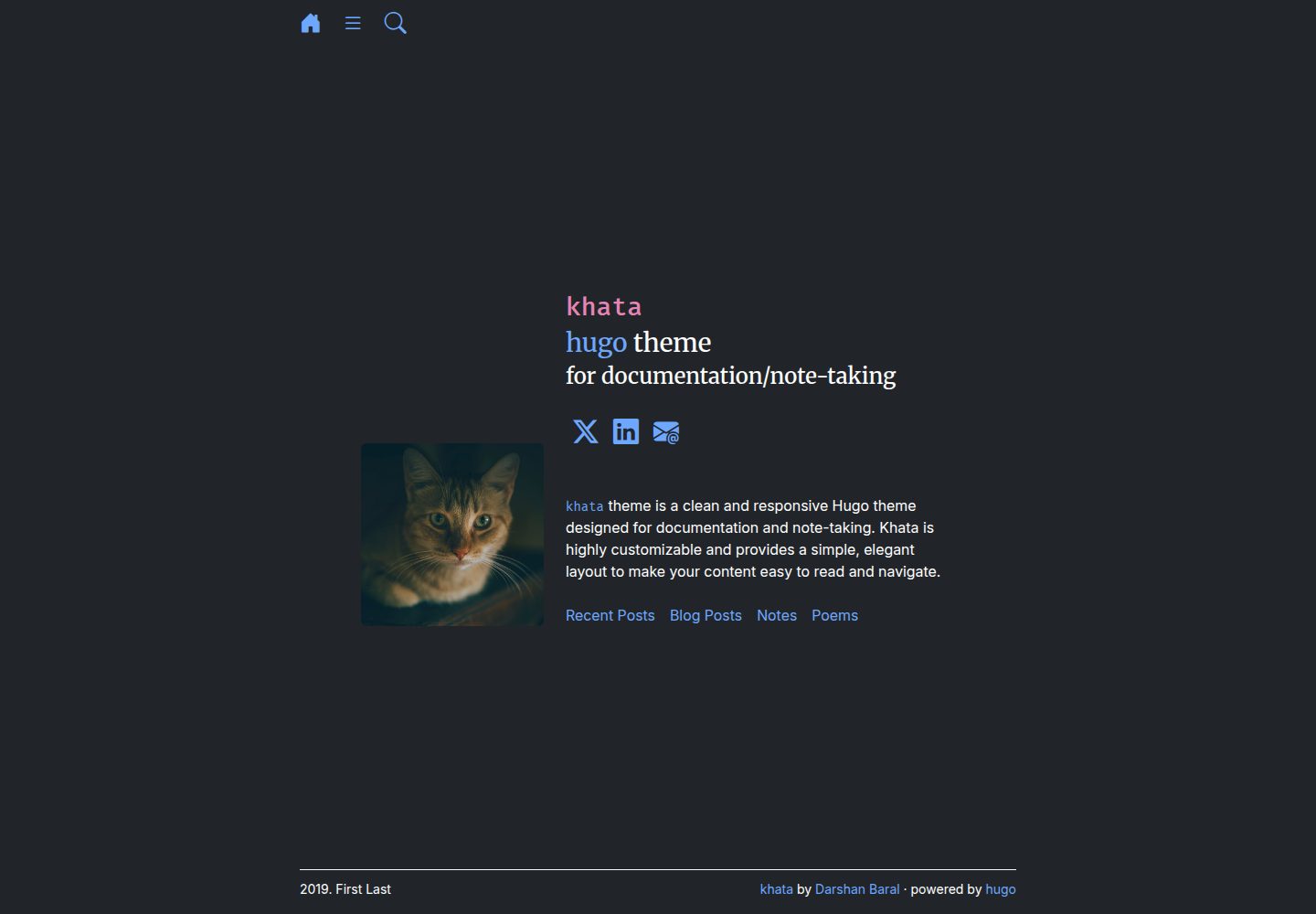
基于 Hugo 的文档与笔记类主题
Hugo文档
khata — Hugo 文档模板
作者 darshanbaral
khata 是一个基于 Hugo 的文档与笔记类主题,采用文件夹式内容组织,并内置由 Pagefind 提供支持的搜索功能,代码以 MIT 许可发布。
看看你的网站会是什么样
浏览真实页面截图,比较内容排版与手机效果。点击下方缩略图切换,放大查看整页细节。
全部页面与视图 3
截图用于了解视觉与布局,交互效果请以实际项目为准。
采集于 2026-10-04查看来源
值得关注的模板亮点
从已有项目资料中,快速了解它的特点。
内容按文件夹划分章节,文档页面放入对应目录
内置由 Pagefind 提供的搜索功能
提供 exampleSite,包含 config.toml 与 content 示例
archive、recent、search、taxa 为特殊目录,需了解结构后再改动
代码采用 MIT 许可
模板详细介绍
khata 是 darshanbaral 开发的 Hugo 主题,定位为文档与笔记站点。它使用文件夹式结构组织内容:在 content 目录下为不同章节建立文件夹,再把文档页面放进对应文件夹中。主题仓库的 exampleSite 提供了 config.toml 和 content 目录示例,新建站点可以直接复制使用;已有站点只需在 config.toml 中把 theme 设为 khata。
主题自带搜索功能,由 Pagefind 实现。搜索需要在使用 Hugo 构建站点之后再运行 Pagefind 对 public 目录建立索引,README 给出的命令为 hugo -b https://your_base_url/; npx -y pagefind --site public,仓库的 GitHub Actions 工作流文件可作为部署参考。
主题中存在 archive、recent、search、taxa 等特殊文件夹,README 提示这些目录只应在熟悉主题结构后再修改。仓库采用 MIT 许可,允许使用、修改、商用和分发该版本代码,但演示图片、字体、图标等第三方素材需按各自许可单独核对。
Hugo文档
适合你的项目吗?
适用场景
- 为项目或产品搭建文档站点
- 整理个人笔记并以章节文件夹组织内容
- 需要在静态站点中提供站内搜索的 Hugo 项目
- 已有 Hugo 站点希望更换为文档型主题
适合人群
- 使用 Hugo 构建站点的开发者
- 需要按章节组织文档或笔记的团队
- 希望以静态方式部署并自带搜索的文档项目
上手与定制指南
结合仓库当前版本的说明,按下面的资料检查内容、配置与运行要求。
- 1
在站点根目录执行 git submodule add https://github.com/darshanbaral/khata themes/khata 添加主题
- 2
新建站点可复制主题 exampleSite 中的 config.toml 与 content 目录;已有站点在 config.toml 中设置 theme = "khata"
- 3
在 content 下按章节创建文件夹,并把文档页面放入对应文件夹
- 4
启用搜索需先运行 hugo -b https://your_base_url/ 构建,再运行 npx -y pagefind --site public 建立索引
- 5
archive、recent、search、taxa 为特殊目录,不熟悉主题结构时不要修改
授权与来源资料
使用条件与限制
免费使用 · 保留许可声明本次收录的是公开仓库中采用 MIT 许可的免费版本;免费范围为该版本代码,不代表外部服务或第三方素材免费。
使用时需要遵守
- 允许免费使用、修改、商用和分发该版本代码。
- 分发代码副本或实质性部分时,保留原作者版权声明和完整 MIT 许可声明。
- 代码按现状提供;担保与责任限制以原许可证及适用法律为准。
额外费用与待核对事项
- 内置搜索依赖第三方工具 Pagefind:部署前必须先运行 npx -y pagefind --site public 对 public 目录建立索引,否则站点搜索不可用;该步骤需要 Node.js/npx 环境。
- 搜索索引必须在 Hugo 构建完成之后运行,构建与索引是两个先后步骤,顺序错误会导致搜索无结果。
- archive、recent、search、taxa 为特殊目录,不熟悉主题结构时不应修改,否则可能破坏主题功能。
- 演示图片、字体、图标及其他第三方素材需按各自许可核对,不能仅凭代码的 MIT 许可判断。
- 域名、托管、数据库、支付或 AI 等外部服务可能另外收费。
查看原文依据
Permission is hereby granted, free of charge
许可证原文
The Khata theme includes a built-in search feature powered by **[Pagefind](https://pagefind.app/)**. To enable search on your deployed site, you must index your content before deployment.
README 原文
Run the following command after you've built your site with Hugo:
README 原文
https://github.com/darshanbaral/khata/blob/main/LICENSEhttps://github.com/darshanbaral/khata/blob/main/README.mdThe `archive`, `recent`, `search`, and `taxa` folders are special and should only be modified if you are familiar with the theme's structure.
README 原文
DeepSeek 根据仓库许可证和 README 整理 ·2026-10-04。结果仅覆盖已读取资料,依赖、图片、字体及后续条款变更以各自原文为准。
项目核对记录与介绍依据
模板资料
- 来源平台
- Hugo Themes
- 资料与维护参考分
- 资料一般 · 69 / 100
- 技术栈
- Hugo
- 网站类型
- 文档
这个分数如何计算
本站按许可资料(最高30分)、演示链接(12分)、预览图(10分)、Star数(15分)、记录的维护时间(15分)、描述完整度(8分)、功能记录(5分)和分类资料(5分)计算。它不是代码、安全或性能测试,也不是 Google 评分;有链接不代表已实测可用。
这个项目需要核对什么
- 记录的仓库更新时间
- 2025-08-06
- 截图检查日期
- 2026-10-04
已收录演示链接。请用你的内容与屏幕尺寸检查;有演示不代表表单、认证或支付已经可用。
目录记录的主要技术栈是 Hugo。请通过依赖清单和锁文件核对实际版本与托管要求。这些说明基于收录资料,不代表代码审计或部署实测。
查看具体选型方法 →介绍的制作与核对状态
介绍由 AI 辅助整理目录与仓库资料。仓库作者不等于这篇介绍的审核者。
审核声明: [email protected] · 2026-10-04
查看当时使用的来源资料
SHA-256: 0ca2a64ef7d87031d8e0c03ff1e5a8c4c12957dc0da41fb65e328afa92a901cc
2026-10-04T02:48:08.741Z
来源文件 / 仓库### khata Theme
A clean and responsive Hugo theme designed for documentation and note-taking. Khata is highly customizable and provides a simple, elegant layout to make your content easy to read and navigate.
#### Live Demo
Explore the theme in action by visiting the **[live demo](https://darshanbaral.github.io/khata/)**.
#### Installation
Follow these steps to install and set up the Khata theme for your Hugo site.
1. **Add the theme as a submodule:** Navigate to your website's root directory and run the following command to add Khata as a Git submodule:
```bash
cd MY_WEBSITE
git submodule add [https://github.com/darshanbaral/khata](https://github.com/darshanbaral/khata) themes/khata
```
2. **Configure the theme:**
- **New Site:** If you're starting a new Hugo project, copy the `config.toml` file and the `content` folder from the theme's **[exampleSite folder](https://github.com/darshanbaral/khata/tree/main/exampleSite)** into your website's root directory.
- **Existing Site:** If you have an existing site, simply set the theme in your `config.toml` file:
```toml
# config.toml
theme = "khata"
```
3. **Create your content:** Khata uses a folder-based structure for sections. Create new folders within your `content` directory for different sections of your site, then add your documentation pages inside these folders.
> **Note:** The `archive`, `recent`, `search`, and `taxa` folders are special and should only be modified if you are familiar with the theme's structure.
#### Deployment with Search
The Khata theme includes a built-in search feature powered by **[Pagefind](https://pagefind.app/)**. To enable search on your deployed site, you must index your content before deployment.
Run the following command after you've built your site with Hugo:
```bash
hugo -b https://your_base_url/; npx -y pagefind --site public
```
See [github workflow](https://github.com/darshanbaral/khata/blob/main/.github/workflows/deploy.yml) for an example of how to deply the theme.
看看同类模板
对比同技术栈与用途的模板,找到更适合的视觉与内容结构。

hugo-book
Hugo Book 是一个面向文档场景的 Hugo 主题,定位很直接:把文档站点做得像一本朴素的书。
Hugo · 文档

docsy
Hugo theme for open source documentation
Hugo · 文档

hextra
Hextra 是一个 Hugo 主题,定位在文档站与博客之间:既提供侧边栏导航、目录、面包屑、分页这类文档站结构,也能承载博客内容。
Hugo · 文档

doks
Doks 是 Thulite 生态下的文档主题,底层是 Hugo 静态站点生成器。 它把重点放在长文阅读体验上:极简且响应式的布局、为文档优化的排版,以及代码块语法高亮,整体更接近技术手册的形态,而不是通用营销页模板。
Hugo · 工具站

lotusdocs
📖 A free, lightweight, modern documentation theme for Hugo
Hugo · 文档
hugo-theme-relearn
A theme for Hugo designed for documentation
Hugo · 文档