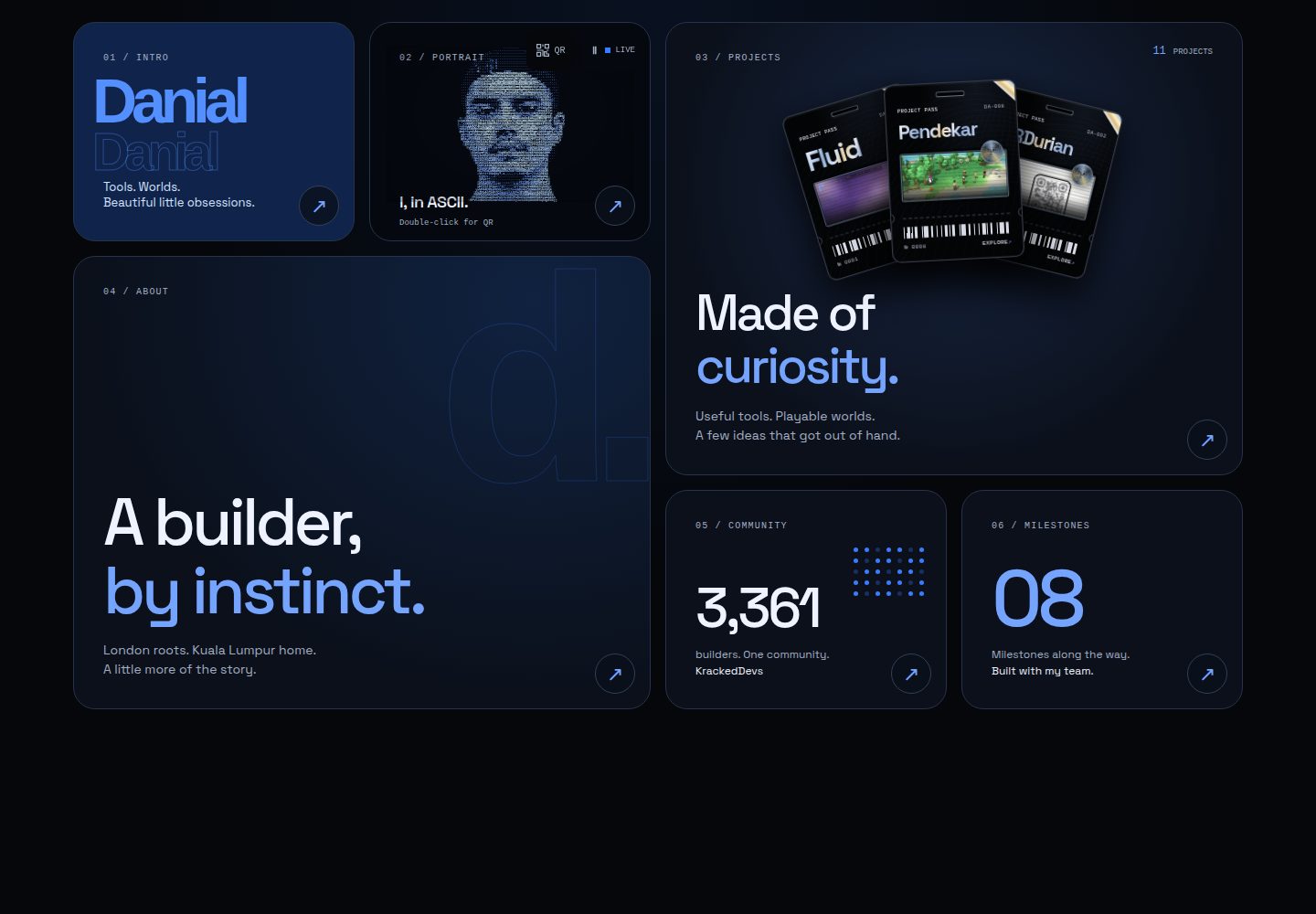
项目以六边形蜂巢布局展示,中心六边形为个人资料入口
ViteReact作品集
honeycomb — Vite 作品集模板
作者 enonforetsam
Honeycomb 是一个以六边形蜂巢为视觉结构的个人作品集模板,项目以六边形分布在生成式壁纸上,点击打开包含截图、问题描述和技术栈的详情面板。
看看你的网站会是什么样
浏览真实页面截图,比较内容排版与手机效果。点击下方缩略图切换,放大查看整页细节。
全部页面与视图 2
截图用于了解视觉与布局,交互效果请以实际项目为准。
采集于 2026-10-18查看来源
值得关注的模板亮点
从已有项目资料中,快速了解它的特点。
项目详情使用原生 <dialog>,包含截图、问题、技术栈和链接
支持 #project/<id> 深链接和上一个/下一个导航
提供可访问的列表视图,布局测试覆盖 1 到 32 个六边形
静态预渲染输出 HTML 和 JSON-LD,包含 sitemap 与 robots
内置 Windows 95 风格的 Nostalgia OS 彩蛋,含留言板和计数器
模板详细介绍
Honeycomb 是一个基于 React 与 Vite 的作品集模板,其核心是将个人项目呈现为蜂巢状排列的六边形。中心六边形代表作者本人,点击后打开包含 About、Now、Work with me 三个标签页的阅读器。每个项目六边形会打开一个原生 <dialog> 详情面板,展示截图、项目解决的问题、技术栈和链接,并支持 #project/<id> 深链接、上一个/下一个切换以及截图缺失时的回退显示。页面还提供可访问的列表视图,桌面端使用双栏布局,手机端堆叠介绍、联系方式和项目。背景是 Fluid 生成的动态壁纸,可暂停/播放、随机切换,并遵循减少动态效果设置。模板包含静态预渲染,在 JavaScript 执行前输出真实 HTML,并生成 Person、WebSite、SoftwareApplication 的 JSON-LD、sitemap 和 robots。README 还提到一个隐藏的 Windows 95 桌面(Nostalgia OS),位于 src/os/,包含启动画面、可拖动窗口、留言板和基于 Cloudflare D1 + KV 的计数器,可通过独立子域名访问。所有项目与个人资料内容集中在 src/data/experiments.js 一个文件中编辑。
ViteReact作品集
适合你的项目吗?
适用场景
- 个人开发者或设计师展示多个项目作品
- 需要以视觉化、非传统网格方式组织作品集
- 希望作品集具备静态预渲染和搜索引擎结构化数据
- 想要在作品集中加入可交互的怀旧彩蛋页面
适合人群
- 有多个项目需要展示的开发者
- 偏好六边形蜂巢视觉风格的个人网站
- 使用 Cloudflare Workers 部署静态站点的用户
- 希望作品集包含深链接和可访问列表视图的创作者
上手与定制指南
结合仓库当前版本的说明,按下面的资料检查内容、配置与运行要求。
- 1
克隆仓库后运行 npm i,复制 src/data/experiments.example.js 为 src/data/experiments.js 并编辑项目与个人资料
- 2
在图片准备好之前,将 shot 和 now.logo 设为 null
- 3
运行 node scripts/shots.mjs 为项目生成截图,npm run build 生成 dist/ 并内嵌内容到 index.html
- 4
部署使用 Cloudflare Worker 与静态资源,需编辑 wrangler.jsonc 中的路由,然后运行 npx wrangler deploy
- 5
Nostalgia OS 的留言板需要 D1 数据库和 KV 命名空间,并在 wrangler.jsonc 中配置;未配置时作品集正常但留言板无内容
授权与来源资料
使用条件与限制
免费使用 · 保留许可声明本次收录的是公开仓库中采用 MIT 许可的免费版本;免费范围为该版本代码,不代表外部服务或第三方素材免费。
使用时需要遵守
- 允许免费使用、修改、商用和分发该版本代码。
- 分发代码副本或实质性部分时,保留原作者版权声明和完整 MIT 许可声明。
- 代码按现状提供;担保与责任限制以原许可证及适用法律为准。
额外费用与待核对事项
- 演示图片、字体、图标及其他第三方素材需按各自许可核对,不能仅凭代码的 MIT 许可判断。
- 域名、托管、数据库、支付或 AI 等外部服务可能另外收费。
- Nostalgia OS 彩蛋(src/os/)的留言板与计数器依赖 Cloudflare D1 + KV 服务,需自行配置。
- 自动部署的 GitHub Action 需要配置 CLOUDFLARE_API_TOKEN 与 CLOUDFLARE_ACCOUNT_ID 仓库密钥。
- 留言板需要 D1 数据库和 KV 命名空间并在 wrangler.jsonc 中声明;未配置时作品集可用但留言板无内容。
- 部署目标为 Cloudflare Worker 与静态资源,需先编辑 wrangler.jsonc 中的路由。
- 壁纸引擎为第三方包 fluid-bg(MIT),README 未逐一说明其他图片等资源的授权,使用前需自行核实。
查看原文依据
Permission is hereby granted, free of charge
许可证原文
`src/os/` is a Windows 95 desktop: boot screen, draggable windows, a guestbook and
README 原文
`CLOUDFLARE_API_TOKEN` and `CLOUDFLARE_ACCOUNT_ID` as repo secrets. The guestbook
README 原文
needs a D1 database and a KV namespace named in `wrangler.jsonc`; without them the
README 原文
Cloudflare Worker with static assets. Edit the routes in `wrangler.jsonc`, then:
README 原文
https://github.com/enonforetsam/honeycomb/blob/main/LICENSEhttps://github.com/enonforetsam/honeycomb/blob/main/README.mdMIT © Danial Alias. The wallpaper engine is [fluid-bg](https://www.npmjs.com/package/fluid-bg) (MIT).
README 原文
DeepSeek 根据仓库许可证和 README 整理 ·2026-10-19。结果仅覆盖已读取资料,依赖、图片、字体及后续条款变更以各自原文为准。
项目核对记录与介绍依据
模板资料
- 来源平台
- GitHub
- 资料与维护参考分
- 资料较完整 · 85 / 100
- 技术栈
- Vite · React
- 网站类型
- 作品集
这个分数如何计算
本站按许可资料(最高30分)、演示链接(12分)、预览图(10分)、Star数(15分)、记录的维护时间(15分)、描述完整度(8分)、功能记录(5分)和分类资料(5分)计算。它不是代码、安全或性能测试,也不是 Google 评分;有链接不代表已实测可用。
这个项目需要核对什么
- 记录的仓库更新时间
- 2026-09-07
- 截图检查日期
- 2026-10-19
已收录演示链接。请用你的内容与屏幕尺寸检查;有演示不代表表单、认证或支付已经可用。
目录记录的主要技术栈是 Vite。请通过依赖清单和锁文件核对实际版本与托管要求。这些说明基于收录资料,不代表代码审计或部署实测。
查看具体选型方法 →介绍的制作与核对状态
介绍由 AI 辅助整理目录与仓库资料。仓库作者不等于这篇介绍的审核者。
审核声明: codex-user-requested-batch-review-20261021 · 2026-10-21
查看当时使用的来源资料
SHA-256: 33c8c22dfe40c988aef335f64f6ff61e8d0a7f9fce085856ccd842cd26fc4f16
2026-10-19T00:21:38.337Z
来源文件 / 仓库<div align="center"> # Honeycomb A portfolio that is a honeycomb: your projects as hexagons on a live generative wallpaper, each opening a sheet with a screenshot, the problem it solves and the stack. The centre hex is you. There is a Windows 95 desktop hidden in it. [](LICENSE) [](https://themasterofnone.xyz) [](https://nostalgia.themasterofnone.xyz) [Live example](https://themasterofnone.xyz) · [Nostalgia OS](https://nostalgia.themasterofnone.xyz) · Wallpaper by [Fluid](https://github.com/enonforetsam/fluid) </div> ## Make it yours in ten minutes ```sh git clone https://github.com/enonforetsam/honeycomb my-site cd my-site && npm i cp src/data/experiments.example.js src/data/experiments.js npm run dev ``` Edit one file. `src/data/experiments.js` holds your projects (name, one line, blurb, problem, stack, link, accent) and your profile (headline, bio, timeline, socials). Set `shot` and `now.logo` to `null` until your images are ready. Everything on the page renders from it, including the static HTML and the JSON-LD that search engines and link previews read. ```sh node scripts/shots.mjs # screenshots of your live projects for the sheets npm run build # dist/, with your words baked into index.html npm run lint && npm test ``` ## What you get - A responsive honeycomb around your profile, plus an accessible list view. Desktop uses two columns; phones stack the introduction, contact and projects. Layout tests cover one to 32 tiles. - Project sheets: a native `<dialog>` with screenshot, problem, stack and links (Esc, backdrop and the × all close it; cmd-click still opens the site). Each project has a shareable `#project/<id>` link, previous/next controls, and a fallback when a screenshot is unavailable. - The centre hex opens into a reader with three tabs: About, Now, Work with me - A live [Fluid](https://befluid.xyz) wallpaper you can shuffle, painted over a CSS gradient so the first frame is never black. Pause/play controls, reduced motion, background-tab pausing and reading-mode pausing keep it considerate. - Static prerender: real HTML before JavaScript, Person + WebSite + SoftwareApplication JSON-LD, sitemap and robots - No text under 12px on any screen, 44px targets, visible focus rings, reduced motion respected - Regression checks for tile geometry, deep links and content integrity, run before deployments. Browser failure fixtures live at `tests/browser.html`. ## Nostalgia OS `src/os/` is a Windows 95 desktop: boot screen, draggable windows, a guestbook and a hit counter on Cloudflare D1 + KV. `worker.js` serves it on its own host (`nostalgia.<your-domain>`) and the portfolio on the apex; open `os.html` locally. ## Structure | file | role | |------|------| | `src/data/experiments.js` | the only file you must edit | | `src/components/HexGrid.jsx` | the comb, the landing words, the fit | | `src/components/ProjectSheet.jsx` | the per-project dialog | | `src/components/BuilderCenterHex.jsx` + `ProfileDialog.jsx` + `AboutPanel.jsx` | the centre hex and its native dialog reader | | `src/components/FluidArt.jsx` | the wallpaper | | `src/landing.css` | the words, the sheet, the copy floor | | `vite.config.js` | the prerender plugin (static HTML + JSON-LD from your data) | | `worker.js` | Cloudflare Worker: host routing, security headers, guestbook API | ## Deploy Cloudflare Worker with static assets. Edit the routes in `wrangler.jsonc`, then: ```sh npm run build && npx wrangler deploy --env staging npm run build && npx wrangler deploy ``` The GitHub Action runs lint, tests and a build before deploying on push to `main` with `CLOUDFLARE_API_TOKEN` and `CLOUDFLARE_ACCOUNT_ID` as repo secrets. The guestbook needs a D1 database and a KV namespace named in `wrangler.jsonc`; without them the portfolio works and the OS guestbook shows nothing. ## Contributing Bugs and ideas welcome; see [CONTRIBUTING.md](CONTRIBUTING.md). ## License MIT © Danial Alias. The wallpaper engine is [fluid-bg](https://www.npmjs.com/package/fluid-bg) (MIT).
看看同类模板
对比同技术栈与用途的模板,找到更适合的视觉与内容结构。

Resumify
Free, privacy-first resume builder — 6 ATS-friendly templates, full customization, JSON import/export. No sign…
Vite · 作品集

showlit
✨ Showlit - A modern and clean template for creating a personal website
Vite · 作品集

folium
Professional developer portfolio boilerplate (React • TypeScript • Tailwind • Vite) with simple content custom…
Vite · 作品集

kurizu-discord
A Discord themed website built using React & Vite
Vite · 作品集
cv-educornelsen
Production portfolio with a streaming AI chatbot (Gemini + SSE), containerized via Docker, deployed to Google …
Vite · 作品集

about-me-personal-portfolio-website-template
Simple Personal Website Template, built with bootstrap and vite js project.
Vite · 作品集