从 astro-erudite 移植到 Hugo,用原生 Hugo 模板与布局系统重写
AstroHugo作品集博客
hugo-theme-erudite — Astro 作品集模板
作者 Fabshkiee
从 astro-erudite 移植到 Hugo 的极简深色主题,含博客与项目作品集两个内容区,纯 HTML/CSS 与 Hugo 模板实现,无 NPM 依赖。
看看你的网站会是什么样
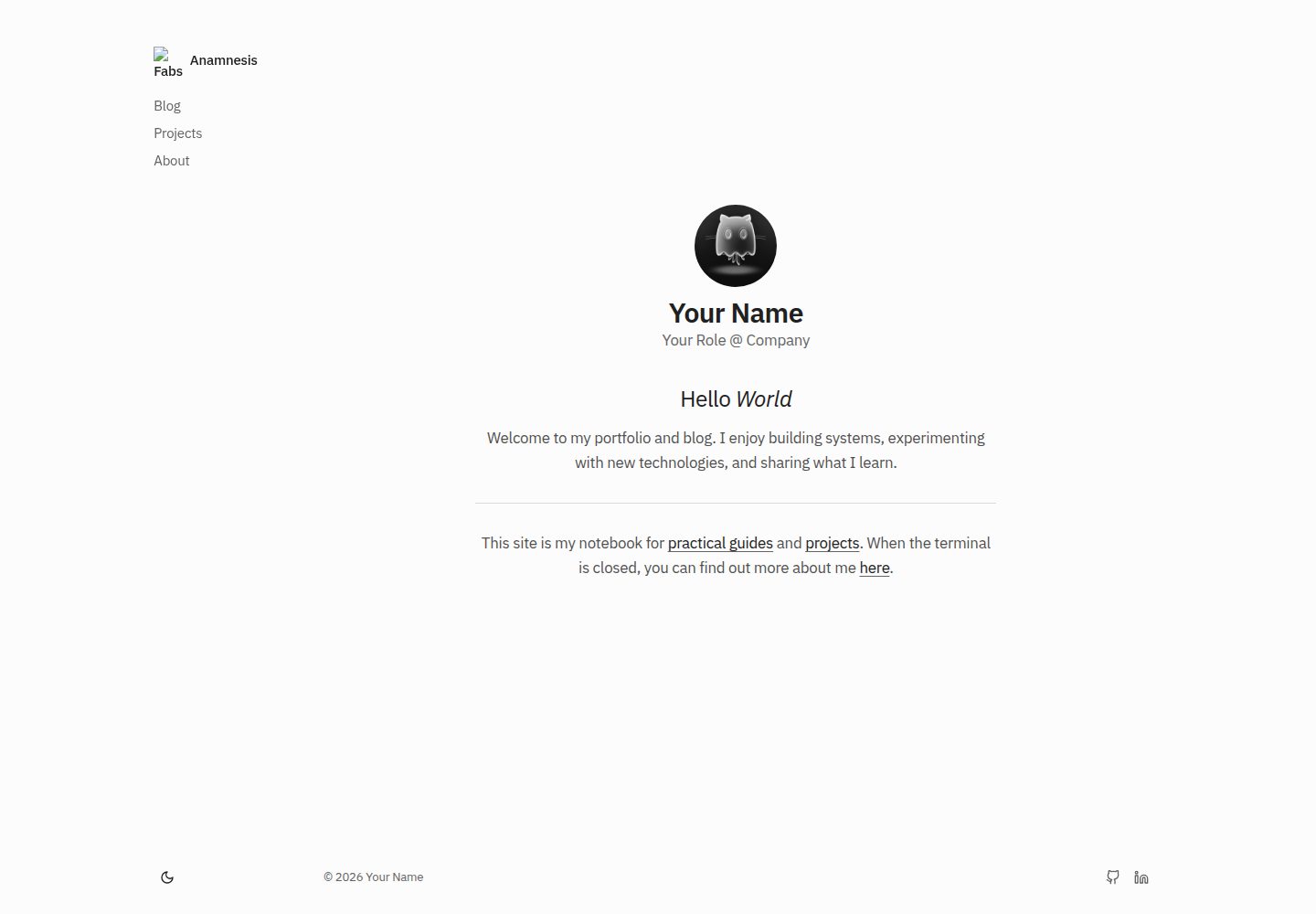
浏览真实页面截图,比较内容排版与手机效果。点击下方缩略图切换,放大查看整页细节。
全部页面与视图 3
截图用于了解视觉与布局,交互效果请以实际项目为准。
采集于 2026-10-03查看来源
值得关注的模板亮点
从已有项目资料中,快速了解它的特点。
零 NPM 依赖,不使用 React、Astro 或 Tailwind,仅 HTML、CSS 与 Hugo 模板
同时提供博客与项目作品集两个内容区,通过 mainSections 分别路由
支持 Hugo 原生标签与分类,以及博客文章的 pinned 置顶字段
深色/浅色切换默认跟随系统偏好,JavaScript 仅用于主题切换
CSS 按 color、layout、typography 等拆分且未压缩,便于阅读和改写
模板详细介绍
这是把 astro-erudite 的设计与布局移植到 Hugo 静态站点生成器的主题,作者重写了模板与样式,使其不依赖 React、Astro 或 Tailwind,只用 HTML、CSS 和 Hugo 模板。主题默认以深色为主,提供深色/浅色切换并默认跟随系统偏好。
内容结构上,主题通过 Hugo 的 mainSections 把博客和项目作品集分成两个独立内容类型,并支持 Hugo 原生的标签与分类。博客文章用 Markdown 撰写,front matter 支持 tags、pinned 等字段;关于页可以用内嵌 HTML 的 timeline 列表展示经历时间线。样式拆成 color.css、layout.css、typography.css 等未压缩的模块化文件,便于直接阅读和修改。JavaScript 只用于主题切换,站点地图由 Hugo 自动生成。
使用前需要在 hugo.toml 中配置 theme、params.author、mainSections,以及 main 与 social 菜单,并开启 Goldmark 的 unsafe 渲染,否则时间线等原始 HTML 组件不会生效。主题以 MIT 许可发布,演示图片、字体、图标等第三方素材需单独核对授权。
AstroHugo作品集博客
适合你的项目吗?
适用场景
- 用 Hugo 搭建带项目展示区的个人博客或作品集站点
- 把原本基于 astro-erudite 的站点迁移到 Hugo 技术栈
- 需要深色为主、可切换浅色且样式可直接修改的极简站点
- 在关于页用内嵌 HTML 的 timeline 列表呈现个人经历
适合人群
- 使用 Hugo 并希望内容以 Markdown 撰写的个人站点作者
- 需要博客与项目作品集两类内容并存的开发者
- 偏好无 NPM 依赖、可直接编辑 CSS 的轻量主题的用户
上手与定制指南
结合仓库当前版本的说明,按下面的资料检查内容、配置与运行要求。
- 1
在已有或新建的 Hugo 站点中,把仓库克隆到 themes/erudite,或在 hugo.toml 中设置 theme = 'erudite'
- 2
在 hugo.toml 配置 params.author(name、role、avatar)、params.mainSections 以及 main 与 social 菜单
- 3
开启 markup.goldmark.renderer.unsafe = true,否则关于页的时间线等原始 HTML 组件无法渲染
- 4
用 hugo new blog/xxx.md 创建文章,front matter 可写 tags 与 pinned;项目内容放入 projects 目录
授权与来源资料
使用条件与限制
免费使用 · 保留许可声明本次收录的是公开仓库中采用 MIT 许可的免费版本;免费范围为该版本代码,不代表外部服务或第三方素材免费。
使用时需要遵守
- 允许免费使用、修改、商用和分发该版本代码。
- 分发代码副本或实质性部分时,保留原作者版权声明和完整 MIT 许可声明。
- 代码按现状提供;担保与责任限制以原许可证及适用法律为准。
额外费用与待核对事项
- 使用时间线等原始 HTML 组件时,必须在 hugo.toml 中开启 Goldmark 的 unsafe 渲染(unsafe = true),否则这些内嵌 HTML 组件不会生效。
- 主题需以克隆或 git submodule 方式放入 Hugo 站点的 themes/erudite 目录,并在 hugo.toml 中设置 theme = 'erudite' 后才能使用。
- 时间线、导航与侧边栏依赖 hugo.toml 中的 params.author、params.mainSections 以及 main 与 social 菜单等配置,未配置时相关功能无法正常工作。
- 演示图片、字体、图标及其他第三方素材需按各自许可核对,不能仅凭代码的 MIT 许可判断。
- 域名、托管、数据库、支付或 AI 等外部服务可能另外收费。
查看原文依据
Permission is hereby granted, free of charge
许可证原文
[markup.goldmark.renderer] unsafe = true # Required for raw HTML components like the timeline
README 原文
Clone this repository into your `themes` folder
README 原文
https://github.com/Fabshkiee/hugo-theme-erudite/blob/main/LICENSEhttps://github.com/Fabshkiee/hugo-theme-erudite/blob/main/README.mdCopy the following into your `hugo.toml` to get the necessary parameters for the timeline, navigation, and sidebar to work
README 原文
DeepSeek 根据仓库许可证和 README 整理 ·2026-10-03。结果仅覆盖已读取资料,依赖、图片、字体及后续条款变更以各自原文为准。
项目核对记录与介绍依据
模板资料
- 来源平台
- GitHub
- 资料与维护参考分
- 资料较完整 · 85 / 100
- 技术栈
- Astro · Hugo
- 网站类型
- 作品集 · 博客
这个分数如何计算
本站按许可资料(最高30分)、演示链接(12分)、预览图(10分)、Star数(15分)、记录的维护时间(15分)、描述完整度(8分)、功能记录(5分)和分类资料(5分)计算。它不是代码、安全或性能测试,也不是 Google 评分;有链接不代表已实测可用。
这个项目需要核对什么
- 记录的仓库更新时间
- 2026-06-22
- 截图检查日期
- 2026-10-03
已收录演示链接。请用你的内容与屏幕尺寸检查;有演示不代表表单、认证或支付已经可用。
目录记录的主要技术栈是 Astro。请通过依赖清单和锁文件核对实际版本与托管要求。这些说明基于收录资料,不代表代码审计或部署实测。
查看具体选型方法 →介绍的制作与核对状态
介绍由 AI 辅助整理目录与仓库资料。仓库作者不等于这篇介绍的审核者。
已完成服务器许可规则与 AI 来源核对;未经过人工编辑审核。
查看当时使用的来源资料
SHA-256: 6ed5d44aeba783e9be9510a201f5a7c57088ae36a587f94e69827ed1aa101dee
2026-10-03T07:27:19.545Z
来源文件 / 仓库# Hugo Theme Erudite
**Hugo Theme Erudite** is a minimalist, dark-mode focused Hugo theme ported from the elegant [astro-erudite](https://github.com/jktrn/astro-erudite) theme, enhanced with a pure native Hugo architecture and layout system.
> **📖 Want to learn more about the original design?**
> This theme's layout and styling are heavily based on [astro-erudite](https://github.com/jktrn/astro-erudite) by [@jktrn](https://github.com/jktrn), which I discovered through [merox-erudite](https://github.com/meroxdotdev/merox-erudite) by [@meroxdotdev](https://github.com/meroxdotdev). For detailed design philosophy and the original implementation, visit the official astro-erudite repository.
## 🎯 What's Different from astro-erudite?
This theme has been completely rebuilt from the ground up to support the **Hugo** Static Site Generator.
### ✨ New Hugo-Native Features
- **Zero NPM Dependencies** - Pure HTML, CSS, and Hugo templating. No React, Astro, or Tailwind required.
- **Blazing Fast Builds** - Leverages Go-based Hugo for sub-second build times.
- **Hugo Taxonomy Support** - Native support for Tags and Categories.
- **Projects & Blog Sections** - Separate content types natively routed through Hugo `mainSections`.
- **Pure CSS Layouts** - Un-minified, easy to read, modular CSS (`color.css`, `layout.css`, `typography.css`, etc.)
## 📋 Features
- 🌓 **Dark/Light Mode Toggle** (Respects system preference by default)
- 📱 Fully responsive layout
- 📝 Blog authoring with Markdown
- 🏢 Project portfolio section
- 🏷️ Tagging system
- ⏱️ Dynamic Experience Timeline component
- ⚡ Minimal JavaScript footprint (only for theme toggling)
- 🔍 Automatic Sitemap generation
## 🚀 Getting Started
### 1. Create a new Hugo Site
If you don't already have a Hugo site, create one:
```bash
hugo new site my-blog
cd my-blog
```
### 2. Install the Theme
Clone this repository into your `themes` folder:
```bash
git clone https://github.com/Fabshkiee/hugo-theme-erudite.git themes/erudite
```
*(Alternatively, you can add it as a git submodule: `git submodule add ... themes/erudite`)*
### 3. Update Configuration
Add the theme to your site's configuration file (`hugo.toml`):
```toml
theme = 'erudite'
```
### 4. Start the Server
Run the local Hugo development server:
```bash
hugo server -D
```
Open your browser and visit `http://localhost:1313`
## ⚙️ Configuration
Copy the following into your `hugo.toml` to get the necessary parameters for the timeline, navigation, and sidebar to work:
```toml
baseURL = 'https://yoursite.com/'
locale = 'en-us'
title = 'Your Name'
theme = 'erudite'
[params]
description = "Role · Hobbyist · Creator"
mainSections = ["blog"]
[params.author]
name = "Your Name"
role = "Your Role @ Company"
avatar = "https://github.com/ghost.png" # Link to your Avatar
[markup.goldmark.renderer]
unsafe = true # Required for raw HTML components like the timeline
[[menu.main]]
identifier = "blog"
name = "Blog"
url = "/blog/"
weight = 10
[[menu.main]]
identifier = "projects"
name = "Projects"
url = "/projects/"
weight = 20
[[menu.main]]
identifier = "about"
name = "About"
url = "/about/"
weight = 30
[[menu.social]]
name = "GitHub"
url = "https://github.com/Fabshkiee"
weight = 10
[[menu.social]]
name = "LinkedIn"
url = "https://linkedin.com/in/Fabshkiee"
weight = 20
```
## 📝 Adding Content
### Blog Posts
Create a new post in the blog directory:
```bash
hugo new blog/my-first-post.md
```
**Front matter example:**
```markdown
---
title: "My First Blog Post"
date: 2026-06-21
tags: ["tech", "coding"]
pinned: true
---
```
### About Section / Timeline
In `content/about.md` (or `content/_index.md`), you can use pure HTML inside your markdown to generate the timeline:
```html
<ul class="timeline">
<li>
<span class="year">Present</span>
<span class="desc">Working on exciting new projects.</span>
</li>
</ul>
```
## 📄 License
This project is open-source and available under the [MIT License](LICENSE).
## 🙏 Credits
- **Original Theme Architecture:** [astro-erudite](https://github.com/jktrn/astro-erudite) by [@jktrn](https://github.com/jktrn).
- **Inspirational Fork:** [merox-erudite](https://github.com/meroxdotdev/merox-erudite) by [@meroxdotdev](https://github.com/meroxdotdev).
- Developed with the assistance of Antigravity to speed up the architecture porting process from Astro to Hugo natively.
看看同类模板
对比同技术栈与用途的模板,找到更适合的视觉与内容结构。

astrowind
⭕️ AstroWind: A free template using Astro v7 and Tailwind CSS v4. Astro starter theme.
Astro · 博客

astro-paper
A minimal, accessible and SEO-friendly Astro blog theme.
Astro · 博客

fuwari
✨A static blog template built with Astro.
Astro · 博客

Firefly
Firefly 是一款基于 Astro 的静态博客主题,由 CuteLeaf 在 saicaca 的 Fuwari 模板基础上二次开发,主打清新美观的视觉风格。
Astro · 博客

astro-theme-cactus
A simple Astro theme. Use it to create your blog or website.
Astro · 作品集

astrofy
Astrofy is a free and open-source template for your Personal Portfolio Website built with Astro and TailwindCS…
Astro · 作品集