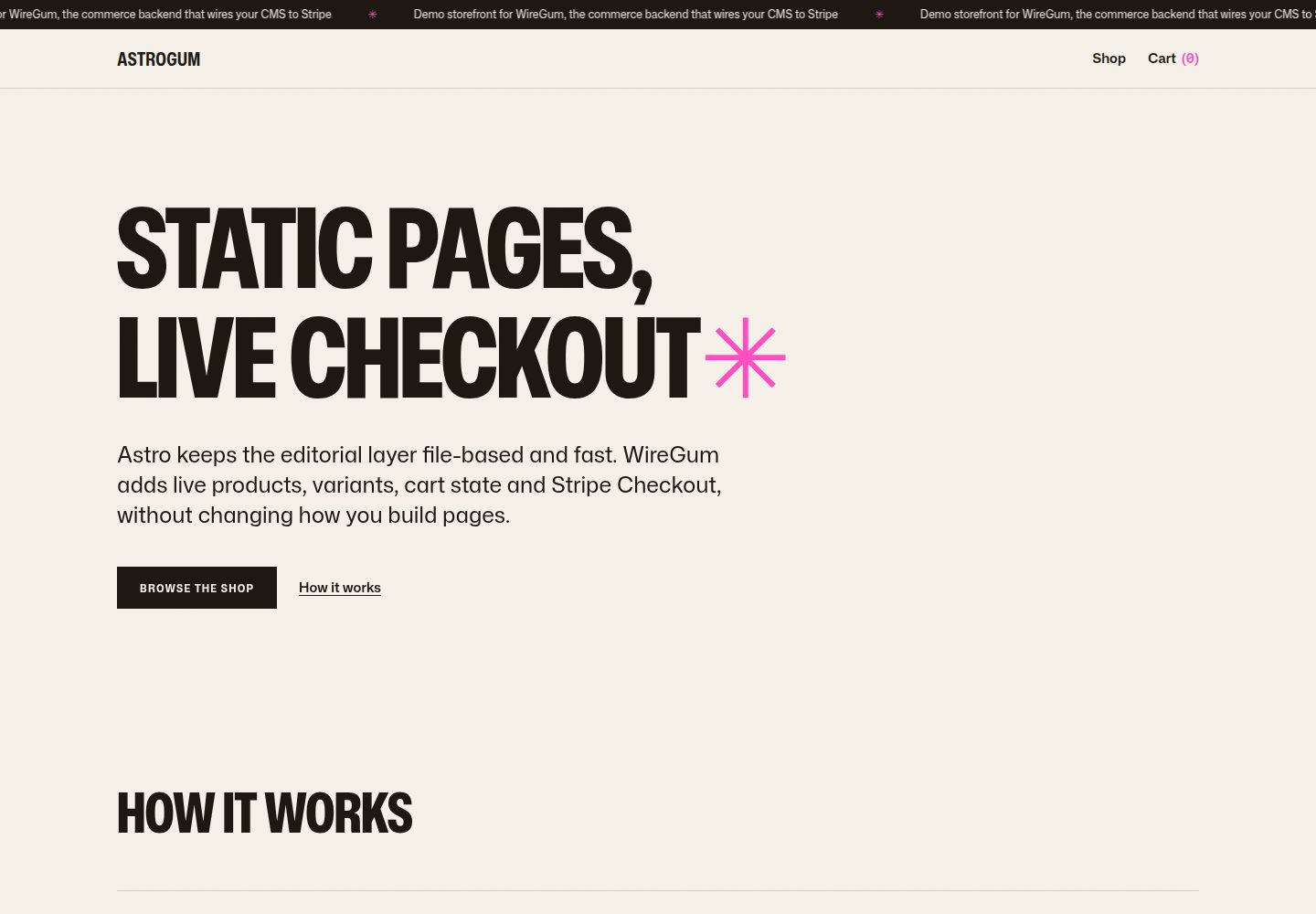
内容与交易分离:Markdown 内容集合负责页面、文案和商品图片,构建时生成静态 HTML;WireGum 组件负责实时价格、变体、购物车与 Stripe Checkout
Astro电商启动器
starter-astro — Astro 电商模板
作者 getwiregum
基于 Astro 的电商店面启动模板,由 WireGum 提供实时价格、变体、购物车与 Stripe 结账,内容以 Markdown 内容集合管理并在构建时生成静态页面。
看看你的网站会是什么样
浏览真实页面截图,比较内容排版与手机效果。点击下方缩略图切换,放大查看整页细节。
全部页面与视图 3
截图用于了解视觉与布局,交互效果请以实际项目为准。
采集于 2026-10-02查看来源
值得关注的模板亮点
从已有项目资料中,快速了解它的特点。
内置首页、商店索引、商品详情页和可主题化的购物车抽屉,商品页支持实时价格与变体选择器
具备降级行为:店面 API 不可达时保留 Astro 内容与备用价格,仅禁用购买按钮,不覆盖页面内容
附带四个示例商品,其中一个 T 恤带 Size 与 Color 变体,指向 WireGum 公开演示工作区
使用 Tailwind CSS v4 与一组设计令牌(Mona Sans、暖纸色调、WireGum 粉色强调色),组件脚本无额外依赖
集成点集中在 Layout.astro 的 data-wiregum-config 配置块与 data-wiregum-* 标记属性,关键处有代码注释说明
模板详细介绍
这是一个面向 Astro 的电商店面启动模板,将编辑内容与交易逻辑分开:页面、文案和商品图片放在 Markdown 内容集合中,构建时渲染为静态 HTML;实时价格、商品变体、购物车状态和 Stripe Checkout 由 WireGum 的店面组件负责。模板包含首页(主视觉、how it works、frontmatter 中指定的精选商品)、商店索引(支持快速加入购物车)、带实时价格与变体选择器的商品页,以及可主题化的购物车抽屉。内置四个示例商品,其中一个 T 恤带有 Size 与 Color 变体,指向 WireGum 公开演示工作区。
模板具备降级行为:组件会检查当前源能否访问店面 API,若不能访问,Astro 的图片、文案和备用价格仍然可见,购买按钮被禁用,不会用组件错误覆盖内容。样式使用 Tailwind CSS v4,配一组小型设计令牌(Mona Sans、暖纸色调、WireGum 粉色作为唯一强调色)和少量无依赖的组件脚本。
使用前需要 Node.js 22.12 或更新版本,以及一个已授权店面域名的 WireGum 工作区。演示内容指向公开演示工作区,该工作区只授权托管演示站点;在其他源(包括本地开发)会按设计进入降级模式,需连接自己的工作区并授权本地或生产源后才能启用加购与结账。商品 frontmatter 中的 wiregumProduct 需填写 WireGum 商品引用(公开 ID 或商品 slug),并需在 WireGum 店面设置中授权站点实际运行的源并至少添加一个运费费率。构建产物为 dist/ 下的纯静态站点,可部署到任意静态托管,构建时需设置 PUBLIC_WIREGUM_* 环境变量。
Astro电商启动器
适合你的项目吗?
适用场景
- 搭建以静态内容为主、交易由外部服务处理的 Astro 电商店面
- 需要商品页展示实时价格与多属性变体选择器的商店
- 希望购物车与结账由 Stripe 处理、无需自行实现支付流程的项目
- 以 Markdown 管理商品文案与图片、并希望构建时输出静态 HTML 的内容型商店
适合人群
- 使用 Astro 并希望以内容集合管理商品信息的开发者
- 已使用或计划使用 WireGum 工作区并接受其店面组件的团队
- 需要静态部署、由外部服务承担价格与结账逻辑的电商项目
- 希望在本地开发时保留内容预览、在授权源启用真实交易的开发者
上手与定制指南
结合仓库当前版本的说明,按下面的资料检查内容、配置与运行要求。
- 1
需要 Node.js 22.12 或更新版本,以及一个已授权店面域名的 WireGum 工作区
- 2
在 src/lib/wiregum.ts 或 .env 中配置 PUBLIC_WIREGUM_WIDGET_URL、PUBLIC_WIREGUM_ORGANIZATION、PUBLIC_WIREGUM_LOCALE
- 3
在 WireGum 店面设置中授权站点实际运行的源(本地开发需包含 localhost:4321)并至少添加一个运费费率
- 4
在商品 frontmatter 中将 wiregumProduct 设为 WireGum 商品引用(公开 ID 或 slug),并在 astro.config.mjs 中设置生产源 site
- 5
演示内容指向公开演示工作区,其他源会进入降级模式;正式使用前需替换示例商品 ID 与图片,并核对第三方素材许可
授权与来源资料
使用条件与限制
免费使用 · 保留许可声明本次收录的是公开仓库中采用 MIT 许可的免费版本;免费范围为该版本代码,不代表外部服务或第三方素材免费。
使用时需要遵守
- 允许免费使用、修改、商用和分发该版本代码。
- 分发代码副本或实质性部分时,保留原作者版权声明和完整 MIT 许可声明。
- 代码按现状提供;担保与责任限制以原许可证及适用法律为准。
额外费用与待核对事项
- 使用真实交易功能需拥有并授权一个 WireGum 工作区(含店面域名授权),否则仅能以降级模式展示内容。
- 公开演示工作区仅授权托管演示站点;在本地或其他源运行时加购与结账被禁用,需连接并授权自己的工作区才能启用。
- 需在 WireGum 店面设置中授权站点实际运行的源,并至少添加一个运费费率,否则交易不可用。
- 正式建店前必须替换示例商品 ID 与图片,不能直接沿用演示内容。
- 支付由 Stripe 处理,属于外部服务,可能产生额外费用与账户要求。
- 演示图片、字体、图标及其他第三方素材需按各自许可核对,不能仅凭代码的 MIT 许可判断。
- 域名、托管、数据库、支付或 AI 等外部服务可能另外收费。
查看原文依据
Permission is hereby granted, free of charge
许可证原文
A WireGum workspace with the storefront domain authorized
README 原文
the demo runs in fallback mode by design: Astro's content and fallback prices stay visible while **Add to cart** and checkout are disabled
README 原文
authorize the exact origin your site runs on (including `localhost:4321` for local work) and add at least one shipping rate
README 原文
Replace the demo product IDs and imagery before using the starter for a real store
README 原文
https://github.com/getwiregum/starter-astro/blob/main/LICENSEhttps://github.com/getwiregum/starter-astro/blob/main/README.mdStripe handles the payments
README 原文
DeepSeek 根据仓库许可证和 README 整理 ·2026-10-02。结果仅覆盖已读取资料,依赖、图片、字体及后续条款变更以各自原文为准。
项目核对记录与介绍依据
模板资料
- 来源平台
- GitHub
- 资料与维护参考分
- 资料较完整 · 88 / 100
- 技术栈
- Astro
- 网站类型
- 电商 · 启动器
这个分数如何计算
本站按许可资料(最高30分)、演示链接(12分)、预览图(10分)、Star数(15分)、记录的维护时间(15分)、描述完整度(8分)、功能记录(5分)和分类资料(5分)计算。它不是代码、安全或性能测试,也不是 Google 评分;有链接不代表已实测可用。
这个项目需要核对什么
- 记录的仓库更新时间
- 2026-08-04
- 截图检查日期
- 2026-10-02
已收录演示链接。请用你的内容与屏幕尺寸检查;有演示不代表表单、认证或支付已经可用。
目录记录的主要技术栈是 Astro。请通过依赖清单和锁文件核对实际版本与托管要求。这些说明基于收录资料,不代表代码审计或部署实测。
查看具体选型方法 →介绍的制作与核对状态
介绍由 AI 辅助整理目录与仓库资料。仓库作者不等于这篇介绍的审核者。
已完成服务器许可规则与 AI 来源核对;未经过人工编辑审核。
查看当时使用的来源资料
SHA-256: b1c7e2399d236a2443c17ec7e88b38962675c61743d683890ecae4cd1d9f1237
2026-10-02T07:35:56.940Z
来源文件 / 仓库# WireGum × Astro starter A small, production-minded storefront starter for [Astro](https://astro.build) and [WireGum](https://wiregum.com). Astro owns the editorial layer: pages, copy and product imagery live in Markdown content collections and are rendered to static HTML at build time. WireGum provides live prices, variants, cart state and Stripe Checkout through its storefront widget. Stripe handles the payments. Read the full integration guide at [wiregum.com/docs/astro](https://wiregum.com/docs/astro). ## What is included - A home page with a hero, a "how it works" section and featured products picked in frontmatter - A shop index with quick add-to-cart, and product pages with live prices and variant selectors - An accessible, fully themeable cart drawer - Graceful degradation: the widget checks that the storefront API is reachable from the current origin. If it is not, Astro's images, copy and fallback prices stay visible and the buy buttons are disabled. No widget error replaces your content - Four seeded demo products, including a t-shirt with Size and Color variants, wired to the public WireGum demo workspace - Tailwind CSS v4 with a small token set (Mona Sans, warm paper palette, WireGum pink as the single accent) and a few small dependency-free component scripts ## Requirements - Node.js 22.12 or newer - A WireGum workspace with the storefront domain authorized ## Quick start ```sh npm install npm run dev ``` Open `http://localhost:4321` for the storefront. `npm run build` renders the static site into `dist/`, and `npm run preview` serves that build locally. ### About the demo workspace The seeded content points at the public WireGum demo workspace, which authorizes the hosted demo at `https://starter-astro.wiregum.com`. On any other origin, including local development, the demo runs in fallback mode by design: Astro's content and fallback prices stay visible while **Add to cart** and checkout are disabled. Connect your own workspace and authorize your local or production origin to lift that. ## Connect your own workspace WireGum settings live in [src/lib/wiregum.ts](src/lib/wiregum.ts) and can be overridden per environment with a `.env` file (see [.env.example](.env.example)): | Env var | What it is | | ----------------------------- | ----------------------------------------------------------------------------------------------------- | | `PUBLIC_WIREGUM_WIDGET_URL` | The storefront widget URL for your WireGum instance, e.g. `https://wiregum.com/api/storefront/widget` | | `PUBLIC_WIREGUM_ORGANIZATION` | Your workspace slug, from the WireGum dashboard | | `PUBLIC_WIREGUM_LOCALE` | The storefront locale, e.g. `en` or `it` | Then: 1. In WireGum → Storefront settings, authorize the exact origin your site runs on (including `localhost:4321` for local work) and add at least one shipping rate 2. In each product's frontmatter, set `wiregumProduct` to a reference from WireGum → Products: either the public ID (`wg_…`) or the product slug. The ID survives renames, the slug is easier to read; this starter uses the IDs 3. Set `site` in [astro.config.mjs](astro.config.mjs) to the production origin used for canonical and Open Graph URLs 4. Replace the demo product IDs and imagery before using the starter for a real store ## How the integration works - [src/layouts/Layout.astro](src/layouts/Layout.astro) embeds the WireGum settings as a JSON `data-wiregum-config` block and loads the widget script; no custom JavaScript is needed - The widget reads the config, hydrates the commerce markup, and exposes its lifecycle on `<html data-wiregum-status>` (`loading`, `ready`, `unavailable`) for the CSS skeleton. When the origin is not authorized it keeps the Astro markup intact and disables the buy buttons instead - Templates mark up commerce hooks with `data-wiregum-*` attributes: the product scope ([src/pages/shop/[slug].astro](src/pages/shop/[slug].astro)), prices, the variant selector, quantity and add-to-cart - The cart drawer ([src/components/CartDrawer.astro](src/components/CartDrawer.astro)) contains a hidden `data-wiregum-cart-item` template the widget clones for every line, keeping the markup fully themeable - The widget renders variant selectors automatically for multi-variant products, as shown by the seeded t-shirt The key integration points carry short code comments explaining each pattern. ## Editing content Everything editorial lives in [src/content/products](src/content/products): one Markdown file per product, with title, short description, cover image, fallback price, CTA label and the WireGum reference in frontmatter, and the long description in the body. Home and shop copy live in their page templates. ## Project structure ```text src/styles/global.css Design tokens and WireGum widget styling (Tailwind v4) src/content/products/ Seeded products (Markdown + frontmatter) src/assets/products/ Demo product images, optimized by astro:assets src/lib/ Site identity and WireGum settings src/layouts/Layout.astro Head, WireGum config + widget script, page chrome src/components/ Header, footer, ticker, product card/row, cart drawer src/pages/ Home, shop index, product pages, 404 public/fonts/ Mona Sans variable font (OFL) ``` ## Deploying `npm run build` produces a fully static site in `dist/` — deploy it to any static host (Netlify, Vercel, Cloudflare Pages, GitHub Pages, your own server). Set the `PUBLIC_WIREGUM_*` env vars at build time for the target environment. Remember to authorize the production origin in WireGum. ## Links - [WireGum](https://wiregum.com) · [Astro guide](https://wiregum.com/docs/astro) · [GitHub](https://github.com/getwiregum) - [Astro](https://astro.build) ## License The starter code (templates, components, content, styles and scripts) is [MIT-licensed](LICENSE). [Mona Sans](https://github.com/github/mona-sans) is included under the SIL Open Font License (see [public/fonts/MonaSans-OFL.txt](public/fonts/MonaSans-OFL.txt)).
看看同类模板
对比同技术栈与用途的模板,找到更适合的视觉与内容结构。

astrowind
⭕️ AstroWind: A free template using Astro v7 and Tailwind CSS v4. Astro starter theme.
Astro · 博客
accessible-astro-starter
Accessible Astro Starter 是一个以无障碍为核心理念的 Astro 6 启动模板,由 incluud 团队维护。
Astro · 博客

astro-erudite
An opinionated, unstyled static blogging template built with Astro and native CSS.
Astro · 作品集

astro-shopify
astro-shopify 是一个面向开发者的轻量级电商启动模板,用于构建基于 Shopify 的无头店面。
Astro · 电商
astro-ecommerce
Astro Ecommerce - Ready to use components
Astro · 电商

brutal
A neobrutalism Astro starter theme
Astro · 启动器