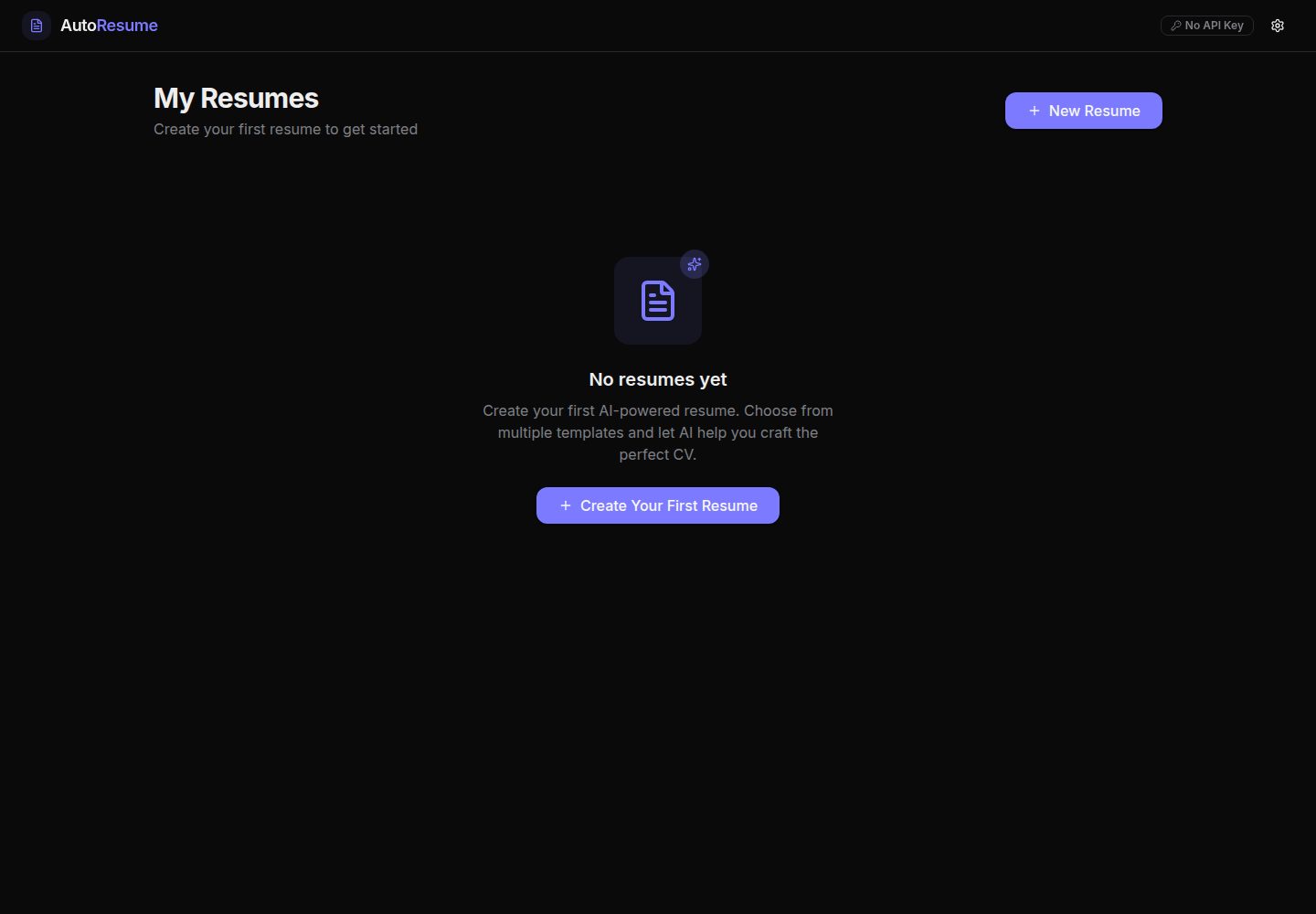
表单式简历编辑器,覆盖个人信息、摘要、经历、教育和技能等板块,并支持拖拽排序
Next.jsReact作品集
auto-resume — Next.js 作品集模板
作者 Holymaiden
AutoResume 是一个基于 Next.js 与 React 的开源简历构建器,提供表单编辑、实时预览、多模板切换与可选的 OpenAI/Gemini AI 内容建议,数据保存在浏览器本地。
看看你的网站会是什么样
浏览真实页面截图,比较内容排版与手机效果。点击下方缩略图切换,放大查看整页细节。
全部页面与视图 2
截图用于了解视觉与布局,交互效果请以实际项目为准。
采集于 2026-10-14查看来源
值得关注的模板亮点
从已有项目资料中,快速了解它的特点。
编辑时实时预览,可在 Modern、Professional、Minimalist 三种模板间切换
支持自定义字体与字号,以及多份简历的创建、复制和删除
数据自动保存到浏览器本地存储,README 称不会发送到服务器
可选接入 OpenAI 或 Google Gemini API 密钥,用于生成摘要、推荐技能和 ATS 关键词优化
基于 Next.js、React、TypeScript、Tailwind CSS、Zustand、React Hook Form 和 Zod 等技术构建
模板详细介绍
AutoResume 是一个开源简历构建器,README 将其定位为「AI-Powered Resume Builder — Build ATS-Friendly Resumes in Minutes」。它提供基于表单的简历编辑器,包含个人信息、摘要、工作经历、教育背景和技能等板块,支持拖拽调整板块顺序,并自动保存到浏览器本地存储。编辑时可实时预览,并可在 Modern、Professional、Minimalist 三种模板间切换,支持自定义字体与字号、多份简历管理以及复制和删除简历。AI 功能为可选项,用户可在设置中选择 OpenAI 或 Google Gemini 并填入自己的 API 密钥,用于生成摘要、推荐技能和进行 ATS 关键词优化;不提供密钥时应用仍可正常使用,只是没有 AI 建议。README 说明所有数据存储在浏览器本地,不会发送到服务器。技术栈方面,README 列出 Next.js、React、TypeScript、Tailwind CSS、Radix UI、Lucide Icons、Zustand、React Hook Form、Zod、Motion、LocalForage 等。项目采用 MIT 许可证。README 未提供 PDF 导出、国际化、单元测试或 PWA 等功能的实现说明,这些仅出现在贡献建议中。
Next.jsReact作品集
适合你的项目吗?
适用场景
- 在本地浏览器中创建和编辑个人简历,并实时查看不同模板的排版效果
- 为不同职位维护多份简历,通过复制和删除功能管理版本
- 在配置自己的 OpenAI 或 Gemini API 密钥后,获取摘要、技能和 ATS 关键词方面的内容建议
- 希望简历数据保留在本地、不发送到第三方服务器的使用场景
适合人群
- 需要快速制作 ATS 友好简历的求职者
- 偏好开源、可自行部署工具的开发者
- 希望数据保存在浏览器本地、对隐私敏感的用户
- 需要同时管理多份简历或尝试不同模板的用户
上手与定制指南
结合仓库当前版本的说明,按下面的资料检查内容、配置与运行要求。
- 1
需要 Node.js 18+ 和 pnpm,README 要求使用 pnpm 安装依赖
- 2
依次执行 git clone、cd auto-resume、pnpm install、pnpm dev,然后访问 http://localhost:3000
- 3
AI 功能为可选:在页面头部的设置中选择 OpenAI 或 Google Gemini 并填入自己的 API 密钥;不填密钥时应用仍可使用,但没有 AI 建议
- 4
README 列出 pnpm build、pnpm start、pnpm lint、pnpm format 和 pnpm format:check 等脚本
- 5
README 未提供部署到 Vercel 或其他平台的具体步骤
授权与来源资料
使用条件与限制
免费使用 · 保留许可声明本次收录的是公开仓库中采用 MIT 许可的免费版本;免费范围为该版本代码,不代表外部服务或第三方素材免费。
使用时需要遵守
- 允许免费使用、修改、商用和分发该版本代码。
- 分发代码副本或实质性部分时,保留原作者版权声明和完整 MIT 许可声明。
- 代码按现状提供;担保与责任限制以原许可证及适用法律为准。
额外费用与待核对事项
- 演示图片、字体、图标及其他第三方素材需按各自许可核对,不能仅凭代码的 MIT 许可判断。
- 域名、托管、数据库、支付或 AI 等外部服务可能另外收费。
- AI 功能需要用户自备 OpenAI 或 Google Gemini 的 API 密钥,属于外部服务,可能产生费用。
- AI 功能为可选;不提供 API 密钥时应用仍可使用,但无法获得 AI 建议。
查看原文依据
Permission is hereby granted, free of charge
许可证原文
- 🤖 **AI-Powered** — Bring your own API key (OpenAI or Gemini) to get intelligent content suggestions.
README 原文
https://github.com/Holymaiden/auto-resume/blob/main/LICENSEhttps://github.com/Holymaiden/auto-resume/blob/main/README.md> **Note:** AI features are optional. The app works perfectly without an API key — you just won't get AI-powered suggestions.
README 原文
DeepSeek 根据仓库许可证和 README 整理 ·2026-10-14。结果仅覆盖已读取资料,依赖、图片、字体及后续条款变更以各自原文为准。
项目核对记录与介绍依据
模板资料
- 来源平台
- GitHub
- 资料与维护参考分
- 资料较完整 · 85 / 100
- 技术栈
- Next.js · React
- 网站类型
- 作品集
这个分数如何计算
本站按许可资料(最高30分)、演示链接(12分)、预览图(10分)、Star数(15分)、记录的维护时间(15分)、描述完整度(8分)、功能记录(5分)和分类资料(5分)计算。它不是代码、安全或性能测试,也不是 Google 评分;有链接不代表已实测可用。
这个项目需要核对什么
- 记录的仓库更新时间
- 2026-04-08
- 截图检查日期
- 2026-10-14
已收录演示链接。请用你的内容与屏幕尺寸检查;有演示不代表表单、认证或支付已经可用。
目录记录的主要技术栈是 Next.js。请通过依赖清单和锁文件核对实际版本与托管要求。这些说明基于收录资料,不代表代码审计或部署实测。
查看具体选型方法 →介绍的制作与核对状态
介绍由 AI 辅助整理目录与仓库资料。仓库作者不等于这篇介绍的审核者。
审核声明: codex-user-requested-batch-review-20261017 · 2026-10-16
查看当时使用的来源资料
SHA-256: 06a9c5d31bb2f08666b0f1e98deb962892eba6082becef53966744abcee3b4bb
2026-10-14T19:02:42.834Z
来源文件 / 仓库<div align="center"> # ✨ AutoResume ### AI-Powered Resume Builder — Build ATS-Friendly Resumes in Minutes [](https://nextjs.org/) [](https://react.dev/) [](https://www.typescriptlang.org/) [](https://tailwindcss.com/) [](LICENSE) **AutoResume** is a modern, open-source resume builder that leverages AI to help you craft professional, ATS-optimized resumes. With real-time preview, multiple beautiful templates, drag-and-drop reordering, and full privacy — everything runs 100% in your browser. [🚀 Live Demo](https://auto-resume-eight.vercel.app) · [📖 Documentation](#usage) · [🐛 Report Bug](../../issues) · [💡 Request Feature](../../issues) </div> --- ## 🎯 Why AutoResume? Most resume builders are either too simple, locked behind paywalls, or send your data to third-party servers. **AutoResume** is different: - 🔒 **Privacy First** — All data is stored locally in your browser. Nothing is sent to any server. - 🤖 **AI-Powered** — Bring your own API key (OpenAI or Gemini) to get intelligent content suggestions. - 🎨 **Beautiful Templates** — Multiple professionally designed templates with real-time preview. - 📱 **Fully Responsive** — Works seamlessly on desktop, tablet, and mobile. - ⚡ **Blazing Fast** — Built with Next.js 16 and React 19 for optimal performance. - 🆓 **100% Free & Open Source** — No paywalls, no subscriptions, no hidden fees. --- ## ✨ Features <table> <tr> <td width="50%"> ### 📝 Smart Resume Editor - Intuitive form-based editor with validation - Sections: Personal Info, Summary, Experience, Education, Skills - Drag & drop reordering of sections - Auto-save to browser local storage </td> <td width="50%"> ### 🤖 AI Assistance - AI-powered content suggestions (OpenAI & Gemini) - Smart summary generation - Skills recommendations - ATS keyword optimization </td> </tr> <tr> <td width="50%"> ### 🎨 Professional Templates - **Modern** — Clean design with accent colors and left sidebar - **Professional** — Classic corporate layout with structured sections - **Minimalist** — Typography-focused elegant design - Real-time preview while editing </td> <td width="50%"> ### ⚙️ Customization - Custom font selection (typeface & size) - Template switching in real-time - Multiple resume management - Duplicate & delete resumes </td> </tr> </table> --- ## 🛠️ Tech Stack | Category | Technologies | |---|---| | **Framework** | Next.js 16, React 19, TypeScript 5 | | **Styling** | Tailwind CSS 4, Radix UI, Lucide Icons | | **State Management** | Zustand, React Hook Form, Zod | | **Animation** | Motion (Framer Motion) | | **AI Integration** | OpenAI API, Google Gemini API | | **Data** | LocalForage, Browser LocalStorage | | **DX Tools** | ESLint, Prettier, Husky, pnpm | --- ## 🚀 Getting Started ### Prerequisites - **Node.js** 18+ ([Download](https://nodejs.org/)) - **pnpm** ([Install](https://pnpm.io/installation)) ### Installation ```bash # Clone the repository git clone https://github.com/holymaiden/auto-resume.git # Navigate to the project cd auto-resume # Install dependencies pnpm install # Start the development server pnpm dev ``` Open [http://localhost:3000](http://localhost:3000) to see the app! 🎉 ### AI Setup (Optional) 1. Click the ⚙️ **Settings** button in the header 2. Choose your AI provider: **OpenAI** or **Google Gemini** 3. Paste your API key 4. AI features will be activated instantly > **Note:** AI features are optional. The app works perfectly without an API key — you just won't get AI-powered suggestions. --- ## 📁 Project Structure ``` auto-resume/ ├── src/ │ ├── app/ # Next.js App Router pages │ │ ├── page.tsx # Dashboard — resume list │ │ └── editor/ # Resume editor page │ ├── components/ │ │ ├── editor/ # Editor components │ │ │ ├── form-builder/ # Form sections (personal, experience, etc.) │ │ │ └── preview/ # Live preview & templates │ │ ├── layout/ # App header, providers │ │ ├── settings/ # Settings modal │ │ └── ui/ # Reusable UI components (Radix-based) │ ├── lib/ # Utilities, constants, storage │ ├── schemas/ # Zod validation schemas │ ├── stores/ # Zustand state management │ └── types/ # TypeScript type definitions ├── public/ # Static assets ├── package.json └── tsconfig.json ``` --- ## 📜 Available Scripts | Script | Description | |---|---| | `pnpm dev` | Start development server with hot reload | | `pnpm build` | Build for production | | `pnpm start` | Start production server | | `pnpm lint` | Run ESLint checks | | `pnpm format` | Format code with Prettier | | `pnpm format:check` | Check formatting without modifying files | --- ## 🤝 Contributing Contributions are welcome! Here's how you can help: 1. **Fork** the repository 2. **Create** a feature branch (`git checkout -b feature/amazing-feature`) 3. **Commit** your changes (`git commit -m 'feat: add amazing feature'`) 4. **Push** to the branch (`git push origin feature/amazing-feature`) 5. **Open** a Pull Request ### Contribution Ideas - 🌍 Add internationalization (i18n) support - 📄 PDF export functionality - 🎨 New resume templates - 🧪 Unit & integration tests - 📱 PWA support for offline usage --- ## 📄 License This project is licensed under the **MIT License** — see the [LICENSE](LICENSE) file for details. --- ## ⭐ Show Your Support If you find AutoResume helpful, please consider giving it a ⭐ on GitHub! It helps others discover this project. <div align="center"> **Built with ❤️ by [holymaiden](https://github.com/holymaiden)** [⬆ Back to Top](#-autoresume) </div>
看看同类模板
对比同技术栈与用途的模板,找到更适合的视觉与内容结构。

react-resume-template
A personal resume website template built with React.js, Typescript, Next.js, and styled with Tailwind css
Next.js · 作品集

nxt-lnk
Custom bio links for creatives who love coding. A perfect custom alternative for linktree, bio and other short…
Next.js · 作品集

sylph
A minimal portfolio template.
Next.js · 作品集

sleek-portfolio
sleek-portfolio 是一个面向开发者个人品牌展示的现代作品集模板,基于 Next.js 15、TypeScript、Tailwind CSS 和 Shadcn UI 构建。
Next.js · 作品集

research-website-template
React + Next.js template for research websites (for PhD students, researchers, etc)
Next.js · 作品集

shadcn-portfolio
shadcn-portfolio 是一个面向开发者的作品集模板,技术栈为 Next.js 15、shadcn/ui、Tailwind CSS 和 Framer Motion。
Next.js · 作品集