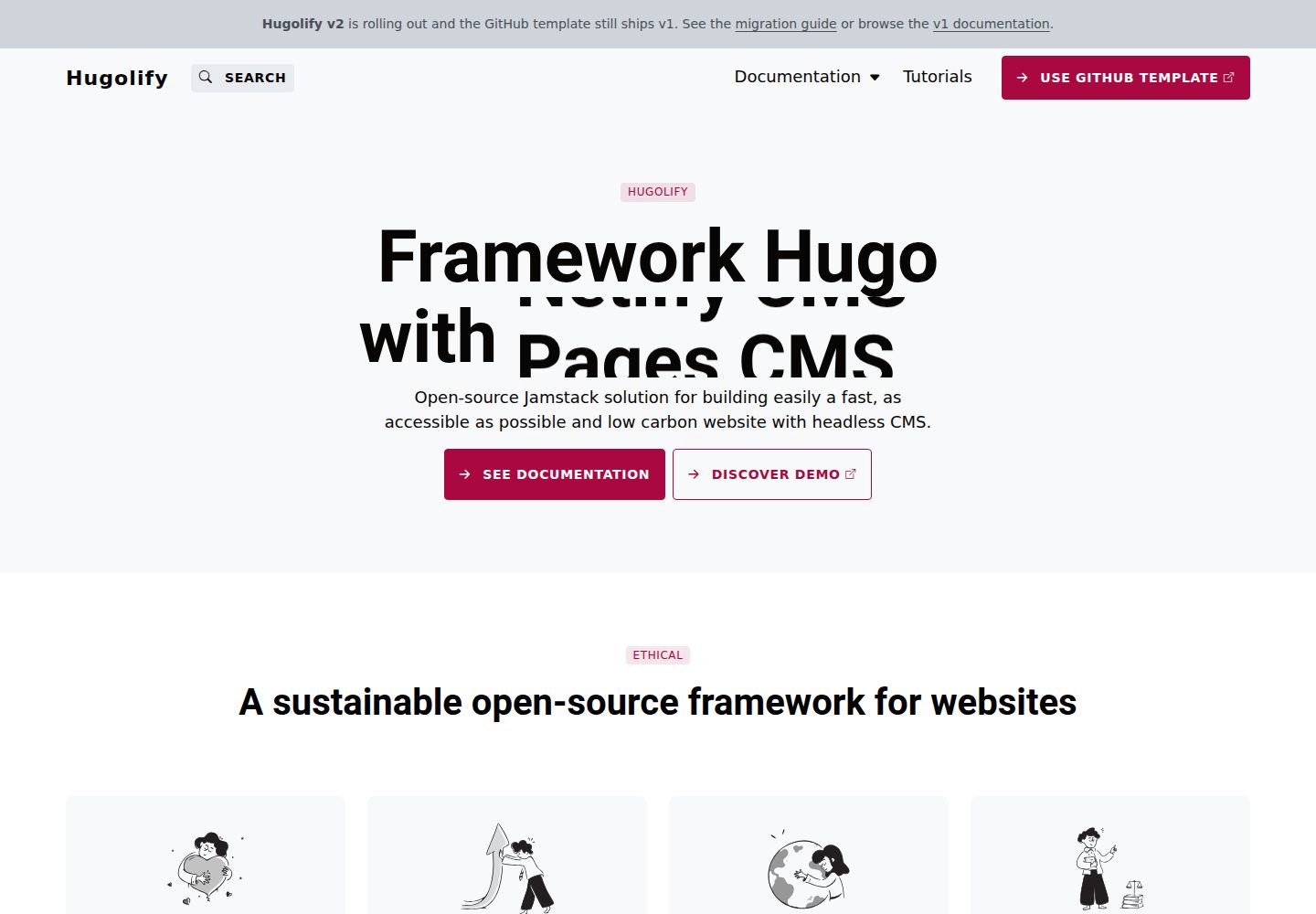
核心主题只含 layouts、content types、i18n 与 archetypes,不含 CSS 和 JavaScript
Hugo启动器
hugolify-theme — Hugo 启动器模板
作者 Hugolify
Hugolify 的核心主题,只提供 Hugo 的布局、内容类型、i18n 与 archetypes,CSS 与 JS 由独立样式模块提供。
看看你的网站会是什么样
浏览真实页面截图,比较内容排版与手机效果。点击下方缩略图切换,放大查看整页细节。
全部页面与视图 3
截图用于了解视觉与布局,交互效果请以实际项目为准。
采集于 2026-10-03查看来源
值得关注的模板亮点
从已有项目资料中,快速了解它的特点。
样式与 JS 由独立 styling module 提供,可在站点配置中整体替换
模板使用语义化 CSS 类名,JS 钩子统一为 js-* 类,不绑定具体框架
官方提供 Bootstrap 5 模块,另有开发中的 design-system 模块
内置 Chart.js、CookieConsent、LeafletJS、SplideJS、Tobii Lightbox、Pagefind、Rellax 等 JS 库
多语言支持英语与法语
模板详细介绍
hugolify-theme 是 Hugolify 项目面向 Hugo 的「框架无关」核心主题。按仓库说明,它只包含 layouts、content types、i18n 和 archetypes,不包含任何 CSS 与 JavaScript;样式和交互由站点配置中单独声明的 styling module 提供,因此可以在不改动主题与模板的前提下整体替换 CSS/JS 层。
官方模块包括 hugolify-theme-bootstrap(Bootstrap 5 + SASS,Bootstrap 5 + Vanilla JS)以及仍在开发中的 hugolify-theme-design-system(Vanilla CSS / Design tokens,Vanilla JS)。也可以自行构建样式层:作为 Hugo module(如 hugolify-theme-tailwind、hugolify-theme-bulma)发布,或直接在站点项目的 assets/sass/(或 assets/scss/、assets/css/)与 assets/js/ 中编写,Hugo 会合并所有来源的资源,站点文件优先于模块。
主题对样式层有明确约定:模板使用的 CSS 类名保持语义化(btn、col-small、modal、badge-primary 等),不出现框架专有名称;JS 钩子使用 js-* 类,而不是 data-framework-* 属性;JS 入口为 assets/js/main.js,SASS 入口为 assets/sass/main.sass(或 main.scss、main.css)。
从 v1 迁移到 v2 的主要变化是:v1 把 Bootstrap 的 CSS 和 JS 直接打包在主题内,v2 改为框架无关并由配置显式声明样式模块;同时 JS 钩子由 data-bs-toggle/target 改为 class="js-*" 加 data-target,栅格类由 col-md-* 改为 col-small、col-medium、col-large、col-xsmall,徽章状态由 text-bg-* 改为 badge-*。
主题内置的 JS 库包括 Chart.js、CookieConsent、LeafletJS OpenStreetMap、SplideJS Carousel、Tobii Lightbox、Pagefind 和 Rellax parallax。多语言方面目前支持英语和法语。安装方式有两种:使用 Hugolify 的 starter 模板,或作为 Hugo module 引入,在 config/_default/module.yaml 的 imports 中同时声明 hugolify-theme/v2 与所选样式模块。
Hugo启动器
适合你的项目吗?
适用场景
- 希望用 Hugo 搭建站点,并把样式层与主题模板解耦、便于更换 CSS/JS 方案的项目
- 需要以 Hugo module 方式引入核心主题,再按站点配置选择 Bootstrap 或自定义样式模块
- 计划自行编写 assets/sass 或 assets/js 覆盖模块资源、构建自有设计系统的团队
- 从 hugolify-theme v1 迁移到 v2,需要按新的类名与 JS 钩子约定调整模板的场景
- 需要英语与法语双语内容结构的 Hugo 站点
适合人群
- 熟悉 Hugo module 与站点配置、愿意自行提供样式层的开发者
- 需要框架无关核心主题、并计划替换或自建 CSS/JS 层的项目
- 以 Bootstrap 5 作为默认样式方案起步的 Hugo 站点
- 需要英语、法语双语支持的 Hugo 项目
上手与定制指南
结合仓库当前版本的说明,按下面的资料检查内容、配置与运行要求。
- 1
推荐使用 Hugolify starter 模板(hugolify-template)初始化项目
- 2
作为 Hugo module 引入时,在 config/_default/module.yaml 的 imports 中声明 github.com/hugolify/hugolify-theme/v2 以及所选样式模块
- 3
切换样式模块只需替换 imports 中的样式模块路径,例如从 hugolify-theme-bootstrap 换成 hugolify-theme-design-system
- 4
自定义样式可直接在站点项目添加 assets/sass/(或 assets/scss/、assets/css/)与 assets/js/,站点资源优先于模块
- 5
需遵守约定:JS 入口为 assets/js/main.js,SASS 入口为 assets/sass/main.sass(或 main.scss、main.css),JS 钩子使用 js-* 类
授权与来源资料
使用条件与限制
免费使用 · 保留许可声明本次收录的是公开仓库中采用 MIT 许可的免费版本;免费范围为该版本代码,不代表外部服务或第三方素材免费。
使用时需要遵守
- 允许免费使用、修改、商用和分发该版本代码。
- 分发代码副本或实质性部分时,保留原作者版权声明和完整 MIT 许可声明。
- 代码按现状提供;担保与责任限制以原许可证及适用法律为准。
额外费用与待核对事项
- 该主题本身不含任何 CSS 与 JavaScript,仅提供布局、内容类型、i18n 与 archetypes;必须额外引入独立的样式模块(如 hugolify-theme-bootstrap)或自行编写 assets 资源,否则站点无法获得样式与交互。
- 样式与 JS 由站点配置中单独声明的 styling module 提供,使用前需在 config/_default/module.yaml 的 imports 中显式添加样式模块,属于额外的配置依赖。
- 官方推荐通过 Hugolify starter 模板(hugolify-template)初始化项目,或作为 Hugo module 引入,需要具备 Hugo module 与站点配置的使用能力。
- 表单功能依赖 Netlify 或其他外部表单服务,可能需要第三方账号或服务配置。
- 内置 LeafletJS OpenStreetMap 地图库,实际使用地图功能时可能涉及 OpenStreetMap 等外部服务的使用条款与配额。
- 演示图片、字体、图标及其他第三方素材需按各自许可核对,不能仅凭代码的 MIT 许可判断。
- 域名、托管、数据库、支付或 AI 等外部服务可能另外收费。
查看原文依据
Permission is hereby granted, free of charge
许可证原文
hugolify-theme provides **layouts, content types, i18n and archetypes only** — no CSS, no JavaScript.
README 原文
Styling and JS are provided by a separate **styling module**, declared in the site config.
README 原文
Use the Hugolify starter template:
README 原文
Forms](https://www.hugolify.io/docs/getting-started/form/) (Netlify or other)
README 原文
https://github.com/Hugolify/hugolify-theme/blob/main/LICENSEhttps://github.com/Hugolify/hugolify-theme/blob/main/README.mdLeafletJS OpenStreetMap
README 原文
DeepSeek 根据仓库许可证和 README 整理 ·2026-10-03。结果仅覆盖已读取资料,依赖、图片、字体及后续条款变更以各自原文为准。
项目核对记录与介绍依据
模板资料
- 来源平台
- Hugo Themes
- 资料与维护参考分
- 资料较完整 · 87 / 100
- 技术栈
- Hugo
- 网站类型
- 启动器
这个分数如何计算
本站按许可资料(最高30分)、演示链接(12分)、预览图(10分)、Star数(15分)、记录的维护时间(15分)、描述完整度(8分)、功能记录(5分)和分类资料(5分)计算。它不是代码、安全或性能测试,也不是 Google 评分;有链接不代表已实测可用。
这个项目需要核对什么
- 记录的仓库更新时间
- 2026-10-01
- 截图检查日期
- 2026-10-03
已收录演示链接。请用你的内容与屏幕尺寸检查;有演示不代表表单、认证或支付已经可用。
目录记录的主要技术栈是 Hugo。请通过依赖清单和锁文件核对实际版本与托管要求。这些说明基于收录资料,不代表代码审计或部署实测。
查看具体选型方法 →介绍的制作与核对状态
介绍由 AI 辅助整理目录与仓库资料。仓库作者不等于这篇介绍的审核者。
已完成服务器许可规则与 AI 来源核对;未经过人工编辑审核。
查看当时使用的来源资料
SHA-256: 5982979eb612decd6e53e5f99b3a248de6285bce457c9abfeca99192de26ad17
2026-10-03T06:44:42.820Z
来源文件 / 仓库# Hugolify theme [](https://www.hugolify.io/) ## Performance & SEO * 100/100 Google PageSpeed Insights * Lazy loading and JS defer * PostCSS + [PurgeCSS](https://www.hugolify.io/docs/getting-started/purgecss/) * Responsive images and WebP * SEO friendly ## Content & UX * Accessibility friendly * [Blocks](https://www.hugolify.io/docs/blocks/) * [Forms](https://www.hugolify.io/docs/getting-started/form/) (Netlify or other) * Responsive design * [Search](https://www.hugolify.io/docs/getting-started/search/) * [Shortcodes](https://www.hugolify.io/docs/shortcodes/) ## Architecture hugolify-theme provides **layouts, content types, i18n and archetypes only** — no CSS, no JavaScript. Styling and JS are provided by a separate **styling module**, declared in the site config. This makes it possible to swap the entire CSS/JS layer without touching the theme or templates. ### Official modules | Module | CSS | JS | | --- | --- | --- | | [hugolify-theme-bootstrap](https://github.com/hugolify/hugolify-theme-bootstrap) | Bootstrap 5 + SASS | Bootstrap 5 + Vanilla JS | | hugolify-theme-design-system (wip) | Vanilla CSS / Design tokens | Vanilla JS | ### Custom styling You can build your own styling layer in two ways: * **As a Hugo module** (`hugolify-theme-tailwind`, `hugolify-theme-bulma`…) — sharable, versionable, swappable via the site config. * **Directly in the site** — add `assets/sass/` (or `assets/scss/` or `assets/css/`) and `assets/js/` to your project. Hugo merges assets from all sources, so your files take priority over the module. The contracts to respect in either case: * CSS classes used by templates are semantic (`btn`, `col-small`, `modal`, `badge-primary`…) — no framework-specific names * JS hooks are `js-*` CSS classes — no `data-framework-*` attributes * JS entry point: `assets/js/main.js` * SASS entry point: `assets/sass/main.sass` (or `main.scss` or `main.css`) ## JS libraries * Chart.js * CookieConsent * LeafletJS OpenStreetMap * SplideJS Carousel * Tobii Lightbox * Pagefind * Rellax parallax ## Multilingual Support * English * French ## Install Use the Hugolify starter template: <https://github.com/Hugolify/hugolify-template/> Or add as Hugo modules. Edit `config/_default/module.yaml`: ```yaml imports: - path: github.com/hugolify/hugolify-theme/v2 - path: github.com/hugolify/hugolify-theme-bootstrap ``` To switch styling module, replace the second import: ```yaml imports: - path: github.com/hugolify/hugolify-theme/v2 - path: github.com/hugolify/hugolify-theme-design-system ``` ## Migration from v1 In v1, Bootstrap (CSS and JS) was bundled directly inside `hugolify-theme`. In v2, the theme is framework-agnostic — styling is provided by a separate module declared explicitly in the site config (see Install above). Other breaking changes: * JS hooks: `data-bs-toggle/target` → `class="js-*"` + `data-target` * Grid classes: `col-md-*` → `col-small`, `col-medium`, `col-large`, `col-xsmall` * Badge states: `text-bg-*` → `badge-*` ## Demo <https://demo.hugolify.io/> ## Documentation <https://www.hugolify.io/docs/> ## Licensing Hugolify is free for personal or commercial projects (MIT license)
看看同类模板
对比同技术栈与用途的模板,找到更适合的视觉与内容结构。

hugo-xmin
eXtremely Minimal Hugo theme: about 140 lines of code in total, including HTML and CSS (with no dependencies)
Hugo · 启动器

hugo-theme-gallery
Gallery Theme for Hugo
Hugo · 启动器

reveal-hugo
📽️ Create rich HTML-based presentations with Hugo and Reveal.js
Hugo · 启动器

anatole
Anatole is a minimalistic two-column theme for Hugo.
Hugo · 启动器

hugo-theme-diary
Moments piled up. A Hugo theme ported from SumiMakito/hexo-theme-Journal.
Hugo · 启动器

risotto
A minimalist, responsive hugo theme inspired by terminal ricing aesthetics.
Hugo · 启动器