从文件目录结构自动生成层级菜单与目录,无需手动配置菜单
Astro文档工具站
astro-big-doc — Astro 文档模板
作者 MicroWebStacks
astro-big-doc 是一个基于 Astro 的文档站主题,用零配置的层级菜单和目录渲染标准 Markdown,并通过 Astro 组件为图片、代码、图表、3D 模型和表格增加交互能力。
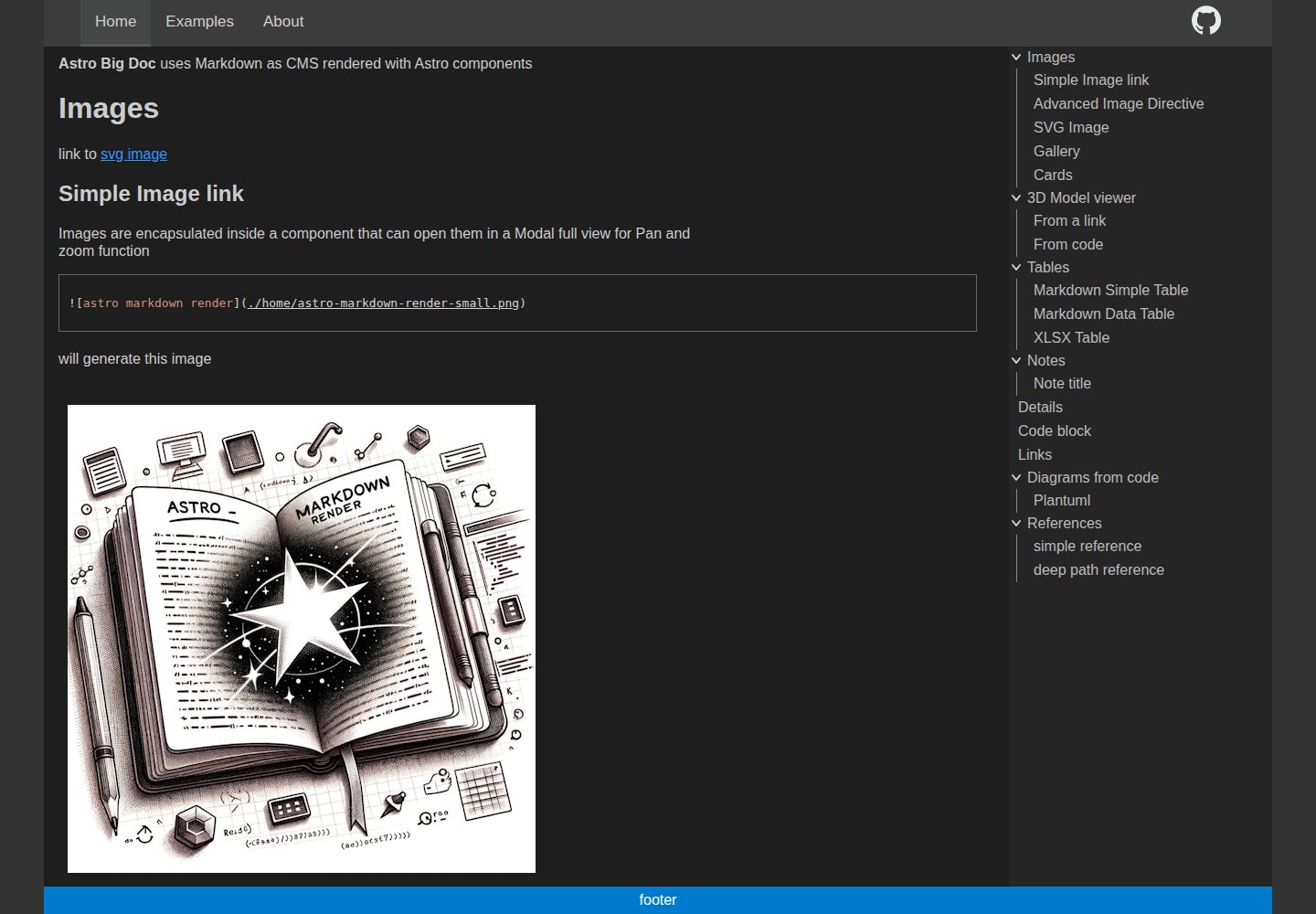
看看你的网站会是什么样
浏览真实页面截图,比较内容排版与手机效果。点击下方缩略图切换,放大查看整页细节。
全部页面与视图 3
截图用于了解视觉与布局,交互效果请以实际项目为准。
采集于 2026-10-01查看来源
值得关注的模板亮点
从已有项目资料中,快速了解它的特点。
渲染标准 Markdown,并可用 Astro 组件扩展图片、代码、图表、3D 模型和表格
Markdown 图片支持 panzoom、弹窗、URL 参数定位与图库
代码块支持类 VSCode 高亮、复制按钮,以及 PlantUML 和 Kroki 图表渲染
表格可转为 DataTables 交互表格,数据可来自 Markdown 表格或 xlsx 文件链接
提供可选 Express 服务器,可叠加 GitHub OAuth 认证、CORS 与 HTTPS
模板详细介绍
astro-big-doc 面向大型文档网站,核心是把标准 Markdown 文件当作内容源,从文件目录结构自动生成层级页面菜单和目录(ToC),无需额外配置菜单。它支持在 .md 中直接使用自定义 Astro 组件,为 Markdown 图片加入 panzoom 与弹窗、图库,为代码块提供类 VSCode 高亮与复制按钮,为代码块或代码文件链接渲染 PlantUML、Kroki 图表,并支持从 .glb 链接或 yaml 参数加载 3D 模型。表格可转为 DataTables 交互表格,也支持从 xlsx 文件链接生成。侧边菜单可折叠、可用鼠标调整宽度。内容目录、输出目录、站点 base 路径和 Kroki 服务地址通过环境变量配置。仓库还包含一个可选的 Express 服务器,用于托管生成的静态站点,并可通过 Express passport 增加 GitHub OAuth 认证层,同时提供 CORS、HTTPS 证书等配置项。README 中另有一份开发者想法清单,属于待实现或探索方向,不代表当前功能。
Astro文档工具站
适合你的项目吗?
适用场景
- 用 Markdown 文件维护的大型产品文档或知识库站点
- 需要在文档中嵌入可缩放图片、交互表格、图表或 3D 模型的技术手册
- 希望从文件目录自动生成导航和目录、减少手工配置的文档项目
- 需要为静态文档站点增加访问认证或跨域 API 能力的内部文档场景
适合人群
- 使用 Astro 并希望以 Markdown 为主要内容格式的文档项目
- 需要层级菜单、目录和丰富 Markdown 扩展能力的文档站点
- 能接受通过环境变量配置内容目录、输出目录和站点 base 的开发者
- 需要可选认证层来托管静态文档的团队
上手与定制指南
结合仓库当前版本的说明,按下面的资料检查内容、配置与运行要求。
- 1
使用 pnpm install 安装依赖,pnpm run dev 启动开发,pnpm run build 构建
- 2
环境变量可写入 .env 文件,参考 .env.example;OUT_DIR、PUBLIC_BASE、CONTENT、STRUCTURE、KROKI_SERVER 等由 config.js 统一导出
- 3
Markdown 内容默认放在 content 目录,根目录的 readme.md 或 README.md 会作为首页
- 4
可选 Express 服务器位于 server/server.js,认证相关变量包括 ENABLE_AUTH、GITHUB_CLIENT_ID、GITHUB_CLIENT_SECRET、SESSION_SECRET 等
- 5
代码采用 MIT 许可;演示图片、字体、图标等第三方素材需单独核对许可
授权与来源资料
使用条件与限制
免费使用 · 保留许可声明本次收录的是公开仓库中采用 MIT 许可的免费版本;免费范围为该版本代码,不代表外部服务或第三方素材免费。
使用时需要遵守
- 允许免费使用、修改、商用和分发该版本代码。
- 分发代码副本或实质性部分时,保留原作者版权声明和完整 MIT 许可声明。
- 代码按现状提供;担保与责任限制以原许可证及适用法律为准。
额外费用与待核对事项
- 可选的 Express 服务器用于托管生成的静态站点,并可通过 Express passport 叠加认证层;不使用该服务器时不影响静态站点本身。
- 启用 GitHub OAuth 认证需要配置 GITHUB_CLIENT_ID、GITHUB_CLIENT_SECRET 和 SESSION_SECRET 等凭据,需自行在 GitHub 注册 OAuth 应用。
- 渲染 Kroki/PlantUML 图表默认依赖外部服务 https://kroki.io,也可改为自建本地 Kroki 服务器。
- 使用 Let's Encrypt 证书需公网可访问主机以完成域名验证,因此不适用于内部域名和局域网主机。
- 演示图片、字体、图标及其他第三方素材需按各自许可核对,不能仅凭代码的 MIT 许可判断。
- 域名、托管、数据库、支付或 AI 等外部服务可能另外收费。
查看原文依据
Permission is hereby granted, free of charge
许可证原文
Express js server in `server\server.js` can optionally be used to serve the generated static site. It adds an authentication layer on top using Express js passport.
README 原文
`GITHUB_CLIENT_ID` : Express passport Github strategy configuration
README 原文
`KROKI_SERVER` : supports local kroki server, defaults to https://kroki.io
README 原文
https://github.com/MicroWebStacks/astro-big-doc/blob/main/LICENSEhttps://github.com/MicroWebStacks/astro-big-doc/blob/main/README.mdfor 'Let's Encrypt' certificates, ownership has to be proven by visibility of the host from the public internet which makes it not usable for internal domains and local network hosts
README 原文
DeepSeek 根据仓库许可证和 README 整理 ·2026-10-01。结果仅覆盖已读取资料,依赖、图片、字体及后续条款变更以各自原文为准。
项目核对记录与介绍依据
模板资料
- 来源平台
- GitHub
- 资料与维护参考分
- 资料较完整 · 92 / 100
- 技术栈
- Astro
- 网站类型
- 文档 · 工具站
这个分数如何计算
本站按许可资料(最高30分)、演示链接(12分)、预览图(10分)、Star数(15分)、记录的维护时间(15分)、描述完整度(8分)、功能记录(5分)和分类资料(5分)计算。它不是代码、安全或性能测试,也不是 Google 评分;有链接不代表已实测可用。
这个项目需要核对什么
- 记录的仓库更新时间
- 2026-07-04
- 截图检查日期
- 2026-10-01
已收录演示链接。请用你的内容与屏幕尺寸检查;有演示不代表表单、认证或支付已经可用。
目录记录的主要技术栈是 Astro。请通过依赖清单和锁文件核对实际版本与托管要求。这些说明基于收录资料,不代表代码审计或部署实测。
查看具体选型方法 →介绍的制作与核对状态
介绍由 AI 辅助整理目录与仓库资料。仓库作者不等于这篇介绍的审核者。
已完成服务器许可规则与 AI 来源核对;未经过人工编辑审核。
查看当时使用的来源资料
SHA-256: 08f777dd42befcf5b8de8ff788ad502539cf9b56ceb942d9ad1d08f7e097c46b
2026-10-01T01:14:09.652Z
来源文件 / 仓库# astro big doc
Live demo : https://microwebstacks.github.io/astro-big-doc/
Astro Theme for big documentation websites. A pure standard Markdown renderer with zero config.
Hierarchical pages menu from files structure and table of content, Markdown rendered as CMS with Astro components for panzoom, 3D, links, interactive tables, diagrams from code, VSCode like highlighter.
Enhances native markdown '.md' files with Astro components, enables parsing of content from a configurable directory in the file system, and allows relative assets paths usage.
User friendly side menus collapsible and width adjustable with the mouse.
Deepwiki : https://deepwiki.com/MicroWebStacks/astro-big-doc
## Features
- Render standard markdown .md with custom Astro components
- Panzoom and Modal on Markdown images
- URL params auto open Modal
- URL params text focus : move to, zoom, then animate glow text (supports xhtml SVG foreign objects)
- URL params updated with pan/zoom and restored from the URL
- Markdown image directive for centering and image size defintion
- Markdown image galleries
- SVG images gallery with open close expand
- Photoswipe gallery with transition open
- Markdown tables become interactive with data tables with [DataTables](https://datatables.net/)
- from Markdown table
- from xlsx file link
- Markdown Code blocks
- VSCode like highlighting using [Shikiji](https://github.com/antfu/shikiji)
- code copy button
- Markdown diagrams rendering
- from code block
- from code file link
- swap between diagram and highlighted code
- support text to diagram with plantuml, and all formats supported by [kroki](https://kroki.io/)
- Markdown 3D Model viewer
- from .glb link
- from yaml code block parameters
- Markdown Note aside (Note, Tip, Caution, Danger)
- Markdown Details collapse block
- Markdown assets
- relative assets referencing with zero copy in dev
- absolute assets referencing from content root and from a public folder (with auto detection)
- Markdown external links identification and rendering with an arrow
- Meta data can be provided in a yaml file to make the SVG interactive with
- links : a list of `{label,link}` to add links to SVG text matches
- highlights : a list of `{label,highlights[]}`, for each label hover, a corresponding list of text gets highlighted with font color and weight
- Meta data yaml file can be added to
- An SVG diagram by placing a yaml file with the same name e.g. for `diagram.svg` a `diagram.yaml`
- A code link and then simply the same as the code filename e.g. for `diagram.puml` a `diagram.yaml`
- A code block by using the code block first param e.g. for ```` ```plantuml filename```` a `filename.yaml`
-
# User guide
```
pnpm install
pnpm run dev
pnpm run build
```
## Environment variables
This project uses unified environment variables that can be configured in a `.env` file, see `.env.example`. All variables will be captured in a `config` structure exported from `config.js` and then used in `astro.config.mjs`, in the express `server.js` and can be imported from any file. A `client_config.js` exports variables that can be used by client code e.g. `PUBLIC_BASE`.
* `OUT_DIR` : directory where the build will be genrated, defaults to `dist`
* `PUBLIC_BASE` : base url for the website, defaults to ""
* `CONTENT` : input directory for the markdown content, defaults to `content`
* `STRUCTURE` : output directory markdown parser content-structure, defaults to `.structure`
* `KROKI_SERVER` : supports local kroki server, defaults to https://kroki.io
## Markdown content
* `icons.yaml` can contain an icon with a link to be placed on the App bar right side
* `url_type` will be automatically defined to `dir` or `file` so that e.g. `./example/readme.md` as type `dir` will be served on `/example`
* `readme.md` or `REAMDME.md` on the content root will be considered as home page served on url root `/`
* markdown front-matter
* `title` : will be used for the menu as well as a browser page title. For url_type file, the title can also derive the slug, but not for url_type folder.
* `slug` : if not available, a slug can be derived from the title of file name. Slug is unused in url_type folder to keep child pages paths similar in file system and url.
* `order` : defines the menu order of the pages
## Express js Server
Express js server in `server\server.js` can optionally be used to serve the generated static site. It adds an authentication layer on top using Express js passport.
* `PORT` : used for the express server and also needed by the auth callback when auth is enabled, defaults to `3001`
* `HOST` : used for the express server and also needed by the auth callback when auth is enabled, defaults to `0.0.0.0` to listen on all interfaces when no auth is enabled
* `PROTOCOL` : either of http or https, defaults to `http`
* `ENABLE_AUTH` : activates the express atuhentication router, not enabled when not defined
* `ENABLE_CORS` : allows cross origns resource sharing, if you want other websites to use your APIs, not allowed when not defined
* `CERT_FILE` : ssl certificate file path, required when https is used
* `KEY_FILE` : key file for the ssl certificate, required when https is used
* `GITHUB_CLIENT_ID` : Express passport Github strategy configuration
* `GITHUB_CLIENT_SECRET` : Express passport Github strategy configuration
* `SESSION_SECRET` : used by 'express-session' handler
# Developper guide
## Ideas
- PanZoom
- URL params, multiple hits counter
- favicon support different icon types (.svg, .ico, .png) and allow it in content root
- watch and regenerate .structure on save for modified files only
- menus
- ToC with content type icons (table, diagram, code,...) with filter
- pages types and icons
- store menu scroll position
- store menus width
- use view transition to give menu persistence impression on page navigation
- ToC auto-expand : open scroll spy, close all others
- Left and right : min (disabled) or expand to level slider or selector
- Left and right : auto expand depth adjust to available vertical space (all level or nothing)
- open close side on nav-resize click
- Code
- keep separate plantuml and kroki (due to perf reason)
- check potential replacement of scrollspy with intersection Observer API
- enhance intersection to cover a path of all visible sections from the page in the toc : start heading, stop heading
- sync with Astro utilities for url resolution and astro image integration
- light and dark mode toggle
- Gallery
- dynamic adjust on container resize
- scale items
- for SVG table of images, use thumbnails to avoid double hits on search
- click opens original SVG for pan zoom in Modal
- content Structure
- parse yaml tags and orgnaize menu with tags order hierarchy
- caching
- SSR render on page hash condition, using ETag
- page hash with depndencies hashes, include assets hash as attribute
## assets management
* User content can be placed in a configurable relative path to the repo root usually `./content` set in these variables
* config.content_path
* config.collect_content.contentdir
* Zerop copy assets management
* during dev, an API endpoint exposes `./content/*` under `/assets/*`
* Generated content by pages frontmatter (e.g. svg diagrams from code and text code for highlighter client copy) :
* `./public/codes/*` during dev, served under `/codes/*` with `./src/pages/codes/[...path].js`
* `./dist/codes` during build, served under `/codes/*`
* Note : since Astro4/Vite5 `./public/*` does not watch and serve newly generated content by pages frontmatter, that's why an endpoint API is needed
* Generated content by integrations
* if only needed by the integration or pages build then gets generated in `.structure/` folder (e.g.`documents_list.json`,...)
* the menu needed by the client gets generated in config.collect_content.out_menu `./public/menu.json` for both dev and build served on `/menu.json`
* Note : integrations cannot directly generate on `dist` because they cannot persist there before start of build
## Notes
- SVGs
- if missing viewbox canot be resized
- should not have `preserveAspectRatio="none"`
- menu config allows index pages but do not use them to keep consistent nav menu of folders/items
- adding interactive SVGs that can be styled with css is challenging
- `svg.astro` uses the innerHTML fragment which breaks visibility of `style` tag no longer scoping imported SVG
- import of `rightarrow.astro` still requires style to be either global or inline
- Tree menu collapse transition :
- display block/none does not animate the height
- scaleY does not bring the height down to 0 due to remaining padding margin
- height can be animated but must be set initially
- max-height can be animated but must be set to max value which breaks the transition timing
- max-height adjusting with js requires high complexity depending on state of expanded children hierarchy
- clip also needs defined start stop
- flex can also animate but then the flex container height must be set explicitely
## local github action
- test locally with https://nektosact.com/installation/index.html
# content-structure Development
for development of content-structure it is possible to replace the registry version with the submodule version
```json
"content-structure": "file:packages/content-structure",
```
## authentication doc
- Github OAuth : https://docs.github.com/en/developers/apps/building-oauth-apps/authorizing-oauth-apps
- express-session :
- repo https://github.com/expressjs/session
- doc https://expressjs.com/en/resources/middleware/session.html
- passport OAuth doc : http://www.passportjs.org/concepts/authentication/oauth/
- passport-github : https://github.com/jaredhanson/passport-github
- passport-github doc : http://www.passportjs.org/packages/passport-github/
- passport example : https://github.com/passport/todos-express-facebook/blob/master/app.js
- jwo example : https://gist.github.com/jwo/ea79620b5229e7821e4ae61055899cf9
- using self signed keys with `server/create.sh` result in browser warning 'your connection is not private' (NET::ERR_CERT_AUTHORITY_INVALID)
- for 'Let's Encrypt' certificates, ownership has to be proven by visibility of the host from the public internet which makes it not usable for internal domains and local network hosts
# References
* https://github.com/syntax-tree/mdast
* https://github.com/syntax-tree/mdast#code
* https://github.com/syntax-tree/mdast#html
* https://github.com/remarkjs/remark/blob/main/doc/plugins.md
* https://github.com/syntax-tree/unist-util-visit
* https://github.com/akebifiky/remark-simple-plantuml
## images
- https://www.svgrepo.com/svg/19947/folders
- https://www.svgrepo.com/svg/400563/openfilefolder
- https://freesvg.org/1542512156 : tree
- https://www.svgrepo.com/svg/75085/full-screen
- https://uxwing.com/text-file-icon/
# License
- MIT
看看同类模板
对比同技术栈与用途的模板,找到更适合的视觉与内容结构。

astrowind
⭕️ AstroWind: A free template using Astro v7 and Tailwind CSS v4. Astro starter theme.
Astro · 博客

astro-paper
A minimal, accessible and SEO-friendly Astro blog theme.
Astro · 博客

astro-theme-cactus
A simple Astro theme. Use it to create your blog or website.
Astro · 作品集

astrofy
Astrofy is a free and open-source template for your Personal Portfolio Website built with Astro and TailwindCS…
Astro · 作品集
bookworm-light-astro
Bookworm Light is a feature-rich, minimal, highly customizable, easy-to-use Astro blog theme.
Astro · 博客

qwind
⭕️ Qwind: A template to make your website using Qwik + Tailwind CSS.
Astro · 工具站