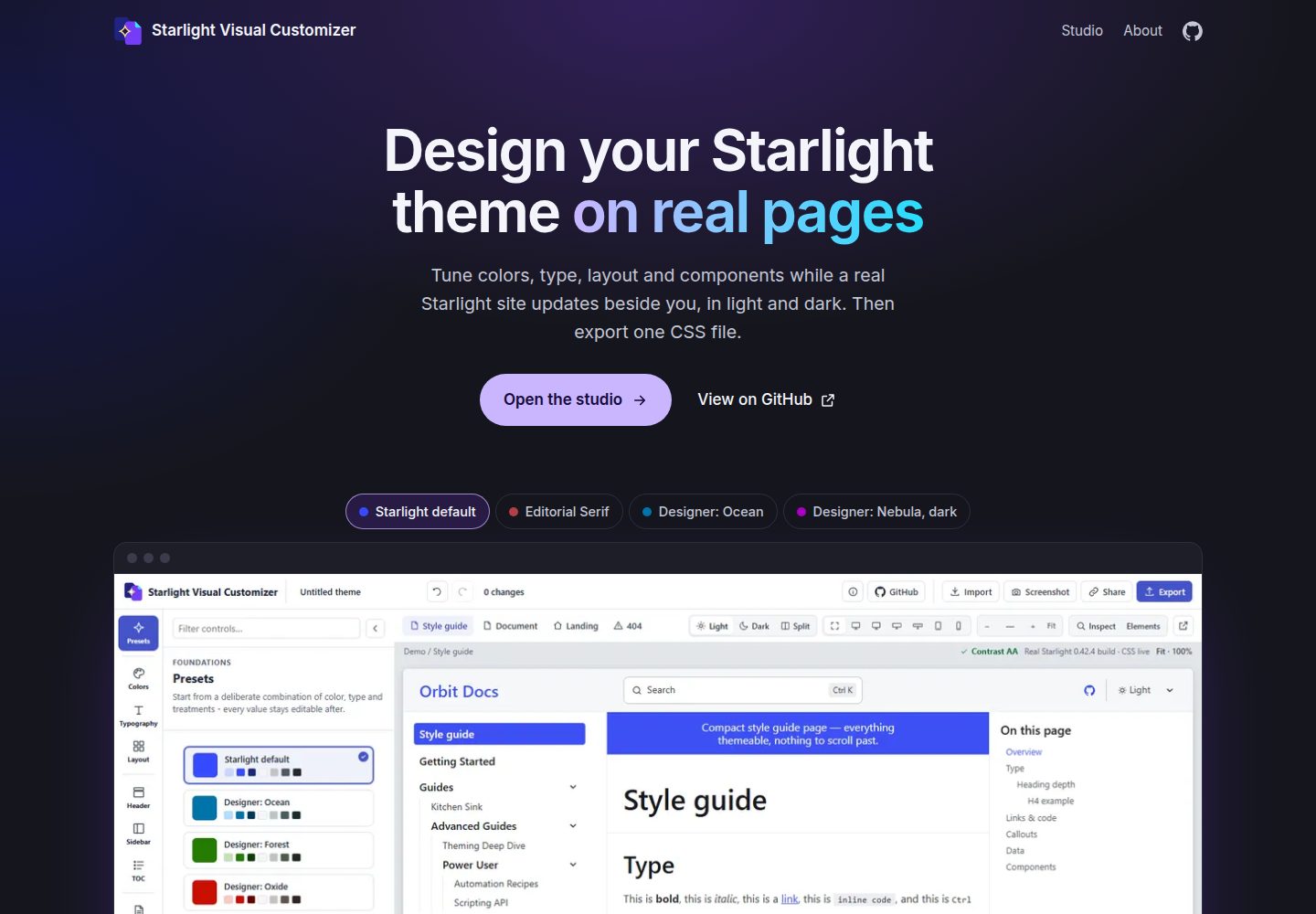
在真实 Starlight 页面框架中预览主题,而非静态模拟图,可切换样式指南、长文档、落地页和 404 页
Astro文档工具站
starlight-visual-customizer — Astro 文档模板
作者 prisant-labs
面向 Astro Starlight 文档站的可视化主题编辑器,在真实 Starlight 页面上调整颜色、字体、布局与组件样式,并导出 theme.css 供 customCss 使用。
看看你的网站会是什么样
浏览真实页面截图,比较内容排版与手机效果。点击下方缩略图切换,放大查看整页细节。
全部页面与视图 3
截图用于了解视觉与布局,交互效果请以实际项目为准。
采集于 2026-10-09查看来源
值得关注的模板亮点
从已有项目资料中,快速了解它的特点。
覆盖颜色、字体、字号比例、内容宽度、页头、侧边栏、目录、提示框、卡片、表格、标签页、代码块与页脚
提供九个预设,选中后所有值仍可继续编辑
浅色与深色并排对比,并报告文字颜色组合是否满足 WCAG AA 对比度
开启 Inspect 后点击页面元素即可定位对应样式控件
导出 theme.css 与 APPLY-THEME.md,或复制一段给编码代理的消息,使用 Starlight 自带 customCss,无需插件
模板详细介绍
这是一个运行在浏览器中的 Starlight 主题编辑工具,由 Prisant Labs 以 MIT 许可开源,与 Astro 官方团队无隶属关系。它扩展了 Starlight 内置颜色主题编辑器的范围:内置编辑器只能设置强调色和灰色,而该工具还覆盖排版、布局与组件样式,包括字体、字号比例、内容宽度、页头、侧边栏、目录、提示框、卡片、表格、标签页、代码块和页脚。
使用方式上,可从九个预设(从 Starlight 默认到 Editorial Serif、High Contrast Mono)起步,之后每个值仍可继续编辑。预览是嵌入框架中的真实 Starlight 构建,而非模拟图,可在样式指南、长文档、落地页和 404 页之间切换,并支持浅色与深色并排对比,预览上方会报告文字颜色组合在两种模式下是否达到 WCAG AA 对比度。开启 Inspect 后点击页面元素即可打开对应控件;设备宽度覆盖 390 像素手机到 2560 像素超宽屏。每次修改都是一步撤销,分享链接在 URL 中携带完整主题和当前页面,打开分享链接前会先询问是否替换已保存的主题。
导出提供两种一键方式:复制一段包含设置步骤和完整样式表的消息,粘贴给 Claude Code、Codex、Cursor 等编码代理;或下载包含 theme.css 与 APPLY-THEME.md 的 zip。主题使用 Starlight 自带的 customCss 选项,无需安装插件。此外还可导出工具自身设置以便日后导入继续编辑,以及预览的 PNG 截图。
隐私方面,主题状态、预览和导出都在客户端运行并保存在 localStorage 或分享链接中,工具自身唯一的网络请求是从 cdn.jsdelivr.net(Fontsource)加载预览用的可变字体。本地运行需要 Node 22,进入 app 目录安装依赖后构建并预览,默认在 http://localhost:4420/studio/ 打开;默认按根路径构建,如需部署在子路径下可在构建和预览前设置 SVC_SITE_BASE。仓库包含 291 个单元测试、14 个浏览器端到端套件以及一个往返测试(把真实导出应用到新脚手架的 Starlight 站点并与实时预览的计算样式比对)。
Astro文档工具站
适合你的项目吗?
适用场景
- 为 Astro Starlight 文档站快速试出一套配色与排版方案
- 在浅色和深色两种模式下检查文字对比度是否达到 WCAG AA
- 把导出的 theme.css 交给 Claude Code、Cursor 等编码代理自动接入项目
- 通过分享链接把完整主题和当前页面发给他人查看或协作
- 在本地运行工具并针对子路径部署(如 GitHub Pages 项目站点)
适合人群
- 使用 Astro Starlight 搭建文档站、希望自定义主题的开发者
- 需要在不改动 Starlight 源码的前提下调整样式细节的前端人员
- 关注浅色/深色模式对比度与可访问性的文档维护者
- 希望把主题配置直接交给编码代理完成接入的团队
上手与定制指南
结合仓库当前版本的说明,按下面的资料检查内容、配置与运行要求。
- 1
本地运行需要 Node 22,进入 app 目录执行 npm install、npm run build,再用 npm run preview:bg 在 http://localhost:4420 提供服务
- 2
打开 http://localhost:4420/studio/ 进入编辑器,默认显示演示站点的样式指南页
- 3
接入自有站点时,把导出的 CSS 放入 src/styles/theme.css,并在 astro.config.mjs 中将其作为 Starlight customCss 数组的最后一项(该 CSS 未分层,最后一项在冲突时生效)
- 4
若选择了非默认网络字体,需按导出文件列出的包名逐个安装 @fontsource-variable/<font>,然后重新构建
- 5
默认按根路径构建;部署在子路径时需在 astro build 与 astro preview 前设置 SVC_SITE_BASE
授权与来源资料
使用条件与限制
免费使用 · 保留许可声明本次收录的是公开仓库中采用 MIT 许可的免费版本;免费范围为该版本代码,不代表外部服务或第三方素材免费。
使用时需要遵守
- 允许免费使用、修改、商用和分发该版本代码。
- 分发代码副本或实质性部分时,保留原作者版权声明和完整 MIT 许可声明。
- 代码按现状提供;担保与责任限制以原许可证及适用法律为准。
额外费用与待核对事项
- 演示图片、字体、图标及其他第三方素材需按各自许可核对,不能仅凭代码的 MIT 许可判断。
- 域名、托管、数据库、支付或 AI 等外部服务可能另外收费。
- 工具自身唯一的网络请求是从 cdn.jsdelivr.net(Fontsource)加载预览用的可变网络字体;离线或无法访问该 CDN 时,字体预览可能无法正常显示。
- 若主题使用了非默认网络字体,需按导出文件列出的包名逐个安装 @fontsource-variable/<font> 依赖,否则字体不会生效。
- 本地运行需要 Node 22 环境。
- 接入自有站点时,必须把导出的 CSS 作为 Starlight customCss 数组的最后一项,因为该 CSS 未分层,最后一项在样式冲突时才会生效。
- 默认按根路径构建;若要部署在子路径(如 GitHub Pages 项目站点),必须在 astro build 与 astro preview 前设置 SVC_SITE_BASE 环境变量。
查看原文依据
Permission is hereby granted, free of charge
许可证原文
The studio makes only one kind of network request on its own: it loads the variable web fonts you preview from `cdn.jsdelivr.net` (Fontsource).
README 原文
If you picked a non-default web font, `npm install` each `@fontsource-variable/<font>` package the file lists.
README 原文
You need Node 22.
README 原文
In `astro.config.mjs`, add that file as the **last** entry of Starlight's `customCss` array. The theme's CSS is unlayered, so the last entry wins any tie with another stylesheet.
README 原文
https://github.com/prisant-labs/starlight-visual-customizer/blob/main/LICENSEhttps://github.com/prisant-labs/starlight-visual-customizer/blob/main/README.mdTo serve it under a sub-path, such as a GitHub Pages project site at `https://<user>.github.io/<repo>/`, set `SVC_SITE_BASE` before `astro build` and `astro preview`.
README 原文
DeepSeek 根据仓库许可证和 README 整理 ·2026-10-09。结果仅覆盖已读取资料,依赖、图片、字体及后续条款变更以各自原文为准。
项目核对记录与介绍依据
模板资料
- 来源平台
- GitHub
- 资料与维护参考分
- 资料较完整 · 85 / 100
- 技术栈
- Astro
- 网站类型
- 文档 · 工具站
这个分数如何计算
本站按许可资料(最高30分)、演示链接(12分)、预览图(10分)、Star数(15分)、记录的维护时间(15分)、描述完整度(8分)、功能记录(5分)和分类资料(5分)计算。它不是代码、安全或性能测试,也不是 Google 评分;有链接不代表已实测可用。
这个项目需要核对什么
- 记录的仓库更新时间
- 2026-10-09
- 截图检查日期
- 2026-10-09
已收录演示链接。请用你的内容与屏幕尺寸检查;有演示不代表表单、认证或支付已经可用。
目录记录的主要技术栈是 Astro。请通过依赖清单和锁文件核对实际版本与托管要求。这些说明基于收录资料,不代表代码审计或部署实测。
查看具体选型方法 →介绍的制作与核对状态
介绍由 AI 辅助整理目录与仓库资料。仓库作者不等于这篇介绍的审核者。
审核声明: [email protected] · 2026-10-09
查看当时使用的来源资料
SHA-256: d6f2c326ed38b4b9230eb20255d9f2289a2520b5df410ce2b3043c62eb6131a8
2026-10-09T01:24:48.011Z
来源文件 / 仓库# Starlight Visual Customizer
**A free visual theme editor for [Starlight](https://starlight.astro.build/). Restyle colors,
fonts, layout and components on real Starlight pages, then export one CSS file.**
[](https://projects.prisantlabs.com/starlight-visual-customizer/studio/)
[](https://github.com/prisant-labs/starlight-visual-customizer/releases)
[](LICENSE)
[](https://starlight.astro.build/)
[](https://astro.build/)
[](https://projects.prisantlabs.com/starlight-visual-customizer/studio/)
Starlight Visual Customizer is an independent, open-source project by Prisant Labs, released
under the MIT license. It is not affiliated with or endorsed by the Astro team.
Starlight's built-in color theme editor sets an accent color and a gray. This editor covers
typography, layout and component styles too. Every change appears at once on real Starlight
pages, in light mode and dark mode.
## What you can do
- **Start from a preset.** Nine presets range from Starlight's own default to Editorial Serif and
High Contrast Mono. Every value stays editable after you pick one.
- **Change the whole look, not just the palette.** Colors, fonts, the type scale, the content
width, the header, the sidebar, the table of contents, callouts, cards, tables, tabs, code
blocks and the footer each have their own controls.
- **See your theme on real pages.** The preview is an actual Starlight build in a frame, not a
mockup. Switch between a style guide, a long document, a landing page and the 404 page.
- **Check light and dark together.** Split view shows both modes side by side. The contrast check
above the preview reports whether text color pairs meet WCAG AA contrast in both modes.
- **Find the control for any element.** Turn on Inspect, then click an element on the page to
open the controls that style it.
- **Preview at real sizes.** Device widths run from a 390-pixel phone to a 2560-pixel ultra-wide
screen.
- **Undo anything, and share the result.** Every change is one undo step. A share link carries
the whole theme and the page you were viewing in its URL. Opening one never silently replaces
a theme you saved: the studio asks first.
<table>
<tr>
<td width="50%"><img src="docs/images/studio-split.png" alt="Split view: the same page in light mode and dark mode, side by side"></td>
<td width="50%"><img src="docs/images/studio-colors.png" alt="The Colors group: accent and gray hue sliders, hex fields and the generated swatches"></td>
</tr>
<tr>
<td><b>Light and dark, side by side.</b> Split view renders the page in both modes from one theme.</td>
<td><b>Colors that stay readable.</b> Pick a hue or type a hex value; Starlight's palette algorithm tunes lightness per role.</td>
</tr>
<tr>
<td><img src="docs/images/studio-export.png" alt="The Export dialog, with the agent message, the files for your site, and the customizer's own settings and screenshot"></td>
<td><img src="docs/images/studio-about.png" alt="The About dialog describing the project"></td>
</tr>
<tr>
<td><b>Export in one click.</b> Copy a message for your coding agent, or download theme.css and the setup steps as a zip.</td>
<td><b>About the project.</b> What the studio does and where to learn more about Starlight.</td>
</tr>
</table>
## How export works
Export gives you two ways to get a theme onto your own site, each one click. The theme uses
Starlight's own `customCss` option, so there is no plugin to install.
- **Copy for your coding agent** copies one message with the setup steps and the whole stylesheet,
to paste into Claude Code, Codex, Cursor or similar.
- **Download the files (.zip)** downloads `theme.css` and `APPLY-THEME.md`, numbered setup steps
you can follow yourself, in one folder.
The studio also exports its own settings, so you can import a theme later and keep editing, and a
PNG screenshot of the preview.
The steps inside `APPLY-THEME.md` (or the pasted message) are generated for each theme, and they
are the same every time:
1. Add the theme's CSS to `src/styles/theme.css` in your project.
2. In `astro.config.mjs`, add that file as the **last** entry of Starlight's `customCss` array.
The theme's CSS is unlayered, so the last entry wins any tie with another stylesheet.
3. If you picked a non-default web font, `npm install` each `@fontsource-variable/<font>`
package the file lists.
4. Rebuild.
A round-trip test checks this promise. It applies a real export to a freshly scaffolded Starlight
site, then compares the computed styles with the studio's own live preview.
## Privacy
Your theme never leaves your browser. The state, the preview and the export all run and stay on
the client, in `localStorage` and, if you use one, a share link. The studio makes only one kind of
network request on its own: it loads the variable web fonts you preview from `cdn.jsdelivr.net`
(Fontsource). [`THIRD-PARTY-NOTICES.md`](THIRD-PARTY-NOTICES.md) lists every dependency and its
license.
## Run it locally
You need Node 22.
```bash
cd app
npm install
npm run build
npm run preview:bg # serves dist/ in the background on http://localhost:4420
```
Open <http://localhost:4420/studio/>. The studio opens on the demo site's style guide page. Pick
a preset, adjust the controls, then open **Export**.
[`docs/development.md`](docs/development.md) covers the dev server, the ports and the background
servers.
### Serving under a sub-path
The app builds for `/` by default. To serve it under a sub-path, such as a GitHub Pages project
site at `https://<user>.github.io/<repo>/`, set `SVC_SITE_BASE` before `astro build` and
`astro preview`. Every internal link goes through one base-path helper, so nothing else changes.
See ["Serving under a sub-path"](docs/development.md#serving-under-a-sub-path) for the exact
commands.
## Tests
| Suite | What it checks |
|---|---|
| `npm test` (291 unit tests) | The CSS, `APPLY-THEME.md` and agent-message emitters, the manifest, state, share-link decoding, the checks on every theme that comes from outside the studio, sidebar-link safety, color math, the sidebar parser, undo and redo, and the base-path helper. No browser needed. |
| `npm run test:e2e` (14 browser suites) | The product page, every control's visual effect and target, the studio shell, Studio sizing, share links, Inspect, hex color entry, the structure editor, PNG screenshot export and the Export dialog, against a running preview |
| `npm run test:roundtrip` | Applies a real export to a freshly scaffolded Starlight site and compares its computed styles with the studio's live preview |
Every pull request runs the unit tests and a production build in CI. The suite-by-suite
breakdown and commands are in [`docs/testing.md`](docs/testing.md).
## Documentation
[`docs/`](docs/README.md) documents the project for people who want to understand, change or
maintain it. It covers [what each part of the studio does](docs/studio.md), the
[export format](docs/export-format.md), the [architecture](docs/architecture.md), the
[security model](docs/security-model.md), and the [decisions](docs/decisions/README.md) behind the
design. Coding agents start at [`AGENTS.md`](AGENTS.md).
## Built with
[Astro](https://astro.build/) and [Starlight](https://starlight.astro.build/), with
[culori](https://github.com/Evercoder/culori) for color math, [vanilla-colorful](https://github.com/web-padawan/vanilla-colorful)
for the color picker, [fflate](https://github.com/101arrowz/fflate) for the zip download and
[modern-screenshot](https://github.com/qq15725/modern-screenshot) for PNG export.
## Contributing
Bug reports, ideas and themes are welcome. Report a bug under
[Issues](https://github.com/prisant-labs/starlight-visual-customizer/issues/new/choose), and bring
questions and ideas to
[Discussions](https://github.com/prisant-labs/starlight-visual-customizer/discussions). To share a
theme, post its share link in Show and tell. [`SUPPORT.md`](SUPPORT.md) lists where every kind of
question goes. [`CONTRIBUTING.md`](CONTRIBUTING.md) explains how to run the app and its tests.
[`SECURITY.md`](SECURITY.md) explains how to report a vulnerability privately, and
[`ACCESSIBILITY.md`](ACCESSIBILITY.md) explains how to report an accessibility barrier.
## Releases
Each release is tagged, and its notes are on the
[Releases page](https://github.com/prisant-labs/starlight-visual-customizer/releases). The same
notes live in the repository under [`docs/releases/`](docs/releases/README.md), one file per
release. [`CHANGELOG.md`](CHANGELOG.md) lists the notable changes in each release.
## License
[MIT](LICENSE). Third-party licenses and attributions are in
[`THIRD-PARTY-NOTICES.md`](THIRD-PARTY-NOTICES.md).
**Your exported themes are yours.** The MIT license covers the studio's own source code. The
files you export (`theme.css`, `APPLY-THEME.md`, the agent message and the settings file) are
yours to use, change and publish however you like, with no attribution or license notice required.
`theme.css` names this tool, with a link, in its header comment, and `APPLY-THEME.md` and the
agent message each end with the same line; keep them or delete them.
Starlight Visual Customizer is an independent, open-source project by Prisant Labs. It is not
affiliated with or endorsed by the Astro team.
看看同类模板
对比同技术栈与用途的模板,找到更适合的视觉与内容结构。

astrowind
⭕️ AstroWind: A free template using Astro v7 and Tailwind CSS v4. Astro starter theme.
Astro · 博客

astro-paper
A minimal, accessible and SEO-friendly Astro blog theme.
Astro · 博客

astro-theme-cactus
A simple Astro theme. Use it to create your blog or website.
Astro · 作品集

astrofy
Astrofy is a free and open-source template for your Personal Portfolio Website built with Astro and TailwindCS…
Astro · 作品集
bookworm-light-astro
Bookworm Light is a feature-rich, minimal, highly customizable, easy-to-use Astro blog theme.
Astro · 博客

qwind
⭕️ Qwind: A template to make your website using Qwik + Tailwind CSS.
Astro · 工具站