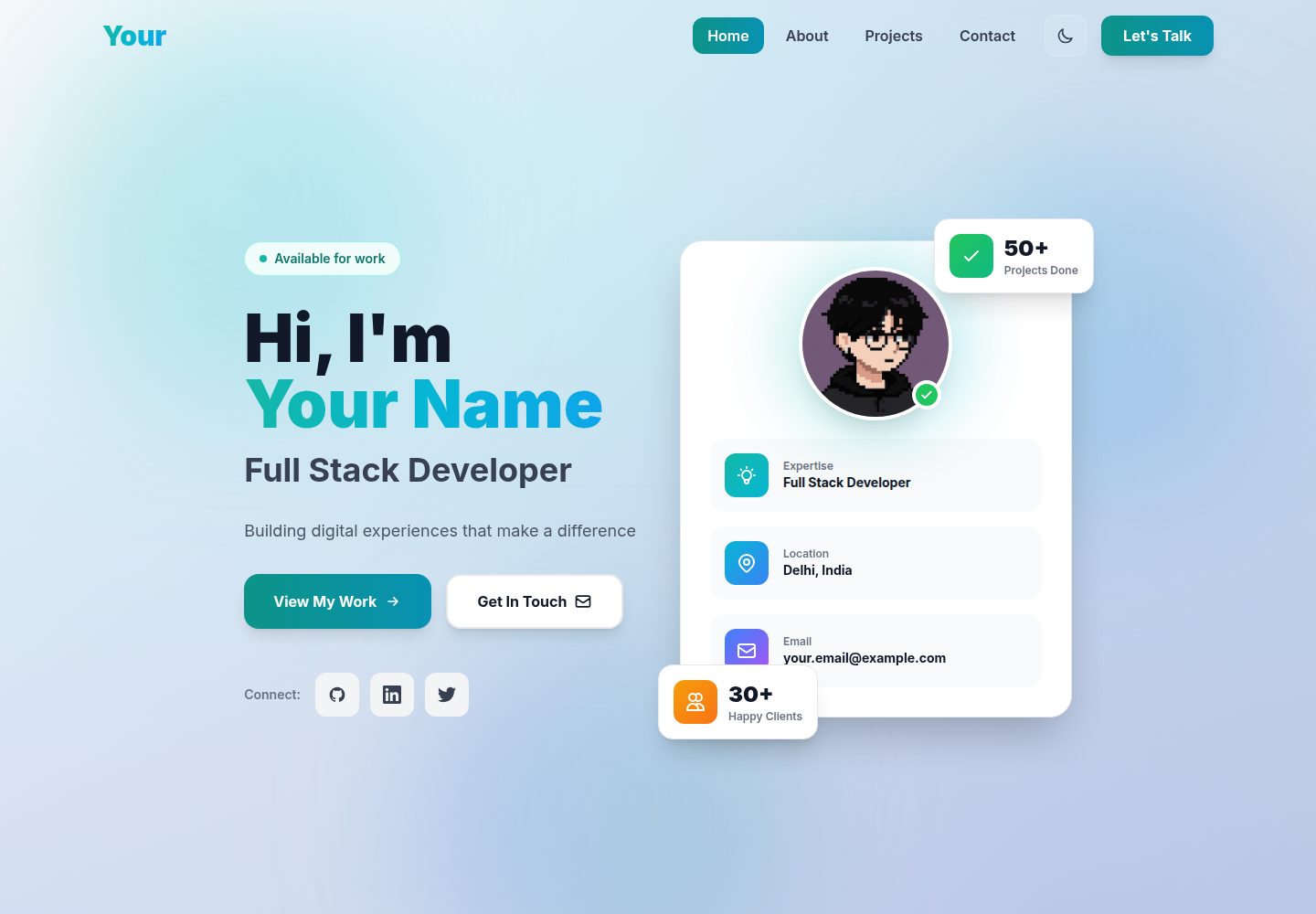
内容集中在 src/config/portfolio.js 一个文件中维护,涵盖个人信息、社交链接、技能、项目和经历
ViteReact作品集
Modern-Portfolio-Template — Vite 作品集模板
作者 sohail78692
基于 React、Vite 和 Tailwind CSS 的个人作品集模板,内容集中在单个配置文件里,联系表单通过 EmailJS 发送邮件。
看看你的网站会是什么样
浏览真实页面截图,比较内容排版与手机效果。点击下方缩略图切换,放大查看整页细节。
全部页面与视图 2
截图用于了解视觉与布局,交互效果请以实际项目为准。
采集于 2026-10-17查看来源
值得关注的模板亮点
从已有项目资料中,快速了解它的特点。
联系表单通过 EmailJS 发送邮件,无需自建后端,README 同时给出 Formspree、Netlify Forms 和自建 API 等替代方案
包含 Hero、About、Projects、Contact 等区块,项目卡片支持标签与 featured 筛选
提供明暗主题切换、平滑滚动导航和响应式布局
技能图标覆盖 React、Vue.js、Next.js、Node.js、Python、AWS、Docker、Jest 等 20 多种技术,未匹配的条目显示默认图标
README 包含从安装、内容替换、EmailJS 配置、图片与 favicon 替换到 SEO 元标签修改的分步说明
模板详细介绍
这是一个面向开发者、设计师和创意工作者的个人作品集模板,README 说明其使用 React 18、Vite 和 Tailwind CSS 构建。页面包含 Hero 介绍区、About 技能与经历时间线、带筛选与悬停效果的项目卡片区、集成 EmailJS 的联系表单,以及带主题切换的平滑滚动导航;支持明暗模式并适配移动端。
内容维护集中在 src/config/portfolio.js,可填写个人信息、社交链接、技能分类、项目与工作经历;个人头像需在 Hero.jsx 中替换图片地址,项目图片可在配置文件中使用在线或 public 目录下的本地图片。联系表单需要自行注册 EmailJS 并填入 Service ID、Template ID 和 Public Key,README 也列出了 Formspree、Netlify Forms 或自建后端等替代方案。
README 未提供依赖清单之外的版本细节、性能测试数据或生产环境验证说明;仓库中的预览截图仅证明页面存在,不代表具体功能表现。
ViteReact作品集
适合你的项目吗?
适用场景
- 开发者或设计师搭建个人作品集页面,集中展示简介、技能、项目与工作经历
- 需要不依赖后端即可接收访客留言的个人站点
- 希望以单个配置文件快速替换演示内容、替换为个人资料的使用场景
- 需要明暗主题切换和移动端适配的静态个人主页
适合人群
- 需要展示项目作品与技能栈的开发者、设计师和创意工作者
- 希望通过配置文件集中管理个人主页内容的用户
- 愿意使用 EmailJS 或类似第三方表单服务接收联系消息的个人站点维护者
上手与定制指南
结合仓库当前版本的说明,按下面的资料检查内容、配置与运行要求。
- 1
需要 Node.js 16.0 或更高版本,以及 npm 或 yarn;安装依赖后运行 npm run dev,默认访问 http://localhost:5173
- 2
在 src/config/portfolio.js 中替换个人信息、社交链接、技能、项目和经历;不需要展示的字段可留空或删除
- 3
联系表单需在 EmailJS 注册并创建邮件服务与模板,然后将 Service ID、Template ID 和 Public Key 填入 src/components/Contact.jsx 对应位置
- 4
个人头像需替换 src/components/Hero.jsx 中的图片地址,项目图片可在配置文件中使用在线链接或 public 目录下的本地文件
- 5
SEO 相关标题、描述和 Open Graph 标签需在 index.html 中手动修改;README 提到可部署到 Vercel、Netlify 或 GitHub Pages,但未给出具体部署命令
授权与来源资料
使用条件与限制
免费使用 · 保留许可声明本次收录的是公开仓库中采用 MIT 许可的免费版本;免费范围为该版本代码,不代表外部服务或第三方素材免费。
使用时需要遵守
- 允许免费使用、修改、商用和分发该版本代码。
- 分发代码副本或实质性部分时,保留原作者版权声明和完整 MIT 许可声明。
- 代码按现状提供;担保与责任限制以原许可证及适用法律为准。
额外费用与待核对事项
- README 提及 Formspree 表单服务;真实提交需配置服务端点,其使用额度与费用需单独核对。
- README 提及 Firebase 集成;启用相关动态功能前需自行配置,并核对 Firebase 的额度与收费。
- 演示图片、字体、图标及其他第三方素材需按各自许可核对,不能仅凭代码的 MIT 许可判断。
- 域名、托管、数据库、支付或 AI 等外部服务可能另外收费。
- 联系表单依赖 EmailJS 第三方服务,需自行注册账号并配置 Service ID、Template ID 和 Public Key 才能正常发送邮件。
- EmailJS 为免费第三方服务,README 称免费额度为每月 200 封邮件;超出额度或服务条款变化需自行承担。
- EmailJS 凭据需手动填入 src/components/Contact.jsx 中的常量,未替换时表单处于演示模式。
- 个人头像需手动替换 src/components/Hero.jsx 中的图片地址,默认使用外部图片链接。
- README 致谢中列出的 Unsplash 图片、Heroicons 图标和 Simple Icons 品牌图标为第三方素材,其许可需自行核实。
- 部署后联系表单可能因 EmailJS 域名白名单设置而失效,需在 EmailJS 后台允许站点域名。
查看原文依据
Permission is hereby granted, free of charge
许可证原文
### Step 3: Setup Email Functionality (IMPORTANT!)
README 原文
The contact form uses **EmailJS** - a free service that sends emails without needing a backend server.
README 原文
Open `src/components/Contact.jsx` and find lines 27-29:
README 原文
4. Find line 134 and replace the image URL:
README 原文
- **Images**: [Unsplash](https://unsplash.com/) - Free high-quality images
README 原文
https://github.com/sohail78692/Modern-Portfolio-Template/blob/main/LICENSEhttps://github.com/sohail78692/Modern-Portfolio-Template/blob/main/README.md**A**: Verify EmailJS credentials are correct and your domain is allowed in EmailJS dashboard settings.
README 原文
DeepSeek 根据仓库许可证和 README 整理 ·2026-10-17。结果仅覆盖已读取资料,依赖、图片、字体及后续条款变更以各自原文为准。
项目核对记录与介绍依据
模板资料
- 来源平台
- GitHub
- 资料与维护参考分
- 资料较完整 · 88 / 100
- 技术栈
- Vite · React
- 网站类型
- 作品集
这个分数如何计算
本站按许可资料(最高30分)、演示链接(12分)、预览图(10分)、Star数(15分)、记录的维护时间(15分)、描述完整度(8分)、功能记录(5分)和分类资料(5分)计算。它不是代码、安全或性能测试,也不是 Google 评分;有链接不代表已实测可用。
这个项目需要核对什么
- 记录的仓库更新时间
- 2025-12-19
- 截图检查日期
- 2026-10-17
已收录演示链接。请用你的内容与屏幕尺寸检查;有演示不代表表单、认证或支付已经可用。
目录记录的主要技术栈是 Vite。请通过依赖清单和锁文件核对实际版本与托管要求。这些说明基于收录资料,不代表代码审计或部署实测。
查看具体选型方法 →介绍的制作与核对状态
介绍由 AI 辅助整理目录与仓库资料。仓库作者不等于这篇介绍的审核者。
审核声明: codex-user-requested-batch-review-20261018 · 2026-10-18
查看当时使用的来源资料
SHA-256: 4c34c5d6d9b8f3c54aae367d55f4e9376cb30d15b2ab48b09589749b9bb748ff
2026-10-17T01:53:17.824Z
来源文件 / 仓库# 🚀 Modern Portfolio Template

A stunning, fully customizable portfolio template built with **React 18**, **Vite**, and **Tailwind CSS**. Perfect for developers, designers, and creatives looking to showcase their work with style and professionalism.
[](https://opensource.org/licenses/MIT)
[](https://reactjs.org/)
[](https://vitejs.dev/)
[](https://tailwindcss.com/)
---
## ✨ Features
### 🎨 Design & UI
- **Modern Aesthetic**: Clean, professional design with glassmorphism effects
- **Dark/Light Mode**: Automatic theme switching with persistent preferences
- **Fully Responsive**: Mobile-first design that looks perfect on all devices
- **Smooth Animations**: Fade-ins, hover effects, and floating gradient orbs
- **Mesh Gradients**: Beautiful animated background patterns
### 💼 Components
- **Hero Section**: Eye-catching introduction with CTA buttons and profile card
- **About Section**: Bio, colorful skill icons (20+ technologies), and experience timeline
- **Projects Section**: Unique card layout with filters, hover effects, and animations
- **Contact Section**: Working contact form with EmailJS integration
- **Navigation**: Smooth scrolling navbar with theme toggle
### 🛠️ Technical Features
- **20+ Colorful Skill Icons**: React, Vue.js, Next.js, Node.js, Python, AWS, Docker, Jest, and more
- **Working Email Form**: EmailJS integration (no backend required!)
- **Single Config File**: Update everything from one place
- **Optimized Performance**: Fast load times and smooth interactions
- **SEO Friendly**: Semantic HTML and meta tags
- **Easy Deployment**: Ready for Vercel, Netlify, or GitHub Pages
---
## 📋 Table of Contents
- [Quick Start](#-quick-start)
- [Complete Setup Guide](#-complete-setup-guide)
- [Step 1: Installation](#step-1-installation)
- [Step 2: Customize Your Content](#step-2-customize-your-content)
- [Step 3: Setup Email Functionality](#step-3-setup-email-functionality-important)
- [Step 4: Images & Branding](#step-4-images--branding)
- [Step 5: SEO Optimization](#step-5-seo-optimization)
- [Step 6: Build & Deploy](#step-6-build--deploy)
- [Customization Guide](#-customization-guide)
- [Deployment](#-deployment)
- [FAQ](#-faq)
- [Support](#-support)
---
## 🚀 Quick Start
### Prerequisites
- **Node.js** (version 16.0 or higher) - [Download here](https://nodejs.org/)
- **npm** or **yarn** package manager (comes with Node.js)
- A code editor (VS Code recommended)
### Installation
```bash
# 1. Clone or download this repository
git clone <your-repo-url>
cd portfolio-template
# 2. Install dependencies
npm install
# 3. Start development server
npm run dev
# 4. Open your browser
# Visit http://localhost:5173
```
That's it! Your portfolio is now running locally. 🎉
---
## 📖 Complete Setup Guide
Follow these steps to make this portfolio truly yours!
### Step 1: Installation
1. **Download or Clone** this repository to your computer
2. **Open Terminal/Command Prompt** and navigate to the project folder:
```bash
cd portfolio-template
```
3. **Install all dependencies**:
```bash
npm install
```
This will download all required packages (~150MB)
4. **Start the development server**:
```bash
npm run dev
```
5. **Open your browser** and go to `http://localhost:5173`
You should see the portfolio running with demo content!
---
### Step 2: Customize Your Content
All content is managed through **ONE FILE**: `src/config/portfolio.js`
Open this file and replace the placeholder content with your own information:
#### 👤 Personal Information
```javascript
personal: {
name: "John Doe", // Your full name
title: "Full Stack Developer", // Your job title
tagline: "Building digital experiences that make a difference", // Your motto
email: "[email protected]", // Your email
phone: "+1 (555) 123-4567", // Your phone number
location: "San Francisco, CA", // Your location
bio: "Passionate developer with 5+ years of experience...", // About you
}
```
#### 🔗 Social Links
```javascript
social: {
github: "https://github.com/yourusername",
linkedin: "https://linkedin.com/in/yourusername",
twitter: "https://twitter.com/yourusername",
instagram: "https://instagram.com/yourusername", // Optional
portfolio: "https://yourwebsite.com", // Optional
}
```
**Note**: Leave any field blank (`""`) or remove it if you don't want to display it.
#### 🎯 Skills
```javascript
skills: [
{
category: "Frontend",
items: ["React", "Vue.js", "TypeScript", "Tailwind CSS", "Next.js"],
},
{
category: "Backend",
items: ["Node.js", "Python", "Express", "Django", "PostgreSQL"],
},
{
category: "Tools & Others",
items: ["Git", "Docker", "AWS", "Jest", "CI/CD"],
},
]
```
**Available Skill Icons** (automatically displayed with beautiful gradients):
- **Frontend**: React, Vue.js, Angular, JavaScript, TypeScript, HTML5, CSS3, Tailwind CSS, Next.js
- **Backend**: Node.js, Express, Python, Django, MongoDB, MySQL, PostgreSQL
- **Tools**: Git, Docker, AWS, Firebase, Figma
- **Testing**: Jest, CI/CD
Don't see your tech? Add it anyway - a default icon will be shown!
#### 💼 Projects
```javascript
projects: [
{
id: 1,
title: "E-Commerce Platform",
description: "A full-stack e-commerce solution with payment integration...",
image: "https://images.unsplash.com/photo-...", // Project screenshot
tags: ["React", "Node.js", "MongoDB", "Stripe"], // Tech stack
liveUrl: "https://your-live-site.com", // Live demo URL
githubUrl: "https://github.com/you/project", // GitHub repo
featured: true, // Show in featured filter
},
// Add more projects...
]
```
**Project Image Tips**:
- Use screenshots of your actual projects
- Recommended size: 800x600px or 16:9 aspect ratio
- You can use Unsplash URLs or local images from `public/` folder
- For local images: `image: "/my-project.png"`
#### 💼 Experience
```javascript
experience: [
{
id: 1,
company: "Tech Company",
position: "Senior Frontend Developer",
period: "2022 - Present",
description: "Leading frontend development for enterprise applications...",
},
// Add more experience entries...
]
```
**Save the file** and check your browser - changes appear instantly! ⚡
---
### Step 3: Setup Email Functionality (IMPORTANT!)
The contact form uses **EmailJS** - a free service that sends emails without needing a backend server.
#### 🔧 EmailJS Setup (5 Minutes)
**Step 1: Create Account**
1. Go to [EmailJS.com](https://www.emailjs.com/)
2. Click **Sign Up** (it's FREE - 200 emails/month)
3. Verify your email address
**Step 2: Connect Your Email**
1. In EmailJS dashboard, click **Email Services**
2. Click **Add New Service**
3. Choose your email provider:
- **Gmail** (recommended for personal)
- **Outlook**
- **Yahoo**
- Or any other provider
4. Follow the connection steps (usually just login)
5. **IMPORTANT**: Copy your **Service ID** - it looks like `service_abc123`
**Step 3: Create Email Template**
1. Click **Email Templates** in the sidebar
2. Click **Create New Template**
3. **Template Name**: "Portfolio Contact Form"
4. **Edit the template** with this content:
```
Subject: New Portfolio Message from {{from_name}}
You received a new message from your portfolio website!
From: {{from_name}}
Email: {{from_email}}
Subject: {{subject}}
Message:
{{message}}
---
Sent via your portfolio contact form
Reply to: {{from_email}}
```
5. Click **Save**
6. **IMPORTANT**: Copy your **Template ID** - it looks like `template_xyz789`
**Step 4: Get Public Key**
1. Click **Account** in the sidebar
2. Go to **General** tab
3. Find **Public Key** section
4. **IMPORTANT**: Copy your **Public Key** - it's a long string like `abcd1234efgh5678`
**Step 5: Update Your Code**
Open `src/components/Contact.jsx` and find lines 27-29:
```javascript
const SERVICE_ID = 'YOUR_SERVICE_ID'; // ← Replace this
const TEMPLATE_ID = 'YOUR_TEMPLATE_ID'; // ← Replace this
const PUBLIC_KEY = 'YOUR_PUBLIC_KEY'; // ← Replace this
```
Replace with your actual credentials:
```javascript
const SERVICE_ID = 'service_abc123'; // ← Your Service ID
const TEMPLATE_ID = 'template_xyz789'; // ← Your Template ID
const PUBLIC_KEY = 'abcd1234efgh5678'; // ← Your Public Key
```
**Step 6: Test It!**
1. Save the file
2. Go to your portfolio in the browser
3. Scroll to the Contact section
4. Fill out the form and click **Send Message**
5. Check your email inbox - you should receive the message! 📧
#### ⚠️ Common Issues
**Problem**: "Failed to send message"
- **Solution**: Double-check all three credentials (Service ID, Template ID, Public Key)
- Make sure you copied them correctly without extra spaces
**Problem**: Email not arriving
- **Solution**: Check spam folder, verify email service is connected in EmailJS dashboard
**Problem**: "Demo Mode" message
- **Solution**: You haven't replaced the placeholder credentials yet
#### 🔄 Alternative Email Solutions
Don't want to use EmailJS? Here are alternatives:
**Option 1: Formspree** (Free - 50 submissions/month)
```javascript
// In Contact.jsx, replace the EmailJS code with:
const response = await fetch('https://formspree.io/f/YOUR_FORM_ID', {
method: 'POST',
headers: { 'Content-Type': 'application/json' },
body: JSON.stringify(formData),
});
```
Get your form ID at [formspree.io](https://formspree.io/)
**Option 2: Netlify Forms** (If deploying to Netlify)
```html
<!-- Add to your form tag in Contact.jsx -->
<form data-netlify="true" name="contact">
```
**Option 3: Build Your Own Backend**
- Create an API endpoint (Node.js/Express/Python)
- Use Nodemailer or similar to send emails
- Update the fetch URL in Contact.jsx
---
### Step 4: Images & Branding
#### Profile Picture (Hero Section)
1. Find your profile picture file
2. Copy it to `public/` folder (name it `profile.jpg` or `profile.png`)
3. Open `src/components/Hero.jsx`
4. Find line 134 and replace the image URL:
```javascript
// Before:
src="https://i.pinimg.com/736x/e7/c6/fc/e7c6fc9e9c0100ba0784c79e36fed731.jpg"
// After:
src="/profile.jpg"
```
#### Project Images
For each project in `src/config/portfolio.js`:
**Option 1: Use Online Images**
```javascript
image: "https://images.unsplash.com/photo-xxxxx"
```
Get free images from [Unsplash](https://unsplash.com/)
**Option 2: Use Local Images**
1. Add your project screenshots to `public/` folder
2. Reference them like this:
```javascript
image: "/project-ecommerce.png"
```
#### Favicon (Browser Tab Icon)
1. Create or download a favicon (16x16 or 32x32px)
2. Save as `public/favicon.ico`
3. It will automatically appear in browser tabs!
---
### Step 5: SEO Optimization
Make your portfolio discoverable on search engines!
#### Update Meta Tags
Open `index.html` and update these lines:
```html
<!-- Page Title (appears in browser tab and search results) -->
<title>John Doe - Full Stack Developer Portfolio</title>
<!-- Description (appears in search results) -->
<meta name="description" content="Portfolio of John Doe, a Full Stack Developer specializing in React, Node.js, and modern web technologies." />
<!-- Open Graph tags (for social media sharing) -->
<meta property="og:title" content="John Doe - Full Stack Developer" />
<meta property="og:description" content="Check out my portfolio showcasing web applications and projects" />
<meta property="og:image" content="https://yourwebsite.com/image.png" />
<meta property="og:url" content="https://yourwebsite.com" />
<!-- Twitter Card -->
<meta name="twitter:card" content="summary_large_image" />
<meta name="twitter:title" content="John Doe - Full Stack Developer" />
<meta name="twitter:description" content="Portfolio showcasing my web development projects" />
<meta name="twitter:image" content="https://yourwebsite.com/image.png" />
```
**Tips**:
- Keep title under 60 characters
- Keep description between 150-160 characters
- Use your actual domain for URLs after deployment
---
### Step 6: Build & Deploy
#### Build for Production
Create an optimized build ready for deployment:
```bash
npm run build
```
This creates a `dist/` folder with:
- Minified JavaScript
- Optimized CSS
- Compressed assets
- Production-ready code
**Build Output**:
```
dist/
├── index.html
├── assets/
│ ├── index-[hash].js (~80KB gzipped)
│ └── index-[hash].css (~8KB gzipped)
└── [your-images]
```
#### Test Production Build Locally
```bash
npm run preview
```
Visit `http://localhost:4173` to see the production version.
---
## 🌐 Deployment
### Option 1: Deploy to Vercel (Recommended - Easiest!)
**Vercel offers FREE hosting for static sites with:**
- Automatic deployments from Git
- Custom domains
- HTTPS by default
- Global CDN
**Steps**:
1. **Create account** at [vercel.com](https://vercel.com/)
2. **Install Vercel CLI**:
```bash
npm install -g vercel
```
3. **Deploy**:
```bash
vercel
```
4. **Follow prompts**:
- Link to your Git repo (optional)
- Confirm settings
- Done! You'll get a live URL like `https://yourportfolio.vercel.app`
**Set Custom Domain** (Optional):
- Go to Vercel dashboard → Your project → Settings → Domains
- Add your custom domain (e.g., `johndoe.com`)
- Follow DNS instructions
### Option 2: Deploy to Netlify
**Steps**:
1. **Push code to GitHub**:
```bash
git init
git add .
git commit -m "Initial commit"
git remote add origin https://github.com/yourusername/portfolio.git
git push -u origin main
```
2. **Go to** [netlify.com](https://www.netlify.com/) and sign up
3. **Click** "New site from Git"
4. **Connect** your GitHub repository
5. **Configure build settings**:
- Build command: `npm run build`
- Publish directory: `dist`
- Click **Deploy site**
6. **Done!** Your site is live at `https://yourname.netlify.app`
**Custom Domain**:
- Go to Site Settings → Domain Management → Add custom domain
### Option 3: Deploy to GitHub Pages
**Steps**:
1. **Update** `vite.config.js`:
```javascript
export default defineConfig({
plugins: [react()],
base: '/your-repo-name/', // ← Add this line
})
```
2. **Install** GitHub Pages package:
```bash
npm install --save-dev gh-pages
```
3. **Add deploy script** to `package.json`:
```json
"scripts": {
"dev": "vite",
"build": "vite build",
"preview": "vite preview",
"deploy": "npm run build && gh-pages -d dist" // ← Add this
}
```
4. **Deploy**:
```bash
npm run deploy
```
5. **Enable GitHub Pages**:
- Go to your repo → Settings → Pages
- Source: Deploy from branch `gh-pages`
- Save
6. **Visit**: `https://yourusername.github.io/your-repo-name/`
### Option 4: Other Platforms
- **Firebase Hosting**: `npm install -g firebase-tools` → `firebase deploy`
- **Cloudflare Pages**: Connect Git repo in dashboard
- **Render**: Connect Git repo, set build command
- **Surge.sh**: `npm install -g surge` → `surge dist/`
---
## 🎨 Customization Guide
### Theme Colors
Want to change the color scheme? Edit `tailwind.config.js`:
```javascript
theme: {
extend: {
colors: {
primary: {
50: '#f0f9ff',
100: '#e0f2fe',
// ... change these values
900: '#0c4a6e',
},
},
},
}
```
**Tip**: Use [uicolors.app](https://uicolors.app) to generate a complete color palette!
### Fonts
#### Using Google Fonts:
1. Open `index.html` and add to `<head>`:
```html
<link rel="preconnect" href="https://fonts.googleapis.com">
<link href="https://fonts.googleapis.com/css2?family=Inter:wght@400;600;700;900&display=swap" rel="stylesheet">
```
2. Update `tailwind.config.js`:
```javascript
theme: {
extend: {
fontFamily: {
sans: ['Inter', 'sans-serif'],
},
},
}
```
### Adding New Sections
Create a new component in `src/components/`:
```javascript
// src/components/NewSection.jsx
export default function NewSection() {
return (
<section id="new-section" className="section-padding relative overflow-hidden modern-gradient-bg">
<div className="absolute inset-0 mesh-gradient"></div>
<div className="container-custom relative z-10">
<h2 className="text-4xl font-black mb-6">
<span className="gradient-text">New Section</span>
</h2>
{/* Your content */}
</div>
</section>
);
}
```
Then import it in `src/App.jsx`:
```javascript
import NewSection from './components/NewSection';
// Add to your component tree
<NewSection />
```
---
## 📂 Project Structure
```
portfolio-template/
├── public/ # Static assets
│ ├── image.png # Cover/OG image
│ └── favicon.ico # Browser tab icon
├── src/
│ ├── components/ # React components
│ │ ├── Navbar.jsx # Navigation bar with theme toggle
│ │ ├── Hero.jsx # Hero section with profile
│ │ ├── About.jsx # About, skills, experience
│ │ ├── Projects.jsx # Project showcase with filters
│ │ ├── Contact.jsx # Contact form with EmailJS
│ │ └── Footer.jsx # Footer with social links
│ ├── config/
│ │ └── portfolio.js # ⭐ MAIN CONFIG - Update this!
│ ├── contexts/
│ │ └── ThemeContext.jsx # Dark/light mode logic
│ ├── App.jsx # Main app component
│ ├── main.jsx # Entry point
│ └── index.css # Global styles
├── .gitignore # Git ignore rules
├── index.html # HTML template
├── package.json # Dependencies
├── tailwind.config.js # Tailwind configuration
├── vite.config.js # Vite configuration
└── README.md # This file
```
---
## 🔧 Available Scripts
```bash
# Development
npm run dev # Start dev server (http://localhost:5173)
npm run build # Build for production
npm run preview # Preview production build locally
npm run lint # Run ESLint to check code quality
```
---
## 💡 FAQ
### Q: How do I change the background animations?
**A**: Edit the orb classes in any section component. Look for `orb-1`, `orb-2`, `orb-3` and adjust colors/sizes.
### Q: Can I add more skill icons?
**A**: Yes! Edit `src/components/About.jsx` and add to the `skillIcons` object. Use similar SVG structure.
### Q: How do I remove a section?
**A**: Open `src/App.jsx` and comment out or remove the component import and usage.
### Q: The site loads slow on first visit
**A**: This is normal - images are loading. Use optimized images and consider lazy loading.
### Q: Can I use this commercially?
**A**: Yes! This template is MIT licensed - use it for personal or commercial projects.
### Q: How do I add Google Analytics?
**A**: Add your GA script to `index.html` in the `<head>` section.
### Q: Images aren't showing after deployment
**A**: Make sure image paths start with `/` for local images, or use full URLs for external images.
### Q: Contact form not working after deployment
**A**: Verify EmailJS credentials are correct and your domain is allowed in EmailJS dashboard settings.
---
## 🛠️ Technologies Used
| Technology | Version | Purpose |
|------------|---------|---------|
| React | 18.x | UI library |
| Vite | 7.x | Build tool & dev server |
| Tailwind CSS | 3.x | Styling framework |
| EmailJS | 4.x | Contact form emails |
| React Context | Built-in | Theme management |
---
## 📊 Performance
- **Lighthouse Score**: 95+ across all metrics
- **First Contentful Paint**: < 1.5s
- **Time to Interactive**: < 3s
- **Bundle Size**: ~80KB (gzipped)
- **Total Page Size**: ~250KB including images
---
## 🌟 Browser Support
| Browser | Supported Versions |
|---------|-------------------|
| Chrome | Last 2 versions |
| Firefox | Last 2 versions |
| Safari | Last 2 versions |
| Edge | Last 2 versions |
| Mobile Safari | iOS 12+ |
| Chrome Mobile | Android 5+ |
---
## 🤝 Contributing
Found a bug or have a suggestion? Contributions are welcome!
1. Fork the repository
2. Create your feature branch: `git checkout -b feature/amazing-feature`
3. Commit your changes: `git commit -m 'Add amazing feature'`
4. Push to the branch: `git push origin feature/amazing-feature`
5. Open a Pull Request
---
## 📝 License
This project is licensed under the **MIT License** - see the [LICENSE](LICENSE) file for details.
**What this means**:
- ✅ Use commercially
- ✅ Modify as you wish
- ✅ Distribute freely
- ✅ Private use
- ❌ Liability (use at your own risk)
- ❌ Warranty (no guarantees)
---
## 🙏 Credits & Acknowledgments
- **Images**: [Unsplash](https://unsplash.com/) - Free high-quality images
- **Icons**: [Heroicons](https://heroicons.com/) - Beautiful hand-crafted SVG icons
- **Tech Icons**: Official brand logos from [Simple Icons](https://simpleicons.org/)
- **Email Service**: [EmailJS](https://www.emailjs.com/) - Frontend email service
- **Frameworks**: [React](https://react.dev/) & [Tailwind CSS](https://tailwindcss.com/)
---
## 💬 Support
Need help? Here's how to get support:
1. **📖 Check this README** - Most questions are answered here
2. **🐛 Report Issues** - Open an issue on GitHub
3. **💡 Discussions** - Ask questions in GitHub Discussions
4. **📧 Email** - Contact the maintainer for serious bugs
---
## 🎯 What's Next?
After customizing your portfolio:
- [ ] ✅ Update all personal information
- [ ] ✅ Configure EmailJS for contact form
- [ ] ✅ Add your projects with screenshots
- [ ] ✅ Update skills and experience
- [ ] ✅ Replace profile picture
- [ ] ✅ Test on mobile devices
- [ ] ✅ Optimize images for web
- [ ] ✅ Update SEO meta tags
- [ ] ✅ Test contact form
- [ ] ✅ Build and deploy
- [ ] 🚀 Share your portfolio with the world!
---
## 🎉 Showcase
Built something cool with this template? Let me know! I'd love to feature your portfolio here.
---
## ⭐ Star This Repo!
If this template helped you create an awesome portfolio, please give it a star! It helps others discover this project.
---
**Made with ❤️ by Sohail, for developers**
*Happy coding! 🚀*
看看同类模板
对比同技术栈与用途的模板,找到更适合的视觉与内容结构。

Resumify
Free, privacy-first resume builder — 6 ATS-friendly templates, full customization, JSON import/export. No sign…
Vite · 作品集

showlit
✨ Showlit - A modern and clean template for creating a personal website
Vite · 作品集

folium
Professional developer portfolio boilerplate (React • TypeScript • Tailwind • Vite) with simple content custom…
Vite · 作品集

kurizu-discord
A Discord themed website built using React & Vite
Vite · 作品集
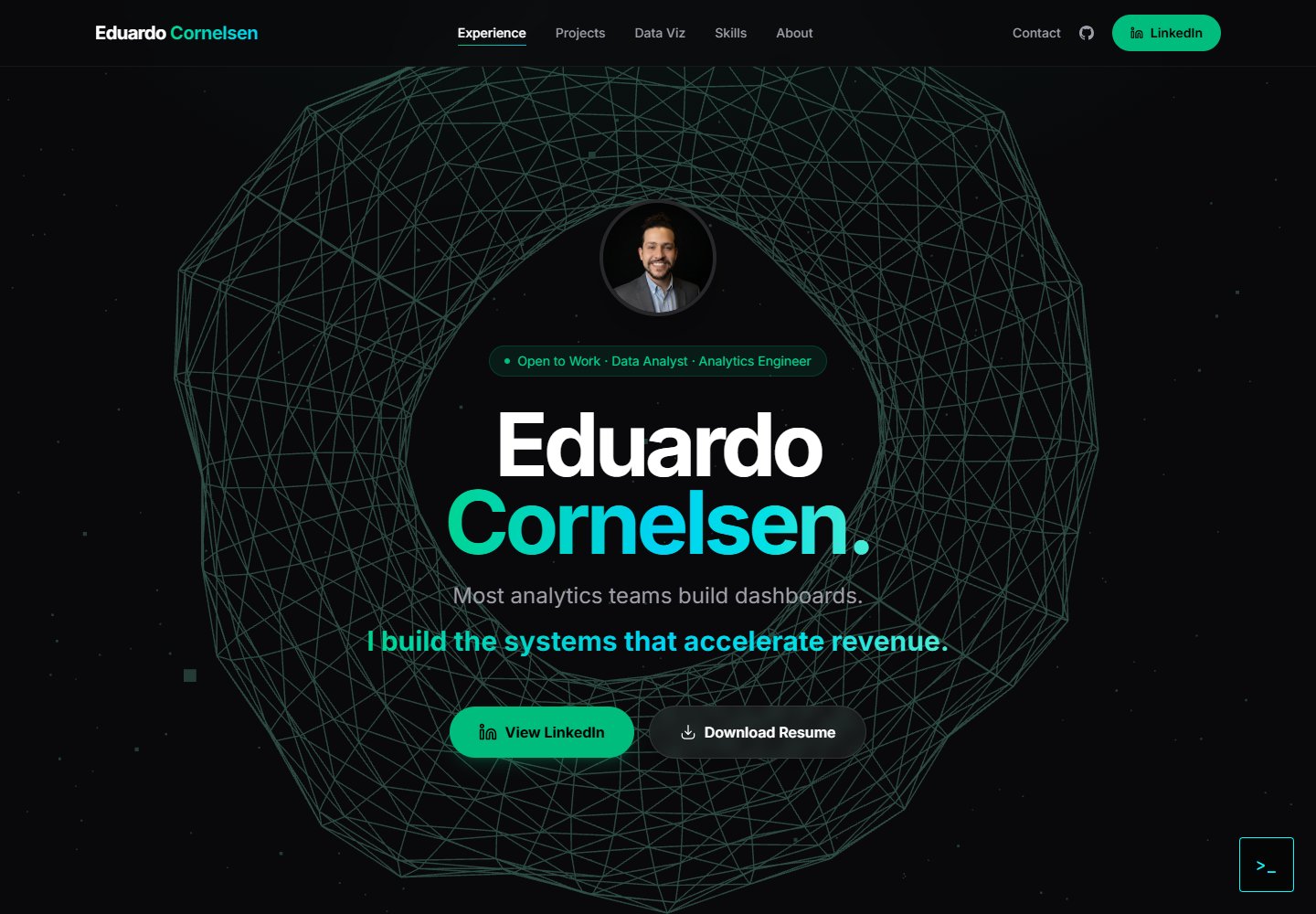
cv-educornelsen
Production portfolio with a streaming AI chatbot (Gemini + SSE), containerized via Docker, deployed to Google …
Vite · 作品集

about-me-personal-portfolio-website-template
Simple Personal Website Template, built with bootstrap and vite js project.
Vite · 作品集