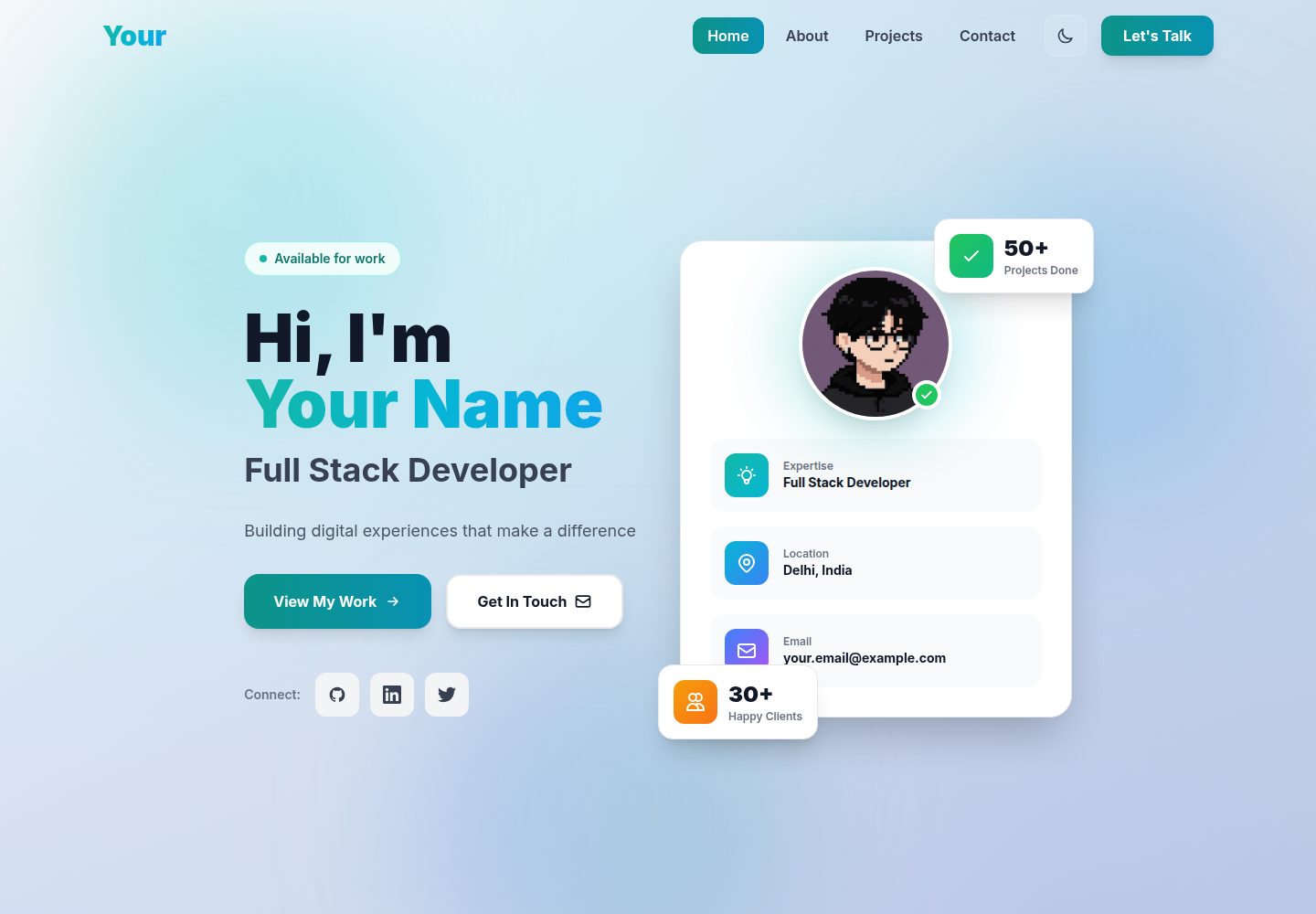
Content is maintained in a single file, src/config/portfolio.js, covering personal information, social links, skills, projects, and experience
ViteReactPortfolio
Modern-Portfolio-Template — Vite Portfolio Template
By sohail78692
A personal portfolio template built on React, Vite, and Tailwind CSS, with content maintained in a single configuration file and a contact form that sends email through EmailJS.
Explore the design
Compare the page layouts and mobile experience. Open any screenshot for a closer look.
Desktop homepage1 / 2
Desktop captureTop of page
Actual screenshot captured by the server browser.
All pages & views 2
Screenshots show visual appearance; interactive behavior may differ.
Recorded 2026-10-17View source
What stands out
A quick read of the recorded project description.
The contact form sends email through EmailJS without a self-hosted backend; the README also gives alternatives such as Formspree, Netlify Forms, and a self-built API
Includes Hero, About, Projects, and Contact sections, with project cards supporting tag and featured filtering
Provides light/dark theme switching, smooth-scroll navigation, and a responsive layout
Skill icons cover more than 20 technologies, including React, Vue.js, Next.js, Node.js, Python, AWS, Docker, and Jest; unmatched entries show a default icon
The README includes step-by-step instructions from installation and content replacement to EmailJS configuration, image and favicon replacement, and SEO meta tag changes
Template Details
This is a personal portfolio template for developers, designers, and creatives; the README states it is built with React 18, Vite, and Tailwind CSS. The page includes a Hero introduction, an About section with skills and an experience timeline, a project card area with tag and featured filtering plus hover effects, a contact form integrated with EmailJS, and smooth-scroll navigation with theme switching. It supports light and dark modes and adapts to mobile screens.
Content maintenance is centralized in src/config/portfolio.js, where you can enter personal information, social links, skill categories, projects, and work experience. The profile avatar image address must be replaced in Hero.jsx, and project images can use online links or local files in the public directory via the configuration file. The contact form requires you to register with EmailJS and fill in the Service ID, Template ID, and Public Key; the README also lists alternatives such as Formspree, Netlify Forms, or a self-hosted backend.
The README does not provide version details beyond the dependency list, performance test data, or production environment validation notes; the preview screenshots in the repository only show that the page exists and do not represent specific feature behavior.
ViteReactPortfolio
Is it right for your project?
Use Cases
- Developers or designers building a personal portfolio page to present a profile, skills, projects, and work experience in one place
- Personal sites that need to receive visitor messages without relying on a backend
- Use cases where demo content is quickly replaced with personal details through a single configuration file
- Static personal homepages that need light/dark theme switching and mobile adaptation
Suitable For
- Developers, designers, and creatives who need to showcase project work and their skill stack
- Users who want to manage personal homepage content centrally through a configuration file
- Maintainers of personal sites willing to use EmailJS or a similar third-party form service to receive contact messages
Getting started & customization
Use these recorded setup notes alongside the repository instructions for your chosen version.
- 1
Requires Node.js 16.0 or higher and npm or yarn; after installing dependencies, run npm run dev and access http://localhost:5173 by default
- 2
Replace personal information, social links, skills, projects, and experience in src/config/portfolio.js; fields that do not need to be displayed can be left empty or deleted
- 3
For the contact form, register with EmailJS and create an email service and template, then fill the Service ID, Template ID, and Public Key into the corresponding locations in src/components/Contact.jsx
- 4
The profile avatar image address must be replaced in src/components/Hero.jsx; project images can use online links or local files in the public directory via the configuration file
- 5
SEO titles, descriptions, and Open Graph tags must be edited manually in index.html; the README mentions deployment to Vercel, Netlify, or GitHub Pages but does not give specific deployment commands
License & source material
Usage conditions & limitations
Free to use · keep license noticeThis listing covers the free version under the MIT license in the public repository; the free scope is the code of that version and does not mean external services or third-party assets are free.
Must comply with when using
- The code of this version may be used, modified, used commercially, and distributed free of charge.
- When distributing copies or substantial portions of the code, the original author's copyright notice and the full MIT license notice must be retained.
- The code is provided as is; warranties and limitations of liability are governed by the original license and applicable law.
Additional costs & items to verify
- The README mentions the Formspree form service; real submissions require configuring a service endpoint, and its usage quotas and fees must be checked separately.
- The README mentions Firebase integration; enabling related dynamic features requires your own configuration, and Firebase quotas and charges must be checked.
- Demo images, fonts, icons, and other third-party assets must be checked against their respective licenses and cannot be judged solely by the code's MIT license.
- External services such as domains, hosting, databases, payments, or AI may incur separate charges.
- The contact form relies on the EmailJS third-party service; you must register an account and configure the Service ID, Template ID, and Public Key for email to send properly.
- EmailJS is a free third-party service; the README states the free quota is 200 emails per month, and exceeding the quota or changes to the terms of service are your responsibility.
- EmailJS credentials must be entered manually into constants in src/components/Contact.jsx; until they are replaced, the form remains in demo mode.
- The profile avatar image address must be replaced manually in src/components/Hero.jsx; the default uses an external image link.
- The Unsplash images, Heroicons icons, and Simple Icons brand icons listed in the README acknowledgments are third-party assets whose licenses must be verified independently.
- After deployment, the contact form may fail because of EmailJS domain whitelist settings; the site domain must be allowed in the EmailJS dashboard.
View Original Text Basis
Permission is hereby granted, free of charge
Original License Text
### Step 3: Setup Email Functionality (IMPORTANT!)
Original README
The contact form uses **EmailJS** - a free service that sends emails without needing a backend server.
Original README
Open `src/components/Contact.jsx` and find lines 27-29:
Original README
4. Find line 134 and replace the image URL:
Original README
- **Images**: [Unsplash](https://unsplash.com/) - Free high-quality images
Original README
https://github.com/sohail78692/Modern-Portfolio-Template/blob/main/LICENSEhttps://github.com/sohail78692/Modern-Portfolio-Template/blob/main/README.md**A**: Verify EmailJS credentials are correct and your domain is allowed in EmailJS dashboard settings.
Original README
Compiled by DeepSeek based on repository license and README ·2026-10-17. Results only cover the materials read; dependencies, images, fonts, and subsequent term changes are subject to their respective original texts.
Project checks & description sources
Template Information
- Source platforms
- GitHub
- Documentation and maintenance reference score
- More documented · 88 / 100
- Technologies
- Vite · React
- Website type
- Portfolio
How this score is calculated
Our heuristic uses license records (up to 30), a demo link (12), a preview (10), stars (15), recorded maintenance (15), description completeness (8), feature records (5) and classification data (5). It is not a code, security or performance test, or a Google score. A link does not establish tested functionality.
What to verify for this project
- Repository update recorded
- 2025-12-19
- Screenshot last checked
- 2026-10-17
A demo link is listed. Check it with your own content and viewport sizes; its presence does not confirm that forms, authentication or payments work.
The catalog identifies Vite as the primary stack. Check the actual dependency manifest and lockfile for versions and hosting requirements. These notes use recorded metadata, not a code audit or a deployment test.
Use a selection guide →How this description was prepared
AI-assisted description based on catalog records and repository material. Repository authors are not automatically the reviewers of this description.
Review declaration: codex-user-requested-batch-review-20261018 · 2026-10-18
Inspect the recorded source material
SHA-256: 4c34c5d6d9b8f3c54aae367d55f4e9376cb30d15b2ab48b09589749b9bb748ff
2026-10-17T01:53:17.824Z
Source file / repository# 🚀 Modern Portfolio Template

A stunning, fully customizable portfolio template built with **React 18**, **Vite**, and **Tailwind CSS**. Perfect for developers, designers, and creatives looking to showcase their work with style and professionalism.
[](https://opensource.org/licenses/MIT)
[](https://reactjs.org/)
[](https://vitejs.dev/)
[](https://tailwindcss.com/)
---
## ✨ Features
### 🎨 Design & UI
- **Modern Aesthetic**: Clean, professional design with glassmorphism effects
- **Dark/Light Mode**: Automatic theme switching with persistent preferences
- **Fully Responsive**: Mobile-first design that looks perfect on all devices
- **Smooth Animations**: Fade-ins, hover effects, and floating gradient orbs
- **Mesh Gradients**: Beautiful animated background patterns
### 💼 Components
- **Hero Section**: Eye-catching introduction with CTA buttons and profile card
- **About Section**: Bio, colorful skill icons (20+ technologies), and experience timeline
- **Projects Section**: Unique card layout with filters, hover effects, and animations
- **Contact Section**: Working contact form with EmailJS integration
- **Navigation**: Smooth scrolling navbar with theme toggle
### 🛠️ Technical Features
- **20+ Colorful Skill Icons**: React, Vue.js, Next.js, Node.js, Python, AWS, Docker, Jest, and more
- **Working Email Form**: EmailJS integration (no backend required!)
- **Single Config File**: Update everything from one place
- **Optimized Performance**: Fast load times and smooth interactions
- **SEO Friendly**: Semantic HTML and meta tags
- **Easy Deployment**: Ready for Vercel, Netlify, or GitHub Pages
---
## 📋 Table of Contents
- [Quick Start](#-quick-start)
- [Complete Setup Guide](#-complete-setup-guide)
- [Step 1: Installation](#step-1-installation)
- [Step 2: Customize Your Content](#step-2-customize-your-content)
- [Step 3: Setup Email Functionality](#step-3-setup-email-functionality-important)
- [Step 4: Images & Branding](#step-4-images--branding)
- [Step 5: SEO Optimization](#step-5-seo-optimization)
- [Step 6: Build & Deploy](#step-6-build--deploy)
- [Customization Guide](#-customization-guide)
- [Deployment](#-deployment)
- [FAQ](#-faq)
- [Support](#-support)
---
## 🚀 Quick Start
### Prerequisites
- **Node.js** (version 16.0 or higher) - [Download here](https://nodejs.org/)
- **npm** or **yarn** package manager (comes with Node.js)
- A code editor (VS Code recommended)
### Installation
```bash
# 1. Clone or download this repository
git clone <your-repo-url>
cd portfolio-template
# 2. Install dependencies
npm install
# 3. Start development server
npm run dev
# 4. Open your browser
# Visit http://localhost:5173
```
That's it! Your portfolio is now running locally. 🎉
---
## 📖 Complete Setup Guide
Follow these steps to make this portfolio truly yours!
### Step 1: Installation
1. **Download or Clone** this repository to your computer
2. **Open Terminal/Command Prompt** and navigate to the project folder:
```bash
cd portfolio-template
```
3. **Install all dependencies**:
```bash
npm install
```
This will download all required packages (~150MB)
4. **Start the development server**:
```bash
npm run dev
```
5. **Open your browser** and go to `http://localhost:5173`
You should see the portfolio running with demo content!
---
### Step 2: Customize Your Content
All content is managed through **ONE FILE**: `src/config/portfolio.js`
Open this file and replace the placeholder content with your own information:
#### 👤 Personal Information
```javascript
personal: {
name: "John Doe", // Your full name
title: "Full Stack Developer", // Your job title
tagline: "Building digital experiences that make a difference", // Your motto
email: "[email protected]", // Your email
phone: "+1 (555) 123-4567", // Your phone number
location: "San Francisco, CA", // Your location
bio: "Passionate developer with 5+ years of experience...", // About you
}
```
#### 🔗 Social Links
```javascript
social: {
github: "https://github.com/yourusername",
linkedin: "https://linkedin.com/in/yourusername",
twitter: "https://twitter.com/yourusername",
instagram: "https://instagram.com/yourusername", // Optional
portfolio: "https://yourwebsite.com", // Optional
}
```
**Note**: Leave any field blank (`""`) or remove it if you don't want to display it.
#### 🎯 Skills
```javascript
skills: [
{
category: "Frontend",
items: ["React", "Vue.js", "TypeScript", "Tailwind CSS", "Next.js"],
},
{
category: "Backend",
items: ["Node.js", "Python", "Express", "Django", "PostgreSQL"],
},
{
category: "Tools & Others",
items: ["Git", "Docker", "AWS", "Jest", "CI/CD"],
},
]
```
**Available Skill Icons** (automatically displayed with beautiful gradients):
- **Frontend**: React, Vue.js, Angular, JavaScript, TypeScript, HTML5, CSS3, Tailwind CSS, Next.js
- **Backend**: Node.js, Express, Python, Django, MongoDB, MySQL, PostgreSQL
- **Tools**: Git, Docker, AWS, Firebase, Figma
- **Testing**: Jest, CI/CD
Don't see your tech? Add it anyway - a default icon will be shown!
#### 💼 Projects
```javascript
projects: [
{
id: 1,
title: "E-Commerce Platform",
description: "A full-stack e-commerce solution with payment integration...",
image: "https://images.unsplash.com/photo-...", // Project screenshot
tags: ["React", "Node.js", "MongoDB", "Stripe"], // Tech stack
liveUrl: "https://your-live-site.com", // Live demo URL
githubUrl: "https://github.com/you/project", // GitHub repo
featured: true, // Show in featured filter
},
// Add more projects...
]
```
**Project Image Tips**:
- Use screenshots of your actual projects
- Recommended size: 800x600px or 16:9 aspect ratio
- You can use Unsplash URLs or local images from `public/` folder
- For local images: `image: "/my-project.png"`
#### 💼 Experience
```javascript
experience: [
{
id: 1,
company: "Tech Company",
position: "Senior Frontend Developer",
period: "2022 - Present",
description: "Leading frontend development for enterprise applications...",
},
// Add more experience entries...
]
```
**Save the file** and check your browser - changes appear instantly! ⚡
---
### Step 3: Setup Email Functionality (IMPORTANT!)
The contact form uses **EmailJS** - a free service that sends emails without needing a backend server.
#### 🔧 EmailJS Setup (5 Minutes)
**Step 1: Create Account**
1. Go to [EmailJS.com](https://www.emailjs.com/)
2. Click **Sign Up** (it's FREE - 200 emails/month)
3. Verify your email address
**Step 2: Connect Your Email**
1. In EmailJS dashboard, click **Email Services**
2. Click **Add New Service**
3. Choose your email provider:
- **Gmail** (recommended for personal)
- **Outlook**
- **Yahoo**
- Or any other provider
4. Follow the connection steps (usually just login)
5. **IMPORTANT**: Copy your **Service ID** - it looks like `service_abc123`
**Step 3: Create Email Template**
1. Click **Email Templates** in the sidebar
2. Click **Create New Template**
3. **Template Name**: "Portfolio Contact Form"
4. **Edit the template** with this content:
```
Subject: New Portfolio Message from {{from_name}}
You received a new message from your portfolio website!
From: {{from_name}}
Email: {{from_email}}
Subject: {{subject}}
Message:
{{message}}
---
Sent via your portfolio contact form
Reply to: {{from_email}}
```
5. Click **Save**
6. **IMPORTANT**: Copy your **Template ID** - it looks like `template_xyz789`
**Step 4: Get Public Key**
1. Click **Account** in the sidebar
2. Go to **General** tab
3. Find **Public Key** section
4. **IMPORTANT**: Copy your **Public Key** - it's a long string like `abcd1234efgh5678`
**Step 5: Update Your Code**
Open `src/components/Contact.jsx` and find lines 27-29:
```javascript
const SERVICE_ID = 'YOUR_SERVICE_ID'; // ← Replace this
const TEMPLATE_ID = 'YOUR_TEMPLATE_ID'; // ← Replace this
const PUBLIC_KEY = 'YOUR_PUBLIC_KEY'; // ← Replace this
```
Replace with your actual credentials:
```javascript
const SERVICE_ID = 'service_abc123'; // ← Your Service ID
const TEMPLATE_ID = 'template_xyz789'; // ← Your Template ID
const PUBLIC_KEY = 'abcd1234efgh5678'; // ← Your Public Key
```
**Step 6: Test It!**
1. Save the file
2. Go to your portfolio in the browser
3. Scroll to the Contact section
4. Fill out the form and click **Send Message**
5. Check your email inbox - you should receive the message! 📧
#### ⚠️ Common Issues
**Problem**: "Failed to send message"
- **Solution**: Double-check all three credentials (Service ID, Template ID, Public Key)
- Make sure you copied them correctly without extra spaces
**Problem**: Email not arriving
- **Solution**: Check spam folder, verify email service is connected in EmailJS dashboard
**Problem**: "Demo Mode" message
- **Solution**: You haven't replaced the placeholder credentials yet
#### 🔄 Alternative Email Solutions
Don't want to use EmailJS? Here are alternatives:
**Option 1: Formspree** (Free - 50 submissions/month)
```javascript
// In Contact.jsx, replace the EmailJS code with:
const response = await fetch('https://formspree.io/f/YOUR_FORM_ID', {
method: 'POST',
headers: { 'Content-Type': 'application/json' },
body: JSON.stringify(formData),
});
```
Get your form ID at [formspree.io](https://formspree.io/)
**Option 2: Netlify Forms** (If deploying to Netlify)
```html
<!-- Add to your form tag in Contact.jsx -->
<form data-netlify="true" name="contact">
```
**Option 3: Build Your Own Backend**
- Create an API endpoint (Node.js/Express/Python)
- Use Nodemailer or similar to send emails
- Update the fetch URL in Contact.jsx
---
### Step 4: Images & Branding
#### Profile Picture (Hero Section)
1. Find your profile picture file
2. Copy it to `public/` folder (name it `profile.jpg` or `profile.png`)
3. Open `src/components/Hero.jsx`
4. Find line 134 and replace the image URL:
```javascript
// Before:
src="https://i.pinimg.com/736x/e7/c6/fc/e7c6fc9e9c0100ba0784c79e36fed731.jpg"
// After:
src="/profile.jpg"
```
#### Project Images
For each project in `src/config/portfolio.js`:
**Option 1: Use Online Images**
```javascript
image: "https://images.unsplash.com/photo-xxxxx"
```
Get free images from [Unsplash](https://unsplash.com/)
**Option 2: Use Local Images**
1. Add your project screenshots to `public/` folder
2. Reference them like this:
```javascript
image: "/project-ecommerce.png"
```
#### Favicon (Browser Tab Icon)
1. Create or download a favicon (16x16 or 32x32px)
2. Save as `public/favicon.ico`
3. It will automatically appear in browser tabs!
---
### Step 5: SEO Optimization
Make your portfolio discoverable on search engines!
#### Update Meta Tags
Open `index.html` and update these lines:
```html
<!-- Page Title (appears in browser tab and search results) -->
<title>John Doe - Full Stack Developer Portfolio</title>
<!-- Description (appears in search results) -->
<meta name="description" content="Portfolio of John Doe, a Full Stack Developer specializing in React, Node.js, and modern web technologies." />
<!-- Open Graph tags (for social media sharing) -->
<meta property="og:title" content="John Doe - Full Stack Developer" />
<meta property="og:description" content="Check out my portfolio showcasing web applications and projects" />
<meta property="og:image" content="https://yourwebsite.com/image.png" />
<meta property="og:url" content="https://yourwebsite.com" />
<!-- Twitter Card -->
<meta name="twitter:card" content="summary_large_image" />
<meta name="twitter:title" content="John Doe - Full Stack Developer" />
<meta name="twitter:description" content="Portfolio showcasing my web development projects" />
<meta name="twitter:image" content="https://yourwebsite.com/image.png" />
```
**Tips**:
- Keep title under 60 characters
- Keep description between 150-160 characters
- Use your actual domain for URLs after deployment
---
### Step 6: Build & Deploy
#### Build for Production
Create an optimized build ready for deployment:
```bash
npm run build
```
This creates a `dist/` folder with:
- Minified JavaScript
- Optimized CSS
- Compressed assets
- Production-ready code
**Build Output**:
```
dist/
├── index.html
├── assets/
│ ├── index-[hash].js (~80KB gzipped)
│ └── index-[hash].css (~8KB gzipped)
└── [your-images]
```
#### Test Production Build Locally
```bash
npm run preview
```
Visit `http://localhost:4173` to see the production version.
---
## 🌐 Deployment
### Option 1: Deploy to Vercel (Recommended - Easiest!)
**Vercel offers FREE hosting for static sites with:**
- Automatic deployments from Git
- Custom domains
- HTTPS by default
- Global CDN
**Steps**:
1. **Create account** at [vercel.com](https://vercel.com/)
2. **Install Vercel CLI**:
```bash
npm install -g vercel
```
3. **Deploy**:
```bash
vercel
```
4. **Follow prompts**:
- Link to your Git repo (optional)
- Confirm settings
- Done! You'll get a live URL like `https://yourportfolio.vercel.app`
**Set Custom Domain** (Optional):
- Go to Vercel dashboard → Your project → Settings → Domains
- Add your custom domain (e.g., `johndoe.com`)
- Follow DNS instructions
### Option 2: Deploy to Netlify
**Steps**:
1. **Push code to GitHub**:
```bash
git init
git add .
git commit -m "Initial commit"
git remote add origin https://github.com/yourusername/portfolio.git
git push -u origin main
```
2. **Go to** [netlify.com](https://www.netlify.com/) and sign up
3. **Click** "New site from Git"
4. **Connect** your GitHub repository
5. **Configure build settings**:
- Build command: `npm run build`
- Publish directory: `dist`
- Click **Deploy site**
6. **Done!** Your site is live at `https://yourname.netlify.app`
**Custom Domain**:
- Go to Site Settings → Domain Management → Add custom domain
### Option 3: Deploy to GitHub Pages
**Steps**:
1. **Update** `vite.config.js`:
```javascript
export default defineConfig({
plugins: [react()],
base: '/your-repo-name/', // ← Add this line
})
```
2. **Install** GitHub Pages package:
```bash
npm install --save-dev gh-pages
```
3. **Add deploy script** to `package.json`:
```json
"scripts": {
"dev": "vite",
"build": "vite build",
"preview": "vite preview",
"deploy": "npm run build && gh-pages -d dist" // ← Add this
}
```
4. **Deploy**:
```bash
npm run deploy
```
5. **Enable GitHub Pages**:
- Go to your repo → Settings → Pages
- Source: Deploy from branch `gh-pages`
- Save
6. **Visit**: `https://yourusername.github.io/your-repo-name/`
### Option 4: Other Platforms
- **Firebase Hosting**: `npm install -g firebase-tools` → `firebase deploy`
- **Cloudflare Pages**: Connect Git repo in dashboard
- **Render**: Connect Git repo, set build command
- **Surge.sh**: `npm install -g surge` → `surge dist/`
---
## 🎨 Customization Guide
### Theme Colors
Want to change the color scheme? Edit `tailwind.config.js`:
```javascript
theme: {
extend: {
colors: {
primary: {
50: '#f0f9ff',
100: '#e0f2fe',
// ... change these values
900: '#0c4a6e',
},
},
},
}
```
**Tip**: Use [uicolors.app](https://uicolors.app) to generate a complete color palette!
### Fonts
#### Using Google Fonts:
1. Open `index.html` and add to `<head>`:
```html
<link rel="preconnect" href="https://fonts.googleapis.com">
<link href="https://fonts.googleapis.com/css2?family=Inter:wght@400;600;700;900&display=swap" rel="stylesheet">
```
2. Update `tailwind.config.js`:
```javascript
theme: {
extend: {
fontFamily: {
sans: ['Inter', 'sans-serif'],
},
},
}
```
### Adding New Sections
Create a new component in `src/components/`:
```javascript
// src/components/NewSection.jsx
export default function NewSection() {
return (
<section id="new-section" className="section-padding relative overflow-hidden modern-gradient-bg">
<div className="absolute inset-0 mesh-gradient"></div>
<div className="container-custom relative z-10">
<h2 className="text-4xl font-black mb-6">
<span className="gradient-text">New Section</span>
</h2>
{/* Your content */}
</div>
</section>
);
}
```
Then import it in `src/App.jsx`:
```javascript
import NewSection from './components/NewSection';
// Add to your component tree
<NewSection />
```
---
## 📂 Project Structure
```
portfolio-template/
├── public/ # Static assets
│ ├── image.png # Cover/OG image
│ └── favicon.ico # Browser tab icon
├── src/
│ ├── components/ # React components
│ │ ├── Navbar.jsx # Navigation bar with theme toggle
│ │ ├── Hero.jsx # Hero section with profile
│ │ ├── About.jsx # About, skills, experience
│ │ ├── Projects.jsx # Project showcase with filters
│ │ ├── Contact.jsx # Contact form with EmailJS
│ │ └── Footer.jsx # Footer with social links
│ ├── config/
│ │ └── portfolio.js # ⭐ MAIN CONFIG - Update this!
│ ├── contexts/
│ │ └── ThemeContext.jsx # Dark/light mode logic
│ ├── App.jsx # Main app component
│ ├── main.jsx # Entry point
│ └── index.css # Global styles
├── .gitignore # Git ignore rules
├── index.html # HTML template
├── package.json # Dependencies
├── tailwind.config.js # Tailwind configuration
├── vite.config.js # Vite configuration
└── README.md # This file
```
---
## 🔧 Available Scripts
```bash
# Development
npm run dev # Start dev server (http://localhost:5173)
npm run build # Build for production
npm run preview # Preview production build locally
npm run lint # Run ESLint to check code quality
```
---
## 💡 FAQ
### Q: How do I change the background animations?
**A**: Edit the orb classes in any section component. Look for `orb-1`, `orb-2`, `orb-3` and adjust colors/sizes.
### Q: Can I add more skill icons?
**A**: Yes! Edit `src/components/About.jsx` and add to the `skillIcons` object. Use similar SVG structure.
### Q: How do I remove a section?
**A**: Open `src/App.jsx` and comment out or remove the component import and usage.
### Q: The site loads slow on first visit
**A**: This is normal - images are loading. Use optimized images and consider lazy loading.
### Q: Can I use this commercially?
**A**: Yes! This template is MIT licensed - use it for personal or commercial projects.
### Q: How do I add Google Analytics?
**A**: Add your GA script to `index.html` in the `<head>` section.
### Q: Images aren't showing after deployment
**A**: Make sure image paths start with `/` for local images, or use full URLs for external images.
### Q: Contact form not working after deployment
**A**: Verify EmailJS credentials are correct and your domain is allowed in EmailJS dashboard settings.
---
## 🛠️ Technologies Used
| Technology | Version | Purpose |
|------------|---------|---------|
| React | 18.x | UI library |
| Vite | 7.x | Build tool & dev server |
| Tailwind CSS | 3.x | Styling framework |
| EmailJS | 4.x | Contact form emails |
| React Context | Built-in | Theme management |
---
## 📊 Performance
- **Lighthouse Score**: 95+ across all metrics
- **First Contentful Paint**: < 1.5s
- **Time to Interactive**: < 3s
- **Bundle Size**: ~80KB (gzipped)
- **Total Page Size**: ~250KB including images
---
## 🌟 Browser Support
| Browser | Supported Versions |
|---------|-------------------|
| Chrome | Last 2 versions |
| Firefox | Last 2 versions |
| Safari | Last 2 versions |
| Edge | Last 2 versions |
| Mobile Safari | iOS 12+ |
| Chrome Mobile | Android 5+ |
---
## 🤝 Contributing
Found a bug or have a suggestion? Contributions are welcome!
1. Fork the repository
2. Create your feature branch: `git checkout -b feature/amazing-feature`
3. Commit your changes: `git commit -m 'Add amazing feature'`
4. Push to the branch: `git push origin feature/amazing-feature`
5. Open a Pull Request
---
## 📝 License
This project is licensed under the **MIT License** - see the [LICENSE](LICENSE) file for details.
**What this means**:
- ✅ Use commercially
- ✅ Modify as you wish
- ✅ Distribute freely
- ✅ Private use
- ❌ Liability (use at your own risk)
- ❌ Warranty (no guarantees)
---
## 🙏 Credits & Acknowledgments
- **Images**: [Unsplash](https://unsplash.com/) - Free high-quality images
- **Icons**: [Heroicons](https://heroicons.com/) - Beautiful hand-crafted SVG icons
- **Tech Icons**: Official brand logos from [Simple Icons](https://simpleicons.org/)
- **Email Service**: [EmailJS](https://www.emailjs.com/) - Frontend email service
- **Frameworks**: [React](https://react.dev/) & [Tailwind CSS](https://tailwindcss.com/)
---
## 💬 Support
Need help? Here's how to get support:
1. **📖 Check this README** - Most questions are answered here
2. **🐛 Report Issues** - Open an issue on GitHub
3. **💡 Discussions** - Ask questions in GitHub Discussions
4. **📧 Email** - Contact the maintainer for serious bugs
---
## 🎯 What's Next?
After customizing your portfolio:
- [ ] ✅ Update all personal information
- [ ] ✅ Configure EmailJS for contact form
- [ ] ✅ Add your projects with screenshots
- [ ] ✅ Update skills and experience
- [ ] ✅ Replace profile picture
- [ ] ✅ Test on mobile devices
- [ ] ✅ Optimize images for web
- [ ] ✅ Update SEO meta tags
- [ ] ✅ Test contact form
- [ ] ✅ Build and deploy
- [ ] 🚀 Share your portfolio with the world!
---
## 🎉 Showcase
Built something cool with this template? Let me know! I'd love to feature your portfolio here.
---
## ⭐ Star This Repo!
If this template helped you create an awesome portfolio, please give it a star! It helps others discover this project.
---
**Made with ❤️ by Sohail, for developers**
*Happy coding! 🚀*
Explore similar templates
Compare previews and descriptions within the same stack and category.

Resumify
Resumify is a browser-based resume builder built with React, TypeScript, and Vite.
Vite · Portfolio

showlit
Showlit is a personal website template built with React, Vite, TypeScript, Tailwind CSS, and shadcn/ui.
Vite · Portfolio

folium
A developer portfolio template built with Vite, React, TypeScript, and Tailwind CSS.
Vite · Portfolio

kurizu-discord
A personal portfolio website built with React and Vite that mimics the Discord desktop app, organizing projects, skills, and experience into customizable channels, threads, a member list, and emoji reactions.
Vite · Portfolio
cv-educornelsen
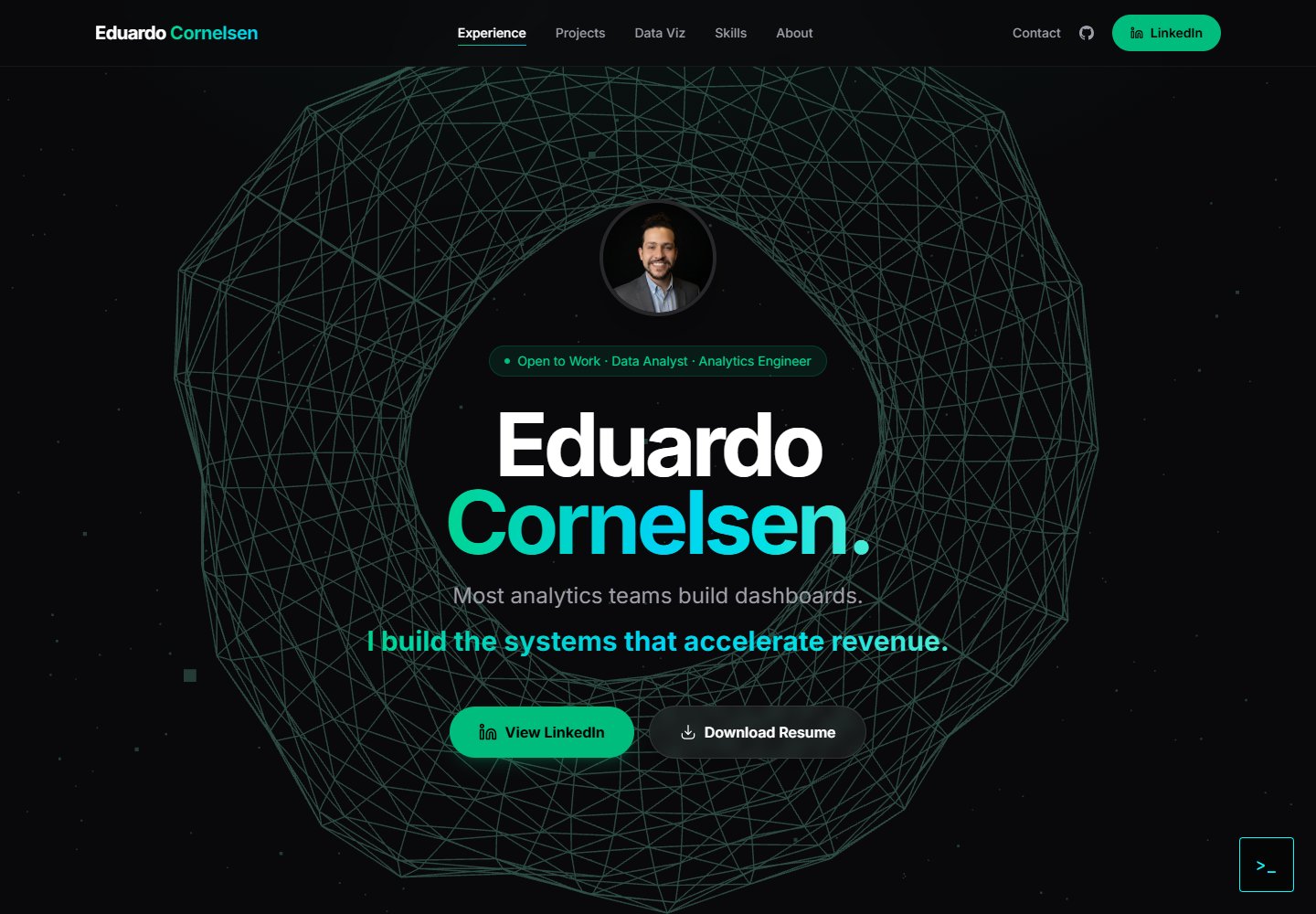
A React + TypeScript personal portfolio template built with Vite, featuring a streaming AI chatbot powered by Google Gemini. An Express backend proxies requests to keep the API key server-side, with rate limiting, IP throttling, canary token injection, and LangFuse tracing.
Vite · Portfolio

about-me-personal-portfolio-website-template
AboutMe is a free personal website template built with Bootstrap and Vite, released under the MIT license. It provides a single-page index.html with organized src directories for images, JavaScript, and SCSS, along with npm scripts for development and build.
Vite · Portfolio