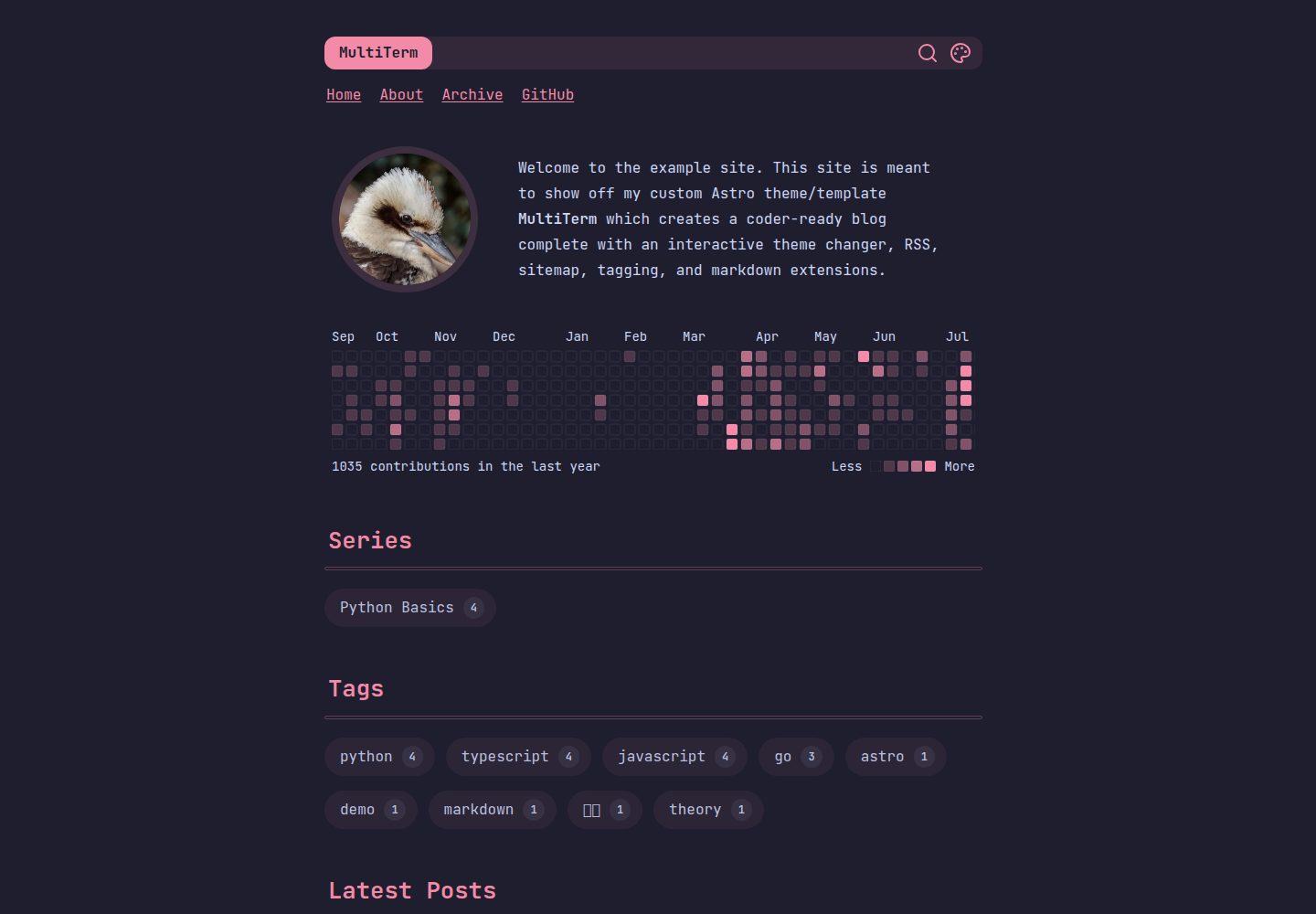
以 Expressive Code 内置的 Shiki 主题作为全站配色来源,可任选两套用于浅色/深色/自动模式,或启用多主题模式让读者从对话框中选择
Astro博客
multiterm-astro — Astro 博客模板
作者 stelcodes
MultiTerm 是一个基于 Astro 的博客主题,核心卖点是可切换的编辑器配色方案,支持浅色/深色/自动模式以及多主题选择,并内置 Giscus 评论、GitHub 活动组件、Markdown 扩展与 RSS、站点地图。
看看你的网站会是什么样
浏览真实页面截图,比较内容排版与手机效果。点击下方缩略图切换,放大查看整页细节。
全部页面与视图 3
截图用于了解视觉与布局,交互效果请以实际项目为准。
采集于 2026-09-30查看来源
值得关注的模板亮点
从已有项目资料中,快速了解它的特点。
页头提供主题切换按钮,浅色、深色与跟随系统三种模式,颜色通过 CSS 变量联动
内置 Giscus 评论,基于 GitHub Discussions,并针对主题配色做了样式适配
首页可选显示静态生成的 GitHub 活动日历,随当前配色方案变化
Markdown 扩展包含提示块、自动目录、emoji 短代码、KaTeX 数学公式、MDX 与阅读时长
内置 RSS 与站点地图,社交链接支持 GitHub、Mastodon、Twitter、LinkedIn 与邮件
模板详细介绍
MultiTerm 是面向开发者写作场景的 Astro 博客主题,围绕「编辑器配色方案」组织视觉系统。它把 Expressive Code 内置的 Shiki 主题作为全站配色来源,读者可以在页头按钮切换浅色、深色或跟随系统,也可以在多主题模式下从对话框中选择任意一套主题,页面元素通过 CSS 变量同步换色。
内容层面,主题提供 Markdown 扩展:提示块(admonitions)、大屏下吸附侧边的自动目录、emoji 短代码、KaTeX 数学公式、MDX 与阅读时长估算;同时内置 RSS 与站点地图,无需额外配置。社交链接覆盖 GitHub、Mastodon、Twitter、LinkedIn 与邮件。评论使用 Giscus,由 GitHub Discussions 承载;首页可选显示静态生成的 GitHub 活动日历。社交卡片图片通过 Satori 自动生成。
配置集中在 src/site.config.ts 单个文件,示例内容位于 src/content 目录,可整体替换。构建默认输出静态站点,也可改为动态生成内容。项目采用 MIT 许可,允许免费使用、修改、商用与分发,但演示图片、字体、图标等第三方素材需单独核对许可;域名、托管等外部服务可能产生费用。
Astro博客
适合你的项目吗?
适用场景
- 开发者搭建个人技术博客,希望整站配色与常用编辑器主题一致
- 想让读者自行选择阅读配色,包括浅色、深色、跟随系统或多主题切换
- 需要评论、RSS、站点地图、社交链接等基础博客能力,但不想逐项配置
- 撰写含数学公式、提示块、目录或 MDX 组件的技术文章
- 希望首页展示 GitHub 活动记录,并让社交分享卡片自动生成
适合人群
- 使用 Astro 并接受在 src/site.config.ts 中集中配置的开发者
- 偏好编辑器配色风格、希望博客视觉与代码主题统一的写作者
- 需要 Markdown 扩展、RSS 与站点地图等常规博客功能的个人站点
- 愿意自行核对并替换演示图片、字体、图标等第三方素材的使用者
上手与定制指南
结合仓库当前版本的说明,按下面的资料检查内容、配置与运行要求。
- 1
克隆仓库后执行 npm install 安装依赖,npm run dev 启动开发服务器,npm run build && npm run preview 构建并预览
- 2
站点配置集中在 src/site.config.ts,示例内容位于 src/content,可删除后替换为自己的文章
- 3
Giscus 评论与 GitHub 活动组件依赖 GitHub 侧配置,使用前需按 Giscus 要求完成设置
- 4
默认构建为静态站点,也可改为动态生成内容
- 5
项目代码采用 MIT 许可,分发时需保留版权声明与许可文本;第三方素材与外部服务需单独确认
授权与来源资料
使用条件与限制
免费使用 · 保留许可声明本次收录的是公开仓库中采用 MIT 许可的免费版本;免费范围为该版本代码,不代表外部服务或第三方素材免费。
使用时需要遵守
- 允许免费使用、修改、商用和分发该版本代码。
- 分发代码副本或实质性部分时,保留原作者版权声明和完整 MIT 许可声明。
- 代码按现状提供;担保与责任限制以原许可证及适用法律为准。
额外费用与待核对事项
- 评论功能依赖 GitHub Discussions 与 Giscus 服务,需在 GitHub 侧完成配置并连接外部服务,非纯本地功能。
- 首页 GitHub 活动日历为可选组件,需连接 GitHub 数据源,使用前需完成相应外部配置。
- 演示图片、字体、图标及其他第三方素材需按各自许可核对,不能仅凭代码的 MIT 许可判断。
- 域名、托管、数据库、支付或 AI 等外部服务可能另外收费。
查看原文依据
Permission is hereby granted, free of charge
许可证原文
Allow readers to respond, discuss, and react with a comment section powered by GitHub and [Giscus](https://giscus.app).
README 原文
https://github.com/stelcodes/multiterm-astro/blob/main/LICENSE.txthttps://github.com/stelcodes/multiterm-astro/blob/main/README.mdOptionally include a statically generated GitHub activity calendar on the homepage
README 原文
DeepSeek 根据仓库许可证和 README 整理 ·2026-10-01。结果仅覆盖已读取资料,依赖、图片、字体及后续条款变更以各自原文为准。
项目核对记录与介绍依据
模板资料
- 来源平台
- GitHub
- 资料与维护参考分
- 资料较完整 · 85 / 100
- 技术栈
- Astro
- 网站类型
- 博客
这个分数如何计算
本站按许可资料(最高30分)、演示链接(12分)、预览图(10分)、Star数(15分)、记录的维护时间(15分)、描述完整度(8分)、功能记录(5分)和分类资料(5分)计算。它不是代码、安全或性能测试,也不是 Google 评分;有链接不代表已实测可用。
这个项目需要核对什么
- 记录的仓库更新时间
- 2025-09-15
- 截图检查日期
- 2026-10-01
已收录演示链接。请用你的内容与屏幕尺寸检查;有演示不代表表单、认证或支付已经可用。
目录记录的主要技术栈是 Astro。请通过依赖清单和锁文件核对实际版本与托管要求。这些说明基于收录资料,不代表代码审计或部署实测。
查看具体选型方法 →介绍的制作与核对状态
介绍由 AI 辅助整理目录与仓库资料。仓库作者不等于这篇介绍的审核者。
已完成服务器许可规则与 AI 来源核对;未经过人工编辑审核。
查看当时使用的来源资料
SHA-256: 4a3100779c1f449799cf49a96c712a36daaa29719bfe0de4f87b4a79eb07d4d9
2026-10-01T13:47:25.664Z
来源文件 / 仓库# MultiTerm Astro 🎨⚡️ **MultiTerm** is an Astro blog theme designed for coders who love their color schemes. Easily theme your whole website with your favorite color schemes and have your prose rendered with a nod to the aesthetics of raw markdown. Check out the [Showing Off Blog Features](https://multiterm.stelclementine.com/posts/showing-off-blog-features) post to see all the exciting MultiTerm capabilites on the [live example site](https://multiterm.stelclementine.com)! > v2.0.0 has been released! 🥳        ## ✨ Features - **Amazing Theme Selection**: Personalize your blog's appearance with your favorite editor color scheme. Pick your favorite [Shiki themes](https://expressive-code.com/guides/themes/#available-themes) bundled with Expressive Code. - **Dark/Light/Auto Theme Mode**: Choose any two Shiki themes and use the standard light/dark/auto model for automatically adapting to your reader's theme preferences with button in the site header. - **Multiple Theme Mode**: Choose three (or all 59!) Shiki themes and allow your reader to choose their favorite from a dialog menu opened from a button in the header. Every element seamlessly changes color interactively using the magic of CSS variables. - **GitHub Comment Section**: Allow readers to respond, discuss, and react with a comment section powered by GitHub and [Giscus](https://giscus.app). Painstakingly themed to match your site perfectly. - **GitHub Activity Widget**: Optionally include a statically generated GitHub activity calendar on the homepage that (of course) matches the active color scheme perfectly. - **Markdown Extensions**: Admonitions, auto-generated TOC that sticks to the side on large screens, emoji shortcodes, KaTeX math, MDX, and reading time estimates. See the example site's [Showing Off Blog Features](https://multiterm.stelclementine.com/posts/showing-off-blog-features) post. - **RSS Feed and Sitemap**: Built-in support for RSS feeds and sitemap with no extra configuration. - **Social Links**: Easily include links to common developer platforms including GitHub, Mastodon, Twitter, LinkedIn and E-mail. - **Responsive Design**: Optimized for all devices from desktops to mobile phones. Built with [Tailwind v4](https://tailwindcss.com/). - **SEO Optimized**: Boost your site's visibility with built-in SEO best practices and automatically generated social card images for every page via [Satori](https://github.com/vercel/satori). - **Customizable Build**: Powered by [Astro](https://astro.build/), render as a static site (the default) or generate content dynamically. Check out the example site [PageSpeed scores](https://pagespeed.web.dev/analysis/https-multiterm-stelclementine-com/qhnp521yci?form_factor=mobile) and [OpenGraph analysis](https://www.opengraph.xyz/url/https%3A%2F%2Fmultiterm.stelclementine.com) ## 🚀 Getting Started **Clone the Repository**: ```bash git clone --depth 1 https://github.com/stelcodes/multiterm-astro my-new-blog && cd my-new-blog ``` **Install Dependencies**: ```bash npm install ``` **Start the Development Server**: ```bash npm run dev ``` **Build Your Site and View the Results**: ```bash npm run build && npm run preview ``` ## 🛠️ Configuration Simple configuration is a core feature of MultiTerm. All configuration is done from a single file: `src/site.config.ts`. This is where you can tailor your website to match your vision. Please take a look at `src/site.config.ts` for more information about the configuration options. To add your own content, check out the `src/content` directory. Feel free to remove all the example content and replace it with your own! ## 📄 License This project is licensed under the [MIT License](LICENSE.txt). ## Inspiration - https://github.com/panr/hugo-theme-terminal - https://github.com/chrismwilliams/astro-theme-cactus ## 🩷 Sponsor Consider [buying me a coffee](https://ko-fi.com/stelclementine) to keep me caffeinated while I work on open source projects like this one! [](https://www.star-history.com/#stelcodes/multiterm-astro&Date)
看看同类模板
对比同技术栈与用途的模板,找到更适合的视觉与内容结构。

astrowind
⭕️ AstroWind: A free template using Astro v7 and Tailwind CSS v4. Astro starter theme.
Astro · 博客

astro-paper
A minimal, accessible and SEO-friendly Astro blog theme.
Astro · 博客

fuwari
✨A static blog template built with Astro.
Astro · 博客

Firefly
Firefly 是一款基于 Astro 的静态博客主题,由 CuteLeaf 在 saicaca 的 Fuwari 模板基础上二次开发,主打清新美观的视觉风格。
Astro · 博客

astro-theme-cactus
A simple Astro theme. Use it to create your blog or website.
Astro · 作品集

astrofy
Astrofy is a free and open-source template for your Personal Portfolio Website built with Astro and TailwindCS…
Astro · 作品集