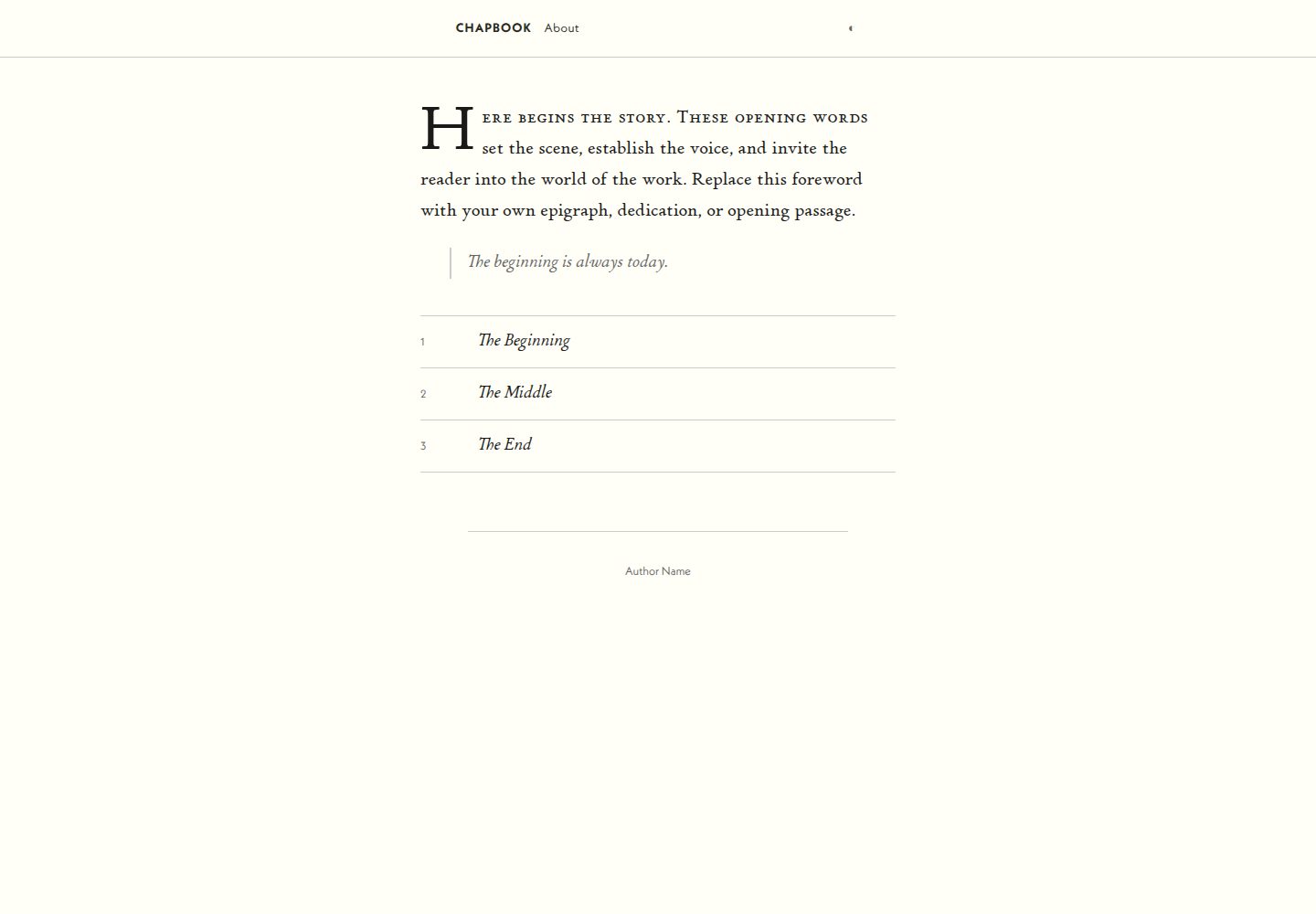
内容与呈现分离,content/ 目录可在同系列三个模板间直接迁移
Eleventy启动器
eleventy-chapbook — Eleventy 启动器模板
作者 tepiton
基于 Eleventy 的分章文学站点启动器,面向连载小说、中篇与长篇散文,提供章节目录、前后章导航和可移植的 content 目录。
看看你的网站会是什么样
浏览真实页面截图,比较内容排版与手机效果。点击下方缩略图切换,放大查看整页细节。
全部页面与视图 3
截图用于了解视觉与布局,交互效果请以实际项目为准。
采集于 2026-09-30查看来源
值得关注的模板亮点
从已有项目资料中,快速了解它的特点。
章节按 front matter 的 order 排序,并自动生成目录与上一章/下一章导航
支持单页作品:删除 chapters/ 目录后 index.md 即成为整部作品
排版与配色由 css/index.css 顶部的 CSS 自定义属性集中控制
内置 drop cap、场景标题、角色声音标题、分节符等文学排版样式
自带 GitHub Pages 部署工作流,推送到 main 即构建发布并自动处理路径前缀
模板详细介绍
eleventy-chapbook 是一个 Eleventy 启动器,用于搭建分章节的文学类网站,目标场景是连载小说、中篇(novella)以及其他长篇散文。它把内容与呈现分离:所有作品内容放在 content/ 目录中,该目录可在同系列模板(eleventy-pamphlet、eleventy-folio)之间整体迁移,换模板即可改变外观而无需改动正文。
多章节作品把 Markdown 文件放入 content/chapters/,每个文件通过 front matter 的 title 与 order 定义标题和排序;order 决定目录与上一章/下一章导航的顺序,缺失时回退为 999,再按文件名排序以保证确定性。文件名决定 URL,例如 ch04-the-storm.md 对应 /chapters/ch04-the-storm/。章节页带编号页眉和前后章导航。若作品是单页,直接删除 content/chapters/ 目录,index.md 即成为整部作品,继承基础布局且不带章节导航与目录。
首页 content/index.md 用自由格式的 Markdown/HTML 渲染在章节列表上方,可放题词、前言或献词;content/about.md 用于版本说明与致谢。站点元数据(标题、站点名、URL、语言、描述、作者)集中在 content/_data/metadata.js,因此 content/ 目录保持自包含。
排版与配色通过 css/index.css 顶部的 CSS 自定义属性控制,包括衬线字体、无衬线字体、背景色、正文色、弱化色、链接色和边框色,改这些变量即可换主题。模板默认使用 Adobe Fonts 的 p22-stickley-pro-text 与 neue-kabel,字体套件 ID 写在 _includes/layouts/base.njk 中;更换字体需要替换 Typekit 链接并同步更新 CSS 变量。
Markdown 渲染配置为 html: true,允许在 Markdown 中直接写 HTML,并提供几种文学排版样式:段首大字(class="drop")、场景标题(渲染为 h4)、角色声音标题(渲染为 h3)和分节符(渲染为 h2)。
项目结构包含 content/(_data、index.md、about.md、chapters/)、_includes/layouts/(base.njk、home.njk、chapter.njk)和 css/index.css。npm 脚本提供开发服务器(0.0.0.0:8082,带实时重载)、生产构建到 _site/ 以及带调试输出的构建。仓库内置 GitHub Actions 工作流,在推送到 main 时构建并部署到 GitHub Pages,并会自动检测仓库名设置路径前缀。
使用限制方面:模板依赖 Adobe Fonts 的字体套件,未替换字体链接时字体授权与可用性取决于该服务;演示图片、字体、图标等第三方素材需按各自许可核对,代码的 MIT 许可不覆盖这些素材;域名、托管等外部服务可能另行收费。
Eleventy启动器
适合你的项目吗?
适用场景
- 连载小说的分章发布与阅读导航
- 中篇小说或长篇散文的章节化站点
- 需要题词、前言、献词与版本说明页的文学作品站点
- 希望用同一份内容在不同模板间切换外观的作者
适合人群
- 用 Markdown 写作、希望按章节组织长篇内容的作者
- 需要章节目录与前后章导航的连载型站点
- 希望内容目录可移植、便于更换模板的 Eleventy 用户
- 使用 GitHub Pages 部署静态文学站点的人
上手与定制指南
结合仓库当前版本的说明,按下面的资料检查内容、配置与运行要求。
- 1
克隆仓库后执行 npm install,再用 npm run start 启动开发服务器,默认地址为 http://localhost:8082
- 2
站点标题、作者、URL 等信息在 content/_data/metadata.js 中修改
- 3
章节文件放入 content/chapters/,需在 front matter 中提供 title 与 order
- 4
模板默认引用 Adobe Fonts 的 p22-stickley-pro-text 与 neue-kabel,更换字体需修改 _includes/layouts/base.njk 中的 Typekit 链接并同步 css/index.css 的字体变量
- 5
第三方字体、图片与图标素材需单独核对其许可,MIT 许可仅覆盖代码本身
授权与来源资料
使用条件与限制
免费使用 · 保留许可声明本次收录的是公开仓库中采用 MIT 许可的免费版本;免费范围为该版本代码,不代表外部服务或第三方素材免费。
使用时需要遵守
- 允许免费使用、修改、商用和分发该版本代码。
- 分发代码副本或实质性部分时,保留原作者版权声明和完整 MIT 许可声明。
- 代码按现状提供;担保与责任限制以原许可证及适用法律为准。
额外费用与待核对事项
- 模板默认引用 Adobe Fonts 的 p22-stickley-pro-text 与 neue-kabel 字体,字体套件 ID 已写入 _includes/layouts/base.njk。使用这些字体需依赖 Adobe Fonts 服务并遵守其授权;若未替换 Typekit 链接,字体的可用性与授权取决于该第三方服务。
- 更换字体需自行替换 _includes/layouts/base.njk 中的 Typekit 链接,并同步更新 css/index.css 中的字体变量,否则站点仍会加载 Adobe Fonts 资源。
- 内置部署工作流依赖 GitHub Pages 服务,推送到 main 分支时触发构建与发布;使用该部署方式需具备 GitHub 账号与仓库,托管等外部服务可能另行收费。
- 演示图片、字体、图标及其他第三方素材需按各自许可核对,不能仅凭代码的 MIT 许可判断。
- 域名、托管、数据库、支付或 AI 等外部服务可能另外收费。
查看原文依据
Permission is hereby granted, free of charge
许可证原文
This template uses `p22-stickley-pro-text` and `neue-kabel` from Adobe Fonts. The kit IDs are baked into `_includes/layouts/base.njk`.
README 原文
To use different fonts, replace the Typekit `<link>` tags and update the CSS variables.
README 原文
https://github.com/tepiton/eleventy-chapbook/blob/main/LICENSEhttps://github.com/tepiton/eleventy-chapbook/blob/main/README.mdThe included `.github/workflows/pages.yml` builds and deploys to GitHub Pages on push to `main`.
README 原文
DeepSeek 根据仓库许可证和 README 整理 ·2026-10-01。结果仅覆盖已读取资料,依赖、图片、字体及后续条款变更以各自原文为准。
项目核对记录与介绍依据
模板资料
- 来源平台
- GitHub
- 资料与维护参考分
- 资料较完整 · 80 / 100
- 技术栈
- Eleventy
- 网站类型
- 启动器
这个分数如何计算
本站按许可资料(最高30分)、演示链接(12分)、预览图(10分)、Star数(15分)、记录的维护时间(15分)、描述完整度(8分)、功能记录(5分)和分类资料(5分)计算。它不是代码、安全或性能测试,也不是 Google 评分;有链接不代表已实测可用。
这个项目需要核对什么
- 记录的仓库更新时间
- 2026-09-12
- 截图检查日期
- 2026-10-01
已收录演示链接。请用你的内容与屏幕尺寸检查;有演示不代表表单、认证或支付已经可用。
目录记录的主要技术栈是 Eleventy。请通过依赖清单和锁文件核对实际版本与托管要求。这些说明基于收录资料,不代表代码审计或部署实测。
查看具体选型方法 →介绍的制作与核对状态
介绍由 AI 辅助整理目录与仓库资料。仓库作者不等于这篇介绍的审核者。
已完成服务器许可规则与 AI 来源核对;未经过人工编辑审核。
查看当时使用的来源资料
SHA-256: 3205476caff4da18a08fbfaababee6b6c0f8d7bcdf92e63b742b72c742c2ecfe
2026-10-01T13:49:50.447Z
来源文件 / 仓库# eleventy-chapbook
An Eleventy v3 starter for chaptered literary sites. Designed for serialized fiction, novellas, and other long-form prose.
Part of a family of interoperable templates:
- **eleventy-pamphlet** - minimal, single layout
- **eleventy-chapbook** (this) - separate layouts, feature-rich
- **eleventy-folio** - polished, with extras
The `content/` directory is portable across all three. Swap templates to change the presentation without touching your content.
## Quick start
```
git clone <this-repo> my-project
cd my-project
npm install
npm run start
```
Then open `http://localhost:8082`.
## Customization
### Site metadata
Edit `content/_data/metadata.js`:
```js
export default {
title: "Your Literary Work",
siteName: "yoursite.lol",
url: "https://example.com/",
language: "en",
description: "A description of this work.",
author: {
name: "Author Name",
url: "https://example.com/about/",
},
}
```
Note: `metadata.js` lives inside `content/_data/` so the entire `content/` directory is self-contained and portable.
### Single-page vs multi-chapter
**Multi-chapter works:** Add files to `content/chapters/`. Each needs front matter:
```yaml
---
title: The Title of This Chapter
order: 1
description: Optional. Used in the HTML meta description tag.
---
```
- `order` controls sort order in the TOC and prev/next navigation
- Filename determines the URL: `ch04-the-storm.md` → `/chapters/ch04-the-storm/`
- Chapter pages get a numbered header and prev/next navigation
**Chapter sorting:** Chapters are sorted by `order` property (ascending, fallback to 999 if missing), then by filename alphabetically for determinism.
**Single-page works:** Delete the `content/chapters/` directory entirely. Your `index.md` becomes the whole work. It inherits the base layout with no chapter navigation or TOC.
### Home page
Edit `content/index.md`. Freeform markdown/HTML rendered above the chapter list. Put your epigraph, foreword, or dedication here.
### About page
Edit `content/about.md`. Colophon and credits. Uses nav key "About" order 2.
### Fonts, colors, and styles
All typographic and color tokens are CSS custom properties at the top of `css/index.css`:
```css
:root {
--font-serif: p22-stickley-pro-text, Palatino, "Palatino Linotype", Georgia, serif;
--font-sans: neue-kabel, "Gill Sans", "Gill Sans MT", Calibri, sans-serif;
--color-bg: #fffff8;
--color-text: #1a1a18;
--color-muted: #666;
--color-link: #2a2a20;
--color-border: #ccc;
}
```
Change any of these to retheme the site without touching the rest of the stylesheet.
**Adobe Fonts (Typekit):** This template uses `p22-stickley-pro-text` and `neue-kabel` from Adobe Fonts. The kit IDs are baked into `_includes/layouts/base.njk`. To use different fonts, replace the Typekit `<link>` tags and update the CSS variables.
**Other web fonts:** Add a `<link>` to your font provider in `_includes/layouts/base.njk` and update the `--font-serif` or `--font-sans` variable in `css/index.css` to match.
### Literary markdown features
`markdown-it` is configured with `html: true`, so raw HTML works in markdown:
**Drop cap** (large decorated first letter + small-caps first line):
```html
<p class="drop">It was a dark and stormy night...</p>
```
**Scene heading** (centered italic with em-dash decoration, renders as `h4`):
```markdown
#### The Road at Midnight
```
**Character voice heading** (italic sans-serif, renders as `h3`):
```markdown
### The Stranger
```
**Section break** (centered small-caps, renders as `h2`):
```markdown
##
```
## Project structure
```
content/
_data/
metadata.js # Title, author, URL
index.md # Home page (opening prose + chapter list)
about.md # Credits / colophon
chapters/
chapters.11tydata.js # Layout for all chapters
ch01-the-beginning.md
ch02-the-middle.md
...
_includes/
layouts/
base.njk # HTML shell
home.njk # Home page layout
chapter.njk # Chapter layout with prev/next
css/
index.css # All literary styles
```
The `content/` directory is designed to be portable. Copy it to eleventy-pamphlet or eleventy-folio to get a different presentation with the same content.
## npm scripts
| Command | Description |
|:--------|:------------|
| `npm run start` | Dev server at `0.0.0.0:8082` with live reload |
| `npm run build` | Production build to `_site/` |
| `npm run debug` | Build with Eleventy debug output |
## Deploy
The included `.github/workflows/pages.yml` builds and deploys to GitHub Pages on push to `main`. No configuration needed for custom domains — the workflow detects the repo name and sets the path prefix automatically.
看看同类模板
对比同技术栈与用途的模板,找到更适合的视觉与内容结构。

eleventy-base-blog
A starter repository for a blog web site using the Eleventy static site generator.
Eleventy · 博客

eleventy-garden
:seedling: A starter site for building a mind garden with eleventy
Eleventy · 启动器

eleventastic
An Eleventy Starter Kit
Eleventy · 启动器

neat-starter
Starter Template for Netlify CMS, Eleventy, Alpine JS & Tailwind CSS
Eleventy · 启动器

Eleventy-Starter-Boilerplate
🚀 Eleventy Starter is production-ready with SEO-friendly for quickly starting a blog. ⚡ Built with Eleventy, …
Eleventy · 博客

eleventy-plus-vite
A clean and fast Eleventy Starter Project with Vite
Eleventy · 启动器