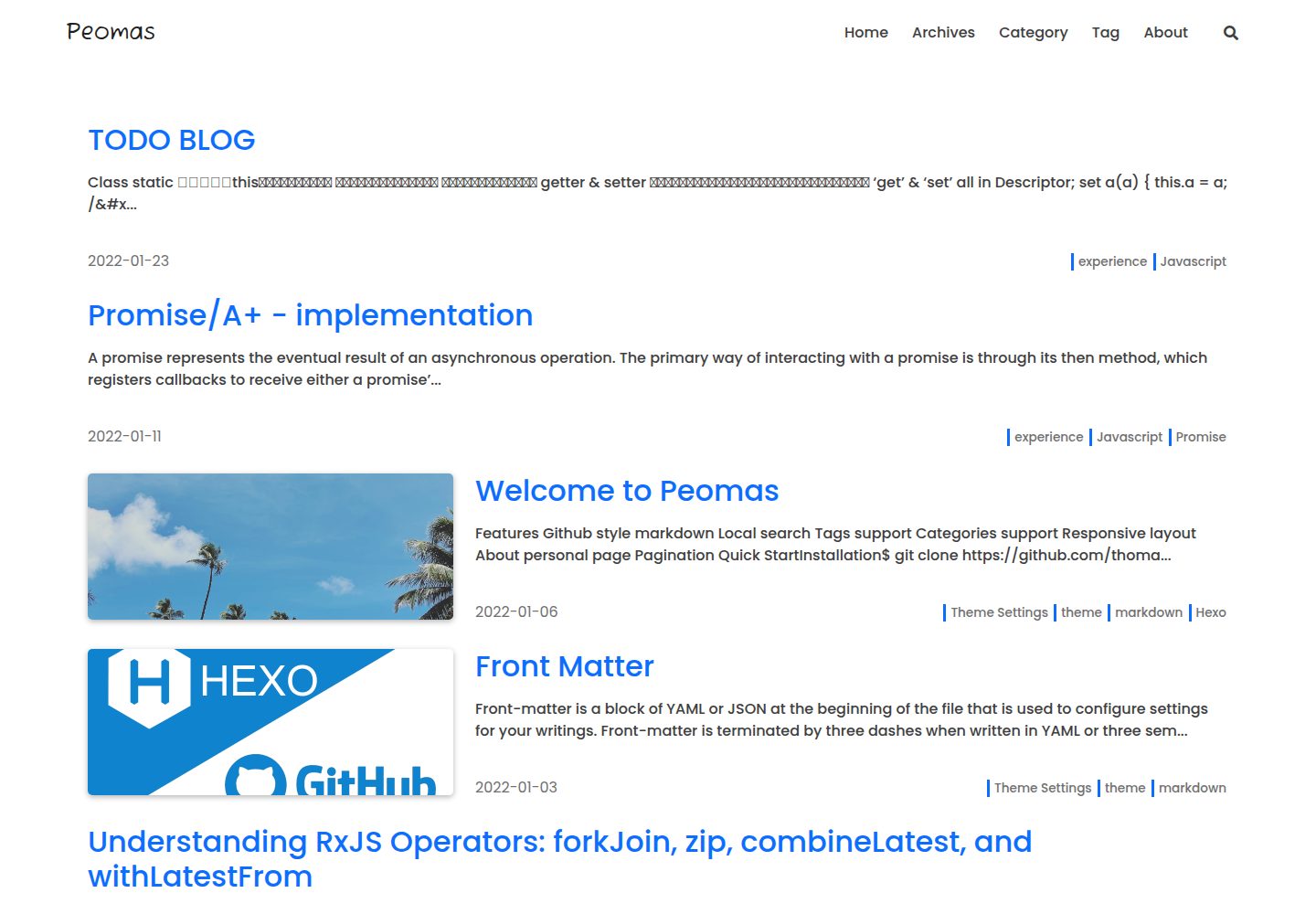
GitHub 风格的 Markdown 渲染
HexoHTML博客
hexo-theme-peomas — Hexo 博客模板
作者 thomasyu929
Peomas 是一个简洁的 Hexo 主题,面向 GitHub Pages 个人博客,支持本地搜索、标签、分类、响应式布局与关于页。
看看你的网站会是什么样
浏览真实页面截图,比较内容排版与手机效果。点击下方缩略图切换,放大查看整页细节。
全部页面与视图 3
截图用于了解视觉与布局,交互效果请以实际项目为准。
采集于 2026-10-02查看来源
值得关注的模板亮点
从已有项目资料中,快速了解它的特点。
内置本地搜索
支持标签与分类页面
响应式布局,适配桌面与移动端
提供关于个人页面与分页
基于 Tocbot 的文章目录
模板详细介绍
Peomas 是一个基于 Hexo 的博客主题,README 说明其可用于 GitHub Pages 个人博客。主题采用 GitHub 风格的 Markdown 渲染,提供本地搜索、标签与分类支持、响应式布局、关于个人页面以及分页功能。
安装方式为将仓库克隆到本地,并在博客根目录的 _config.yml 中把 theme 设置为 hexo-theme-peomas。关于页、分类页和标签页需要手动通过 hexo new page 创建,并在对应 Markdown 文件的 front matter 中指定 layout 为 about、category 或 tag。
主题配置集中在主题自身的 _config.yml 中,可调整 favicon、导航左侧的 Logo 标记、返回顶部按钮、NProgress 进度条、导航菜单、首页的置顶与分类标签显示、基于 Tocbot 的文章目录,以及关于页的头像、标题、副标题和社交图标链接。标签页由 tagcloud 自动生成,可配置字体大小范围与颜色。
该主题采用 MIT 许可,允许免费使用、修改、商用和分发代码,但演示图片、字体、图标等第三方素材需按各自许可核对。
HexoHTML博客
适合你的项目吗?
适用场景
- 在 GitHub Pages 上搭建个人博客
- 为 Hexo 站点更换简洁的博客主题
- 需要本地搜索、标签和分类功能的写作站点
- 展示个人简介与社交链接的关于页
适合人群
- 使用 Hexo 搭建个人博客的开发者
- 将博客托管在 GitHub Pages 的用户
- 偏好简洁、GitHub 风格排版的写作者
- 需要本地搜索与标签分类组织内容的博主
上手与定制指南
结合仓库当前版本的说明,按下面的资料检查内容、配置与运行要求。
- 1
克隆仓库到本地,并在博客根目录 _config.yml 中将 theme 设为 hexo-theme-peomas
- 2
关于页需手动执行 hexo new page about 创建,并在 front matter 中设置 layout: about
- 3
分类页需手动执行 hexo new page category 创建,并设置 layout: category
- 4
标签页需手动执行 hexo new page tag 创建,并设置 layout: tag
- 5
主题配置在主题自身的 _config.yml 中,可调整 favicon、菜单、目录、关于页等选项
授权与来源资料
使用条件与限制
免费使用 · 保留许可声明本次收录的是公开仓库中采用 MIT 许可的免费版本;免费范围为该版本代码,不代表外部服务或第三方素材免费。
使用时需要遵守
- 允许免费使用、修改、商用和分发该版本代码。
- 分发代码副本或实质性部分时,保留原作者版权声明和完整 MIT 许可声明。
- 代码按现状提供;担保与责任限制以原许可证及适用法律为准。
额外费用与待核对事项
- 演示图片、字体、图标及其他第三方素材需按各自许可核对,不能仅凭代码的 MIT 许可判断。
- 域名、托管、数据库、支付或 AI 等外部服务可能另外收费。
查看原文依据
https://github.com/thomasyu929/hexo-theme-peomas/blob/master/LICENSEhttps://github.com/thomasyu929/hexo-theme-peomas/blob/master/README.mdPermission is hereby granted, free of charge
许可证原文
DeepSeek 根据仓库许可证和 README 整理 ·2026-10-02。结果仅覆盖已读取资料,依赖、图片、字体及后续条款变更以各自原文为准。
项目核对记录与介绍依据
模板资料
- 来源平台
- GitHub
- 资料与维护参考分
- 资料一般 · 73 / 100
- 技术栈
- Hexo · HTML
- 网站类型
- 博客
这个分数如何计算
本站按许可资料(最高30分)、演示链接(12分)、预览图(10分)、Star数(15分)、记录的维护时间(15分)、描述完整度(8分)、功能记录(5分)和分类资料(5分)计算。它不是代码、安全或性能测试,也不是 Google 评分;有链接不代表已实测可用。
这个项目需要核对什么
- 记录的仓库更新时间
- 2022-01-11
- 截图检查日期
- 2026-10-02
已收录演示链接。请用你的内容与屏幕尺寸检查;有演示不代表表单、认证或支付已经可用。
目录记录的主要技术栈是 Hexo。请通过依赖清单和锁文件核对实际版本与托管要求。这些说明基于收录资料,不代表代码审计或部署实测。
查看具体选型方法 →介绍的制作与核对状态
介绍由 AI 辅助整理目录与仓库资料。仓库作者不等于这篇介绍的审核者。
已完成服务器许可规则与 AI 来源核对;未经过人工编辑审核。
查看当时使用的来源资料
SHA-256: d40a287d88931029bcd3bc7f555147e33e8a30f9a265af118b0331df1b74ce15
2026-10-02T15:04:47.091Z
来源文件 / 仓库# Peomas
 [](https://badge.fury.io/js/hexo) [](https://github.com/hexojs/hexo) [](https://opensource.org/licenses/MIT)
A concise Hexo theme that can be used for Github Pages personal blog.
See [Demo](https://thomasyu929.github.io/)
## Features
- Github style markdown
- Local search
- Tags support
- Categories support
- Responsive layout
- About personal page
- Pagination
## Quick Start
### Installation
```bash
$ git clone https://github.com/thomasyu929/hexo-theme-peomas.git
```
Set the theme to `hexo-theme-peomas` in the `_config.yml` which in the root path.
```yaml
## Themes: https://hexo.io/themes/
theme: hexo-theme-peomas
```
#### About Page
About page needs to be created by manually.
```bash
$ hexo new page about
```
Then, open `/source/about/index.md` which in your blog directory. Add `layout` property.
```markdown
---
title: about
layout: about
---
Add content for this markdown, this content will show on about page.
```
#### Category Page
Category page needs to be created by manually.
```bash
$ hexo new page category
```
Then, open `/source/category/index.md` which in your blog directory. Add `layout` property.
```markdown
---
title: about
layout: category
---
```
#### Tag Page
Tag page needs to be created by manually.
```bash
$ hexo new page tag
```
Then, open `/source/tag/index.md` which in your blog directory. Add `layout` property.
```markdown
---
title: about
layout: tag
---
```
## Configuration
#### Favicon
Favicon can replace in the theme's `_config.yml`
```yaml
favicon: /img/favicon.png
```
Also have to replace the file in the `theme/source/img`.
#### Logo Mark
Logo Mark which in the left of the navigation can be customized.
```yaml
# Logo Mark
mark: Peomas
logo_mark: null
```
Default only show mark, just text mark. Can add path for `logo_mark` , that way will show the logo pic.
#### Scroll To Top Button
Scroll button can be disabled by set to false in `_config.yml`
```yaml
# Scroll button
scroll_top_btn:
enable: true
```
#### NProgress Bar
NProgress can be disabled or change bar color in `_config.yml`
```yaml
# NProgress
nprogress:
enable: true
color: "#131313"
```
#### Menu
The menu is configured in the theme's `_config.yml`.
```yaml
# Navigation menu
menu:
Home: /
Archives: /archives
Category: /categories
Tag: /tags
About: /about
```
#### Index Page
The index page related settings are configured in the theme's `_config.yml`.
```yaml
# Index Page config
index:
enable_sticky: true
post_url_target: _self
enable_category: true
enable_tag: true
```
#### Table of Contents
Table of contents was generated based on `Tocbot`. It can be disabled in `_config.yml`
```yaml
# Post Page config
toc:
enable: true
```
#### About Page
The about page related settings are configured in the theme's `_config.yml`.
```yaml
about:
avatar:
enable: true
link: /img/avatar.png
title: Thomas Yu
subTitle: Front-End Developer - Labcorp
icon:
- { class: "fab fa-github", url: "https://github.com/thomasyu929", info: "Thomas Yu's Github" }
- { class: "fas fa-envelope", url: "mailto:[email protected]", info: "Mail to me" }
- { class: "fab fa-linkedin", url: "https://linkedin.com", info: "LinkedIn" }
- { class: "fas fa-rss", url: "/atom.xml", info: "Subscribe Thomas's blog"}
```
#### Tag Page
The tag page was generated by `tagcloud` automatically. `tagcloud` related settings are configured in the theme's `_config.yml`.
````yaml
# Tag Page config
tagcloud:
min_font: 15
max_font: 30
unit: px
start_color: "#337ab7"
end_color: "#0d6efd"
````看看同类模板
对比同技术栈与用途的模板,找到更适合的视觉与内容结构。

hexo-theme-matery
A beautiful hexo blog theme with material design and responsive design.一个基于材料设计和响应式设计而成的全面、美观的Hexo主题。
Hexo · 博客

hexo-theme-cactus
:cactus: A responsive, clean and simple theme for Hexo.
Hexo · 博客

hexo-theme-volantis
A Wonderful Theme for Hexo.
Hexo · 博客

hexo-theme-aurora
Hexo Theme Aurora 是一款以极光色彩和渐变 UI 为核心的 Hexo 博客主题,整体走未来感路线。 它的首页采用杂志式网格布局,文章列表与精选区域层次分明,视觉上更接近个人媒体站点而非传统博客。
Hexo · 博客

hexo-theme-Claudia
Claudia 是一款为 Hexo 设计的博客主题,主打简洁外观与易配置。 它支持自动跟随设备深色模式,并在 README 中宣称拥有 90+ 的 Lighthouse 评分,适合追求轻量与性能的博客作者。
Hexo · 博客

hexo-theme-A4
A hexo theme that looks like an A4 paper.(一个类A4纸张质感的hexo博客主题。 )
Hexo · 博客