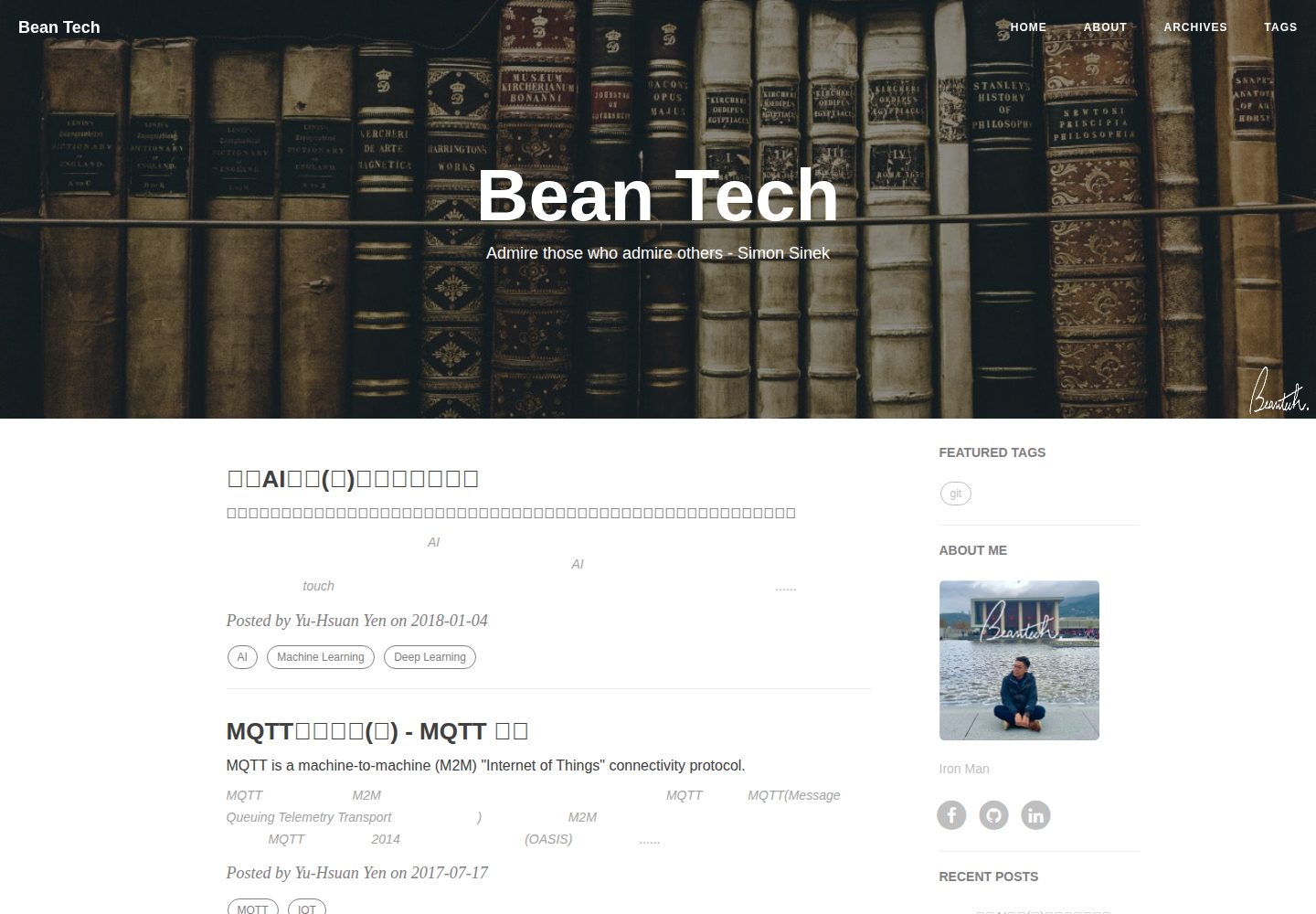
移植自 Hux Blog 的 Hexo 博客主题,由 Kaijun 移植、YuHsuan 修改
Hexo博客
hexo-theme-beantech — Hexo 博客模板
作者 YenYuHsuan
hexo-theme-beantech 是 Hexo 博客主题,移植自 Hux Blog 并由 YuHsuan 修改,仓库以 Apache-2.0 许可发布,附带完整示例项目与配置说明。
看看你的网站会是什么样
浏览真实页面截图,比较内容排版与手机效果。点击下方缩略图切换,放大查看整页细节。
全部页面与视图 3
截图用于了解视觉与布局,交互效果请以实际项目为准。
采集于 2026-10-01查看来源
值得关注的模板亮点
从已有项目资料中,快速了解它的特点。
仓库同时提供主题与完整示例项目,克隆后 npm install 即可开始修改
侧边栏可开关,内置 featured-tags、short-about、recent-posts、friends-blog、archive、category 等 widget
支持侧边栏头像与简介、签名图、返回顶部图标等个人化配置
首页文章标签可通过 home_posts_tag 开关控制显示
使用 hexo-renderer-markdown-it 作为 Markdown 渲染引擎,并提供对应配置项
模板详细介绍
hexo-theme-beantech 是一个面向 Hexo 的博客主题,由 YenYuHsuan 在 Kaijun 移植的 Hux Blog 基础上修改而来,仓库同时包含主题与可直接运行的示例站点。README 说明其用法围绕 _config.yml 展开:部署段需替换为使用者自己的 Git 仓库与分支;侧边栏可开关并配置头像与简介,widgets 列表支持 featured-tags、short-about、recent-posts、friends-blog、archive、category 等组件,新增组件需在 layout/_widget 下添加;签名图与返回顶部图标分别放在 img/signature 和 css/image 目录;首页文章标签可通过 home_posts_tag 控制显示。Markdown 渲染采用 hexo-renderer-markdown-it,配置项包括 html、xhtmlOut、breaks、linkify、typographer 与引号样式,标题锚点图标可在 layout/post.ejs 中调整。仓库未在 README 中声明浏览器兼容范围、性能指标或生产环境验证情况,使用前应自行核对依赖版本与第三方素材许可。
Hexo博客
适合你的项目吗?
适用场景
- 使用 Hexo 搭建个人博客并希望采用 Hux Blog 风格布局
- 需要在侧边栏组合展示标签、近期文章、归档、分类与友链
- 希望通过 _config.yml 集中调整头像、简介、签名与首页标签显示
- 为 Hexo 站点配置 markdown-it 渲染参数与标题锚点样式
适合人群
- 熟悉 Hexo 基本命令与 _config.yml 配置的博客作者
- 希望基于现有主题二次修改、且能阅读 EJS 模板与 CSS 的前端使用者
- 接受以 Apache-2.0 许可使用并自行核对第三方素材的开发者
上手与定制指南
结合仓库当前版本的说明,按下面的资料检查内容、配置与运行要求。
- 1
克隆仓库到本地目录后执行 npm install 安装依赖
- 2
修改 _config.yml 的 deploy 段,替换为使用者自己的 Git 仓库地址与分支
- 3
将头像图片放入 img/ 目录,并在 _config.yml 中设置 sidebar-avatar 与 sidebar-about-description
- 4
如需签名图,将图片放入 img/signature 并开启 signature、指定 signature-img
- 5
常用命令包括 hexo new post、hexo clean && hexo generate、hexo server 与 hexo deploy
授权与来源资料
使用条件与限制
免费使用 · 保留许可声明本次收录的是公开仓库中采用 Apache-2.0 许可的免费版本;免费范围为该版本代码,不代表外部服务或第三方素材免费。
使用时需要遵守
- 允许免费使用、修改、商用和分发;分发时需随附 Apache-2.0 许可证。
- 修改过的文件需显著标明改动,并保留相关版权、专利、商标及归属声明。
- 若原项目附有 NOTICE 文件,分发衍生作品时需保留其中适用的归属声明。
- 许可包含适用的贡献者专利授权;发起许可所述专利诉讼会终止该专利授权,且不授予商标使用权。
- 代码按现状提供;担保与责任限制以原许可证及适用法律为准。
额外费用与待核对事项
- 该主题为 Hux Blog 的移植版本,使用时需保留对原作者 Huxpro 及移植者 Kaijun 的署名与致谢,不得删除相关版权与归属说明。
- 主题由 YuHsuan 在 Kaijun 移植版基础上修改,二次分发或修改时须保留原作者与修改者信息,并标注所做改动。
- 部署配置中的仓库地址与分支需替换为使用者自己的 Git 仓库,不能直接沿用示例仓库。
- 头像、签名等个人图片需自行准备并放入指定目录,仓库不附带可商用素材,素材许可需使用者自行确认。
- Markdown 渲染依赖第三方插件 hexo-renderer-markdown-it,其许可与维护状况独立于本主题,使用前应自行核实。
- 标题锚点功能通过外部 CDN 加载 anchor.js,属于外部服务依赖,离线或 CDN 不可用时该功能可能失效。
- 演示图片、字体、图标及其他第三方素材需按各自许可核对,不能仅凭代码的 Apache-2.0 许可判断。
- 域名、托管、数据库、支付或 AI 等外部服务可能另外收费。
查看原文依据
no-charge, royalty-free, irrevocable copyright license
许可证原文
Ported Theme of [Hux Blog](https://github.com/Huxpro/huxpro.github.io), Thank [Huxpro](https://github.com/Huxpro) for designing such a flawless theme.
README 原文
This BeanTech theme created by [YuHsuan](http://blog.beantech.org) modified from the original Porter [Kaijun](http://kaijun.rocks/hexo-theme-huxblog/)
README 原文
Replace to your own repo!
README 原文
Copy your avatar image to `<root>/img/` and modify the `_config.yml`:
README 原文
My markdown render engine plugin is [hexo-renderer-markdown-it](https://github.com/celsomiranda/hexo-renderer-markdown-it).
README 原文
https://github.com/YenYuHsuan/hexo-theme-beantech/blob/master/LICENSEhttps://github.com/YenYuHsuan/hexo-theme-beantech/blob/master/README.mdasync("//cdn.bootcss.com/anchor-js/1.1.1/anchor.min.js",function(){
README 原文
DeepSeek 根据仓库许可证和 README 整理 ·2026-10-01。结果仅覆盖已读取资料,依赖、图片、字体及后续条款变更以各自原文为准。
项目核对记录与介绍依据
模板资料
- 来源平台
- GitHub
- 资料与维护参考分
- 资料较完整 · 76 / 100
- 技术栈
- Hexo
- 网站类型
- 博客
这个分数如何计算
本站按许可资料(最高30分)、演示链接(12分)、预览图(10分)、Star数(15分)、记录的维护时间(15分)、描述完整度(8分)、功能记录(5分)和分类资料(5分)计算。它不是代码、安全或性能测试,也不是 Google 评分;有链接不代表已实测可用。
这个项目需要核对什么
- 记录的仓库更新时间
- 2024-06-17
- 截图检查日期
- 2026-10-01
已收录演示链接。请用你的内容与屏幕尺寸检查;有演示不代表表单、认证或支付已经可用。
目录记录的主要技术栈是 Hexo。请通过依赖清单和锁文件核对实际版本与托管要求。这些说明基于收录资料,不代表代码审计或部署实测。
查看具体选型方法 →介绍的制作与核对状态
介绍由 AI 辅助整理目录与仓库资料。仓库作者不等于这篇介绍的审核者。
已完成服务器许可规则与 AI 来源核对;未经过人工编辑审核。
查看当时使用的来源资料
SHA-256: 93c1da8f35e473844dc8ba97702201607cc237ea51f57f3d3dfbd97bfe7ddab2
2026-10-01T03:18:03.755Z
来源文件 / 仓库> Ported Theme of [Hux Blog](https://github.com/Huxpro/huxpro.github.io), Thank [Huxpro](https://github.com/Huxpro) for designing such a flawless theme.
>
> This BeanTech theme created by [YuHsuan](http://blog.beantech.org) modified from the original Porter [Kaijun](http://kaijun.rocks/hexo-theme-huxblog/)
# [Live Demo](http://blog.beantech.org)
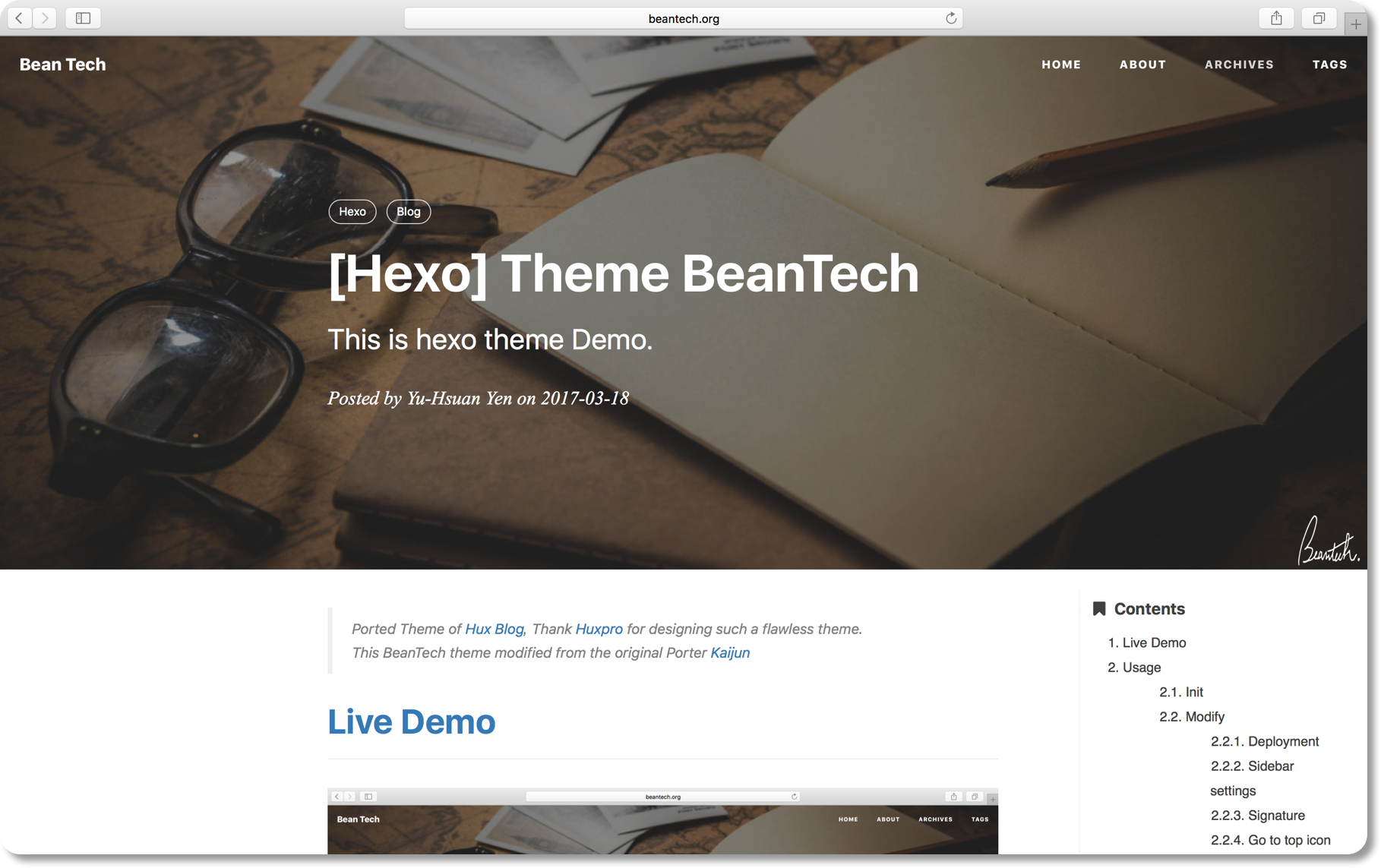
# Usage
I publish the whole project for your convenience, so you can just follow the instruction down below, then you can easily customiz your own blog!
Let's begin!!!
## Init
```bash
git clone https://github.com/YenYuHsuan/hexo-theme-beantech.git ./hexo-beantech
cd hexo-beantech
npm install
```
## Modify
Modify `_config.yml` file with your own info.
Especially the section:
### Deployment
Replace to your own repo!
```yml
deploy:
type: git
repo: https://github.com/<yourAccount>/<repo>
branch: <your-branch>
```
### Sidebar settings
Copy your avatar image to `<root>/img/` and modify the `_config.yml`:
```yml
sidebar: true # whether or not using Sidebar.
sidebar-about-description: "<your description>"
sidebar-avatar: img/<your avatar path>
```
and activate your personal widget you like
```yml
widgets: # here are widget you can use, you can comment out
- featured-tags
- short-about
- recent-posts
- friends-blog
- archive
- category
```
if you want to add sidebar widget, please add at `layout/_widget`.
### Signature Setup
Copy your signature image to `<root>/img/signature` and modify the `_config.yml`:
```yml
signature: true # show signature
signature-img: img/signature/<your-signature-ID>
```
### Go to top icon Setup
My icon is using iron man, you can change to your own icon at `css/image`.
### Post tag
You can decide to show post tags or not.
```yml
home_posts_tag: true
```

```yml
home_posts_tag: false
```

### Markdown render
My markdown render engine plugin is [hexo-renderer-markdown-it](https://github.com/celsomiranda/hexo-renderer-markdown-it).
```yml
# Markdown-it config
## Docs: https://github.com/celsomiranda/hexo-renderer-markdown-it/wiki
markdown:
render:
html: true
xhtmlOut: false
breaks: true
linkify: true
typographer: true
quotes: '“”‘’'
```
and if you want to change the header anchor 'ℬ', you can go to `layout/post.ejs` to change it.
```javascript
async("//cdn.bootcss.com/anchor-js/1.1.1/anchor.min.js",function(){
anchors.options = {
visible: 'hover',
placement: 'left',
icon: 'ℬ'
};
anchors.add().remove('.intro-header h1').remove('.subheading').remove('.sidebar-container h5');
})
```
## Hexo Basics
Some hexo command:
```bash
hexo new post "<post name>" # you can change post to another layout if you want
hexo clean && hexo generate # generate the static file
hexo server # run hexo in local environment
hexo deploy # hexo will push the static files automatically into the specific branch(gh-pages) of your repo!
```
# Have fun ^_^
Please [Star](https://github.com/YenYuHsuan/hexo-theme-beantech) this Project if you like it! [Follow](https://github.com/YenYuHsuan) would also be appreciated!
Peace!
看看同类模板
对比同技术栈与用途的模板,找到更适合的视觉与内容结构。

hexo-theme-matery
A beautiful hexo blog theme with material design and responsive design.一个基于材料设计和响应式设计而成的全面、美观的Hexo主题。
Hexo · 博客

hexo-theme-cactus
:cactus: A responsive, clean and simple theme for Hexo.
Hexo · 博客

hexo-theme-volantis
A Wonderful Theme for Hexo.
Hexo · 博客

hexo-theme-aurora
Hexo Theme Aurora 是一款以极光色彩和渐变 UI 为核心的 Hexo 博客主题,整体走未来感路线。 它的首页采用杂志式网格布局,文章列表与精选区域层次分明,视觉上更接近个人媒体站点而非传统博客。
Hexo · 博客

hexo-theme-Claudia
Claudia 是一款为 Hexo 设计的博客主题,主打简洁外观与易配置。 它支持自动跟随设备深色模式,并在 README 中宣称拥有 90+ 的 Lighthouse 评分,适合追求轻量与性能的博客作者。
Hexo · 博客

hexo-theme-A4
A hexo theme that looks like an A4 paper.(一个类A4纸张质感的hexo博客主题。 )
Hexo · 博客